 foxxcyber/docs
Finding your way around
The pages in the sidebar, and what the Where you stand page tells you.
The sidebar
Every page after you sign in has the same sidebar on the left. On a phone it becomes a strip of links across the top that scrolls sideways.
| Link | What it is for |
|---|---|
| Where you stand | Your home page: the next thing to do and how exposed you are. |
| Talk | Your conversations with your vCISO. See Talking to your vCISO. |
| Your program | The six areas of your security program and where each one stands. See Your security program. |
| Risks | Everything that could go wrong, worst first. See Risks and your limits. |
| Your limits | How much risk you will carry, and your yearly budget. |
| Being exploited | Flaws attackers are using right now that match what you run. See What you depend on. |
| What you depend on | Your systems and suppliers, and what each is worth to you. |
| Policies | The rules you have written down. See Policies and decisions. |
| Decisions | Every call you made and why. |
| Reports | Documents for a client, an insurer, or your board, and links to share them. See Reports and share links. |
| Your business | What your vCISO knows about you. See Telling it about your business. |
| Settings | What your vCISO may change on its own, changes waiting for you, and your usage. See You decide. |
When your vCISO has proposed something that is waiting for you, a note under the links reads 1 change waiting for you (or however many there are). Click it to review them.
Your email address and Sign out sit at the bottom of the sidebar.
Where you stand
Where you stand is the page you come back to. It leads with one thing to do rather than a scoreboard.
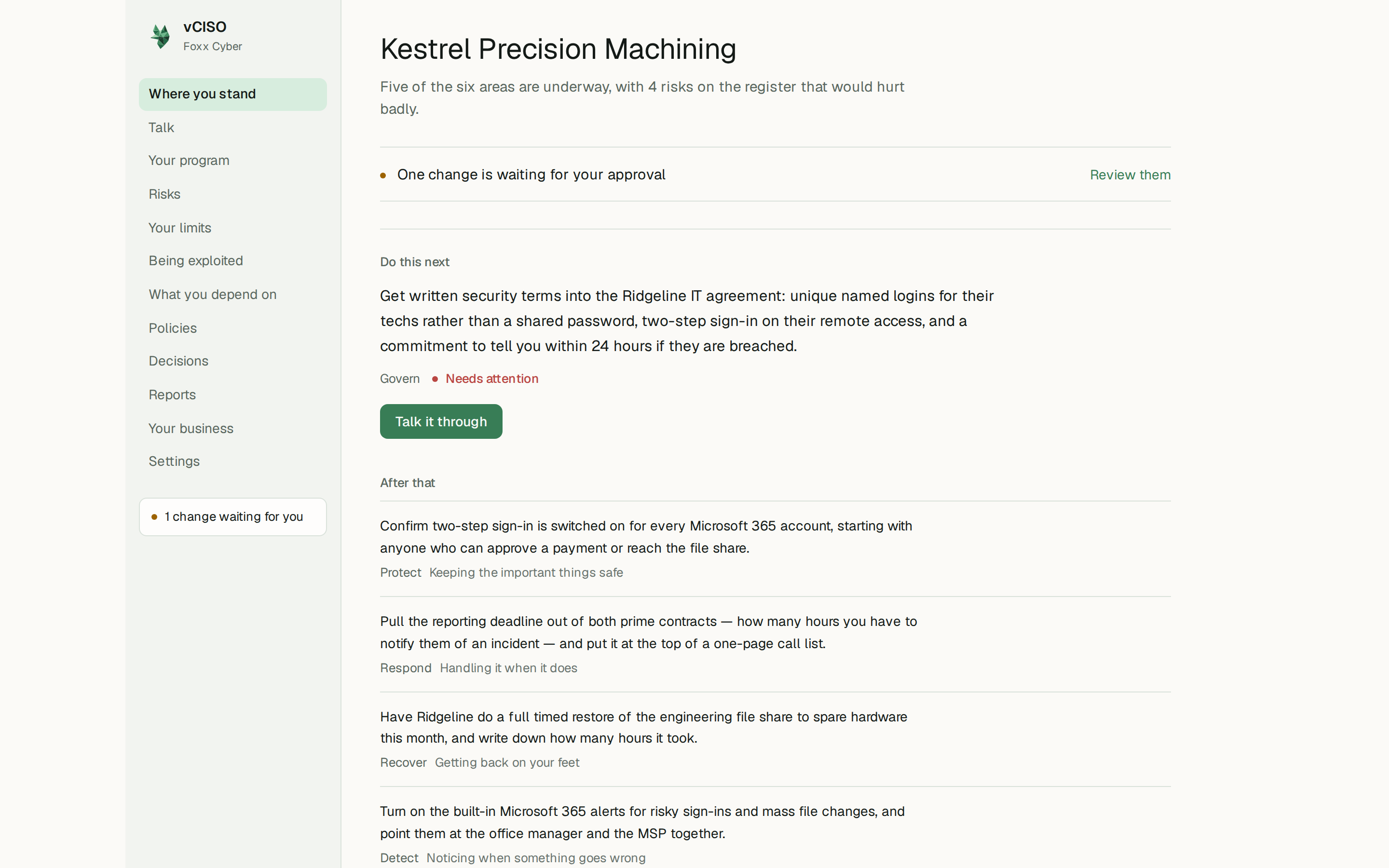
From the top:
- A one-line summary of where things stand, in plain words.
- Changes waiting for your approval, if there are any, with a Review them link.
- Do this next: the single most useful step right now, which area it belongs to, and a Talk it through button that opens a conversation about it.
- After that: the next steps in the other areas.
- How exposed you are: every risk on your register scored out of nine and added up, with a line showing how that total has moved over time. Where your vCISO has judged how bad a risk would be with none of your current protections, a dotted line shows the difference your work so far has made.
- What the money is against: your yearly budget next to what a day with everything down would cost you, once you have given it those figures.
- Where it sits, and where the money goes: the risk carried in each of the six areas, with the money committed there underneath. An area with a long bar and no money under it is where nothing is being spent on the biggest problem.
- What it would hurt to lose: the systems you depend on, ordered by how long you could run without each one.
- What you have to spend: your budget, what is already promised to work in progress, and what is left.
- Where things stand: short lines on your areas, risks, policies, and suppliers, each linking to its page.
- Lately you decided: your most recent decisions.
A brand-new account shows Nothing is recorded yet. That is a normal place to start and a Start talking button. The page fills in as you talk.
None of these figures is a compliance score or a percentage complete. They are counts of real things you can check and argue with: risks, money, and days of downtime.