 foxxcyber/docs
You decide
How much your vCISO may change on its own, approving or declining what it proposes, and checking what a proposal was based on.
Your vCISO can propose changes to your records, but you decide how much it may do on its own. This is enforced by the software before anything is written. It is not left to the vCISO to respect.
What your vCISO may do
Open Settings. The top of the page, What your vCISO may do, has one row for each kind of change:
| Row | Covers |
|---|---|
| Tracking risks | Adding to and updating the list of what could go wrong. |
| Writing policies | Drafting and revising the rules your team follows. |
| Judging where you stand | Setting how each of the six areas is doing on your program page. |
| Remembering your business | Noting what it learns about you. Turning this off means it starts from scratch every conversation. |
| Recording decisions | Keeping a history of what you decided and why. |
Each row has three levels. Pick one and click Save on that row.
| Level | What happens |
|---|---|
| Go ahead | Make the change and tell you about it. |
| Ask me first | Propose it and wait for your approval. |
| Don't touch it | Advise in conversation only. Nothing is written. |
A new account starts with every row at Ask me first.
Leave rows at Ask me first until you have seen a few of your vCISO's proposals and are comfortable with them. You can loosen a row later.
Approving and declining
Anything proposed under Ask me first waits for you in three places:
- Under the conversation where it came up, with Approve and Decline buttons.
- Settings, under Waiting for you, with the reasoning behind each one and the specific change: the risk, how likely, how bad, the cost to fix, the policy title, or whatever applies.
- A note in the sidebar and on Where you stand saying how many changes are waiting.
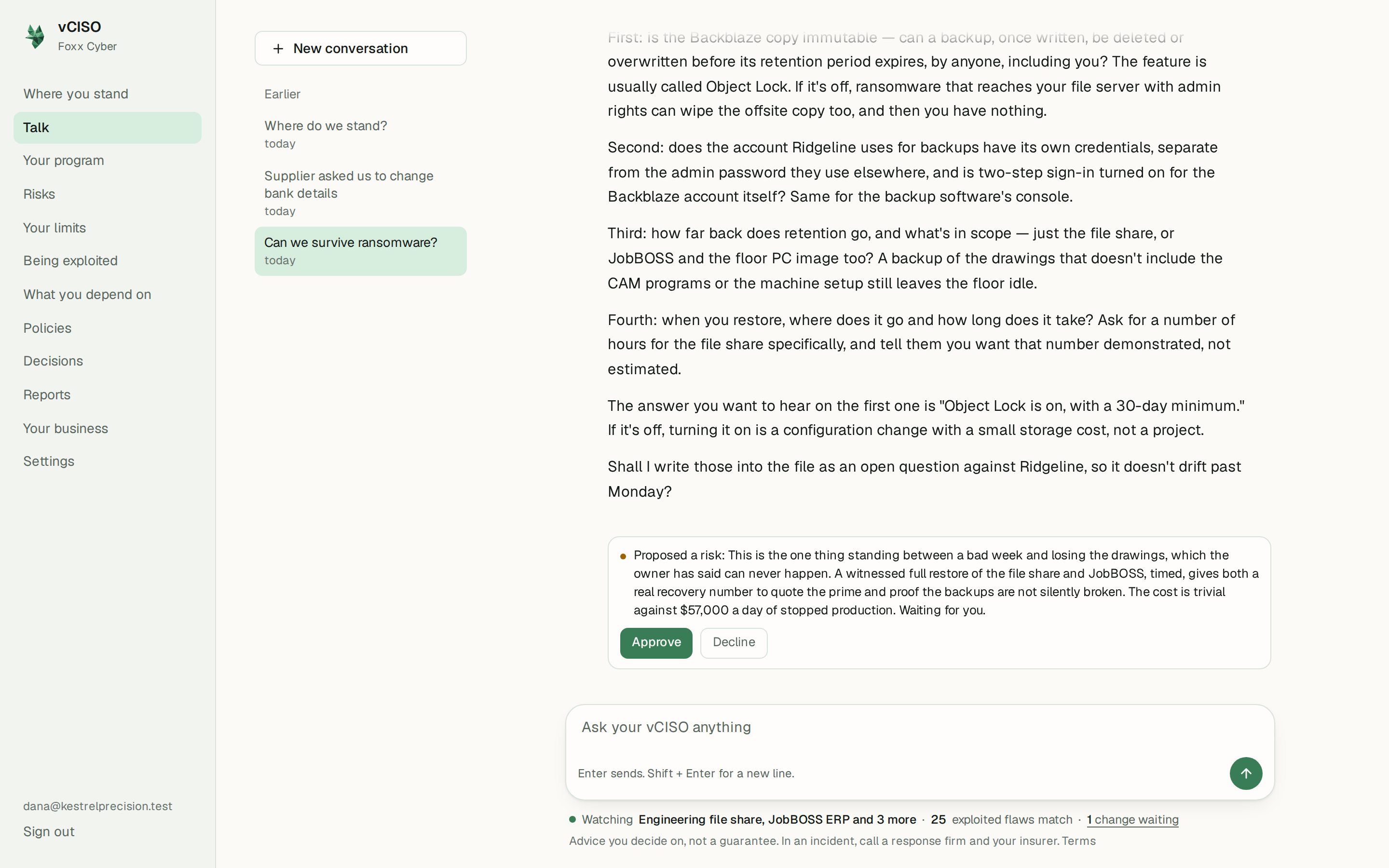
Approve makes the change. Decline leaves your records as they were. Either way, what you chose is kept, so there is a record of what was proposed and what you decided.
Nothing proposed is ever shown as done. A proposal says Waiting for you until you act on it.
Accepting a risk above your line
Some decisions are yours alone. If a risk scores above the line you set on Your limits, your vCISO cannot accept it on your behalf, whatever the settings say. It has to put the case to you, and the acceptance is recorded against your name when you approve it. Once you have written anything on your never accept list, every acceptance needs your sign-off, and one whose wording matches an item on that list is refused outright.
Acceptances reach you as proposals, so keep Tracking risks at Ask me first if you want your vCISO to be able to bring them to you. See Risks and your limits.
What is this based on?
When your vCISO looked something up in its reference library before proposing a change or writing a policy, the passages it read are kept with it. Under the proposal on Settings, or at the foot of a policy, open What is this based on? to see:
- what it went looking for,
- the passages it read, with where each one came from.
These show what your vCISO was working from. They are not proof that it read them correctly. If a passage does not say what it claimed, click This does not support that. A new conversation opens with your challenge already written, and your vCISO has to show its reasoning again.
When you approve a proposal, its passages move with it onto the record it created, so you can still check them later.
Disagreeing with it
You never have to accept its judgement:
- Say so in the conversation. It will change a record and remember why.
- Override an area. On Your program, open You see it differently? under any area and set where you think it stands. It is marked your call. Your vCISO keeps its own view and will say if it still disagrees. See Your security program.
- Correct your business details directly on Your business, and your systems and suppliers on What you depend on.