 foxxcyber/docs
Risks and your limits
How risks are scored, reading the risk register and its grid, and setting how much risk you will carry and what you can spend.
How a risk is scored
Every risk gets two ratings: how likely it is, and how badly it would hurt. Each is low, medium, or high, counted as 1, 2, or 3. Multiply them and the risk scores between 1 and 9. A likely risk that would hurt badly scores 9; an unlikely one you would survive scores 1.
The risk register
Risks in the sidebar opens What could go wrong: everything your vCISO is tracking, worst first.
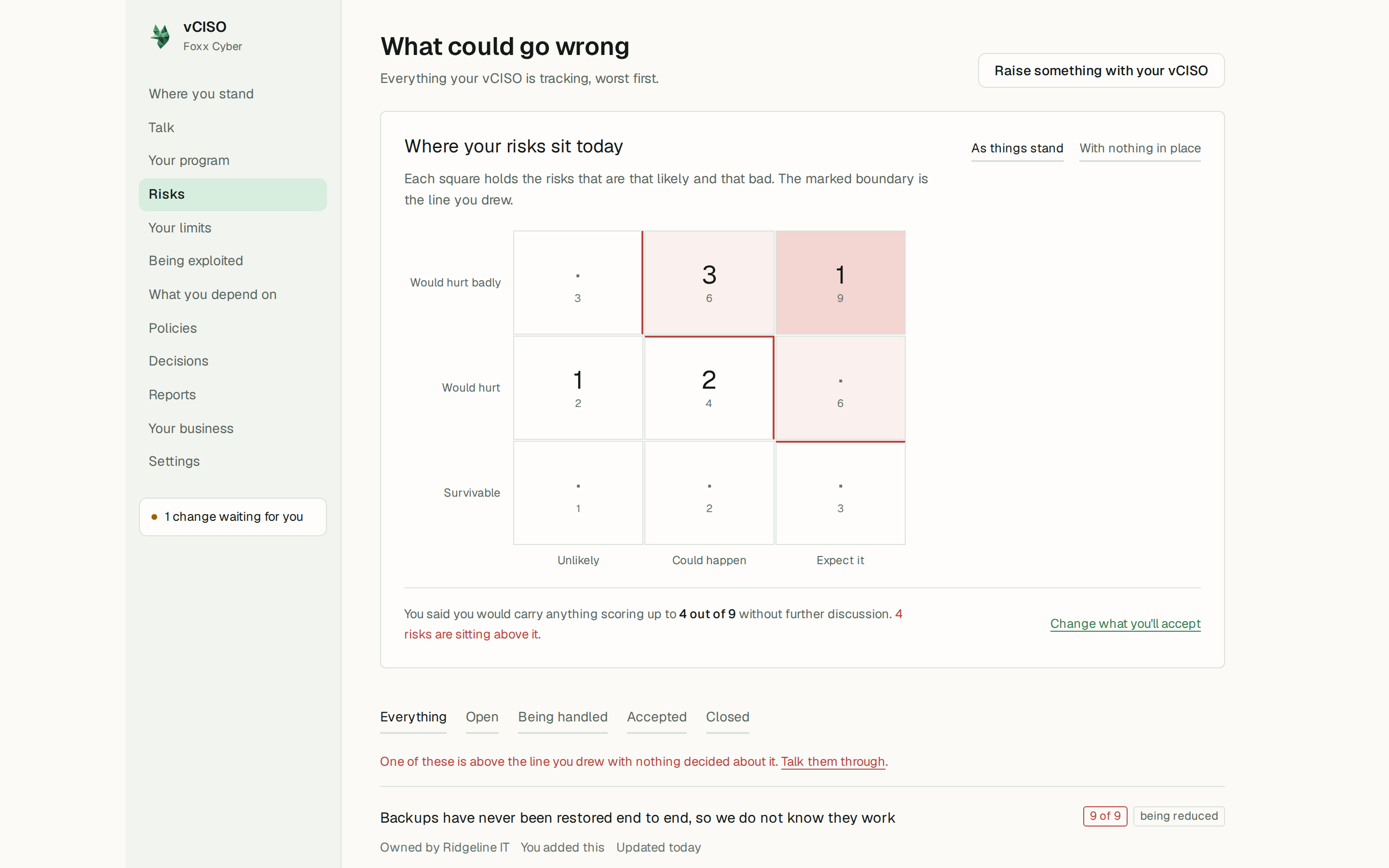
The grid
At the top is a three-by-three grid, likelihood along the bottom and how bad along the side. Each square shows how many risks sit there, and a marked boundary shows the line you drew on Your limits. Click a square to list only the risks in it; Showing one square — show everything takes you back.
Two views sit above the grid:
- As things stand: where your risks sit today.
- With nothing in place: where the same risks would sit if none of your current protections existed. The gap between the two is what those protections are buying you.
The list
Filter it with Everything, Open, Being handled, Accepted, or Closed. Each risk shows:
- its score out of 9, marked if it is above your line,
- the score it would have without your protections, where that has been judged,
- what is being done about it: nothing decided, living with it, stopping doing it, insured or passed on, or being reduced,
- who owns it, what it costs to fix, and when it is due for another look.
A risk your vCISO raised from a flaw attackers are known to be using says so, with the flaw's reference number.
The register fills itself in as you talk. To add or change a risk, tell your vCISO, or click Raise something with your vCISO. Whether it writes the change straight away or proposes it for your approval depends on the Tracking risks row on Settings.
If a risk is above your line with nothing decided about it, the page says so and offers Talk them through.
Your limits
Your limits holds the two numbers your vCISO is held to: how much risk you are willing to carry, and how much you can spend.
What you will carry without a fuss
Pick the highest score you are content to live with, from Up to 1 out of 9 to Up to 9 out of 9. Beside each choice the page tells you how many of your current risks would need a decision at that line.
Your vCISO will not quietly accept anything above your line. It has to bring it to you, and the acceptance is recorded with your name. See You decide.
Below the line you can also fill in:
- In your own words: a sentence or two such as "We can live with a day of downtime. We cannot live with client files leaking." Your vCISO reads this before it advises.
- Things you will never accept, whatever they cost to fix: one per line. These are absolute.
- Revisit accepted risks after: how many months before an accepted risk comes back for another look.
A new account starts with a line of 4 out of 9 and a review every 12 months. Change them to suit you and click Save what you'll carry.
What you can spend
Enter a yearly figure for everything security-related, the currency, and anything that affects it, then click Save your budget. Once a figure is set, the page shows how much of it is already promised to work in progress and how much is left.
Your vCISO weighs every recommendation against what is left. When there is not enough, it says where the money would have to come from, or what the new work would displace.
If you have never thought about a number, ask your vCISO to help you reach one. A rough figure makes its cost arguments far sharper than no figure at all.