 foxxcyber/docs
Audit Log
The practice-wide record of changes, sign-ins and downloads in Bedrock GRC: what is recorded, filtering by person, client, action and date, paging, and the CSV export.
The Audit log (admins only, under Practice in the sidebar) records every change, sign-in and download across the practice, newest first. Use it to answer who did what, to which client and record, when, and from which network address.
Entries hold ids and actions only, never the content of a record: an entry says that risk 42 was updated, not what it now says.
What is recorded
| Area | Examples |
|---|---|
| Client records | Every create, update and delete across risks, goals, the risk appetite, frameworks and answers, objectives, crosswalk fills, baselines, snapshots, the roadmap, documents and their lifecycle, evidence, vendors and their reviews, assets, contacts, calendar events and the engagement log. Imports. |
| Clients | Clients added, profiles saved, archived, taken out of the archive, restored from a backup and deleted permanently. Taking a client out of the archive and restoring one from a backup are recorded as different actions. |
| Sign-in | Every sign-in with how it was completed (password only, authenticator code, recovery code or invitation), every wrong password and refused two-step code, sign-outs, lockouts and unlocks. A sign-in through single sign-on adds its own entry. Refused sign-ins are recorded too: a correct password refused because the firm requires single sign-on, an assessor refused because two-step sign-in is not available on this deployment, and single sign-on sign-ins that failed or were refused. Only attempts turned away as too many are not recorded, so a flood of them cannot fill the log. |
| Accounts | Accounts added, role and access changes, disabling, password changes and admin resets, passwords found below the password policy at sign-in, temporary passwords refused because the person used them before, two-step sign-in turned on, off, reset or moved to a new phone, new recovery codes, recovery codes used, two-step codes refused on Account, sessions signed out, invitations created, emailed, withdrawn and accepted, offboarding. |
| Files and exports | Every file upload, removal and download, by staff and assessors alike; spreadsheet exports, backups, board report views and PDFs, and assessment report PDFs. |
| Client access | Client access links created, emailed and revoked; every portal visit, board report view and file download through a link (with no person attached, since clients have no account). |
| Practice settings | The two-step policy, session timeouts and password policy, branding, firms, framework holds, single sign-on setup, links and unlinks, calendar feeds, and exports of this log. A password policy change records the rules chosen, such as changed=4&classes=ulds&history=5&min=14, never a password. |
| Outside assessments | Answers saved by a partner firm's assessors, with their firm, and every assessment issued. |
A failed sign-in for an account that exists is recorded under that person,
so filtering by person shows it. A failed sign-in for an email that has no
account shows Unknown account; the typed email is never stored. A
failed single sign-on, before the person is known, shows System and
names the firm as its target (firm:N).
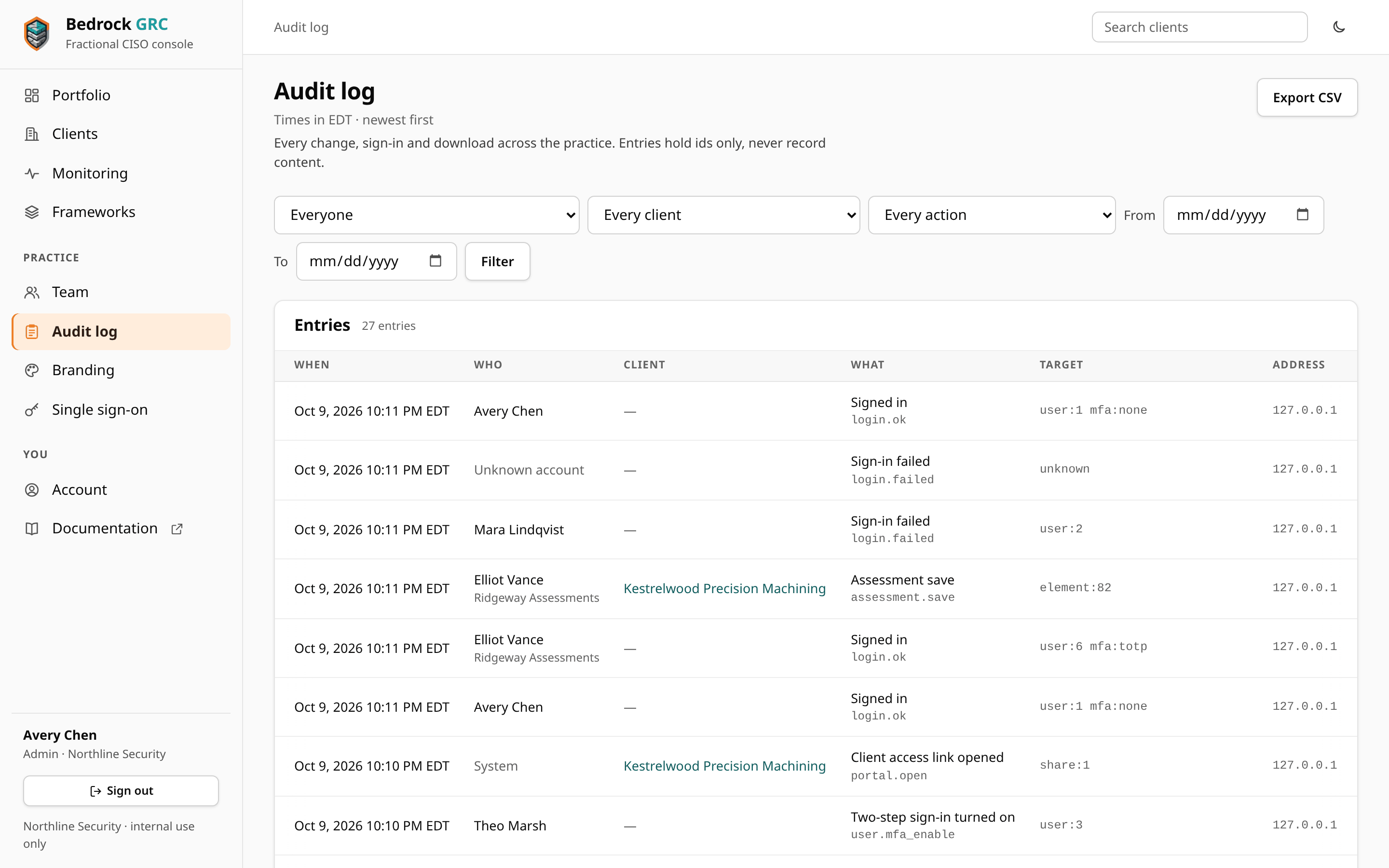
Reading an entry
| Column | What it shows |
|---|---|
| When | The date and time in your practice's time zone, which is named with each time. The line under the page heading also names the zone. |
| Who | The person, and their firm for a partner firm's assessor. System for actions with no person, such as a client opening a portal link. |
| Client | The client the action touched, linked to it. Empty for practice-wide actions. |
| What | The action in words, with its code underneath (for example risk.update). |
| Target | The record's id, such as risk:42, user:7 or share:12. |
| Address | The network address the request came from. |
Filter and page
The bar above the table filters by:
- Person: everyone, or one person (assessors are shown with their firm);
- Client: every client, or one;
- Action: a group, such as Sign-in (all), Accounts (all), Sessions (all), Invitations (all), Clients (all), Single sign-on (all), Files (all), Client access links (all) (portal visits) or Client access link changes (all), or any single action recorded so far;
- From and To: a date range, both days included. Days are your practice's days, in its time zone.
Choose Filter to apply them and Clear to start over. The card's heading counts the entries that match. The log shows 100 entries at a time, with numbered pages at the foot ("1–100 of 3050", Previous, the page numbers and Next). The pages stay where they were when you opened the first one, so entries recorded while you read never push a row onto the next page twice; Filter, or Audit log in the sidebar, starts again from the newest entry.
Export to CSV
Export CSV downloads every entry that matches the current filter,
not just the page on screen, as audit-log-YYYY-MM-DD.csv, dated with the
practice's day. Set the filter first to narrow it.
| Column | Contents |
|---|---|
id | The entry's number. |
time_utc | The time in UTC, in ISO 8601 form. |
person, firm | Who, and their firm for an assessor. Empty for actions with no person. |
client | The client's name, when there is one. |
action, what | The action's code and its words. |
target | The record's id. |
ip | The network address. |
Every cell is written so a spreadsheet cannot run it as a formula. The export is itself recorded in the log (Audit log exported) before the file is sent.
Account and sign-in actions
Each action shows in words, with its code underneath. The ones about people and sign-in:
| What | Code | Recorded when |
|---|---|---|
| Signed in | login.ok | A sign-in completes. The target says how: mfa:none (password only), mfa:totp (authenticator code), mfa:recovery (recovery code), mfa:invite (accepting an invitation) or mfa:idp (single sign-on where the firm trusts the provider's multi-factor sign-in, so no code was asked here). |
| Signed in with single sign-on | sso.login | A sign-in through the firm's identity provider, alongside its Signed in entry. |
| Sign-in failed | login.failed | A wrong password, a disabled or locked account, or an email with no account (shown as Unknown account). |
| Password refused: the firm requires single sign-on | login.sso_required | A correct password from someone whose firm requires single sign-on and who has linked their account. |
| Sign-in refused: account disabled or locked, or two-step sign-in unavailable | login.refused | The password was right, but the account was disabled or locked by the time the code step was reached, or it is an assessor's on a deployment where two-step sign-in is not available (no file encryption key). |
| Two-step code refused | login.mfa_failed | A wrong code at sign-in. |
| Single sign-on sign-in failed | sso.failed | The identity provider turned the sign-in down, it did not complete, a Google account was outside the firm's domains, the provider account is linked to nobody here, or single sign-on was no longer set up when the provider sent the person back. Shown as System, with the firm as the target (firm:N). |
| Single sign-on refused: account disabled or locked | sso.refused | A single sign-on for an account that is disabled, or locked (except from the person's known browser). Recorded under the person. |
| Account locked after failed sign-ins, Account unlocked | user.locked, user.unlock | The tenth failure in a row, and an admin's Unlock now. |
| Password changed | user.password | Someone changes their own password. |
| Password reset by an admin | user.password_reset | An admin sets a temporary password. |
| Temporary password refused: used before | user.password_reset_refused | An admin's temporary password was one of the person's earlier passwords. Recorded under the admin, with the person as the target. |
| Password below the policy at sign-in | user.password_policy | The password typed at sign-in fell short of the password policy, so the person was asked to choose a new one. |
| Setting changed: password policy | setting.password_policy | An admin saves the password policy. |
| Two-step code refused on Account | user.mfa_refused | A wrong code when setting up two-step sign-in, making new recovery codes, turning it off, moving to a new phone or linking single sign-on. |
| Recovery code used | user.mfa_recovery_used | A recovery code is spent, at sign-in or on Account. |
| Offboarded | user.offboard | An admin offboards someone. Each invitation withdrawn and link revoked gets its own entry. |
| Client archived, Client taken out of the archive | client.archive, client.unarchive | Archiving, with a Client access link revoked entry for each link it revoked, and Restore client on an archived client. Links of clients archived before archiving revoked them were revoked when this release was installed, each with a Client access link revoked entry shown as System. |
| Client restored from a backup | client.restore | An admin restores a client backup as a new client. |
A client's own trail
Each client's Engagement tab lists that client's trail with the same action filter (only actions recorded on that client) and date range, 50 entries at a time with Older, with times in your practice's time zone. Staff who can open the client see it; assessors do not. See Engagement Records.
How long entries are kept
Bedrock GRC never deletes audit entries, and there is no way to edit or delete one from the console. When an admin deletes a client permanently, the client's earlier entries stay, without the link to the client, and one more entry records who deleted it and when.