 foxxcyber/docs
Issuing an Assessment
Issue a partner firm's assessment as a frozen, numbered version, download the assessment report PDF in the firm's name, and plan remediation from its findings.
When a partner firm has finished assessing a framework, one of its assessors issues the assessment. Issuing freezes every in-scope answer, who gave it and the evidence linked at that moment into a numbered version: v1, v2, v3 and so on. A version is never edited or deleted. A correction is the next version.
Only assessors of the firm that holds the framework can issue it. Foxx Cyber staff never issue; they read the versions and plan remediation from them.
Issue a version
- Open the framework from the client's Frameworks tab and choose Issued assessments.
- The Issue version N card says whether the framework is ready: Ready: n controls answered by your firm, or Not ready with what is still missing and some example references.
- When it is ready, write a Summary: your overall finding. It opens the report.
- Choose Issue version N and confirm. The version cannot be changed afterwards.
What has to be true first
Issuing is refused while any control in scope is:
- not assessed;
- not applicable without a reason in its narrative; or
- last saved by someone outside your firm, for example an answer left over from before the framework was handed to you. Save it again yourself after checking it.
For NIST SP 800-53, the scope is the baseline set on the framework. Objective answers never block issuing; the control's own answer is the one that has to be there.
What a version holds
Each version records:
- the issuing assessor, the firm and the time;
- the framework's name and version and the scope, as they were when issued;
- every in-scope answer: status, current and target maturity, narrative, evidence location, who saved it and when, and any objective answers;
- for each control, the evidence documents linked to it at that moment: the reference number, title, version in effect, and each file's name and SHA-256.
Later changes to the live answers or the evidence do not touch an issued version, in the app or in the database. Evidence that another firm's assessor added is never part of a version.
The issued version page
Issued assessments lists every version with who issued it, when, and the scope, and a Report (PDF) link for each. Opening one shows:
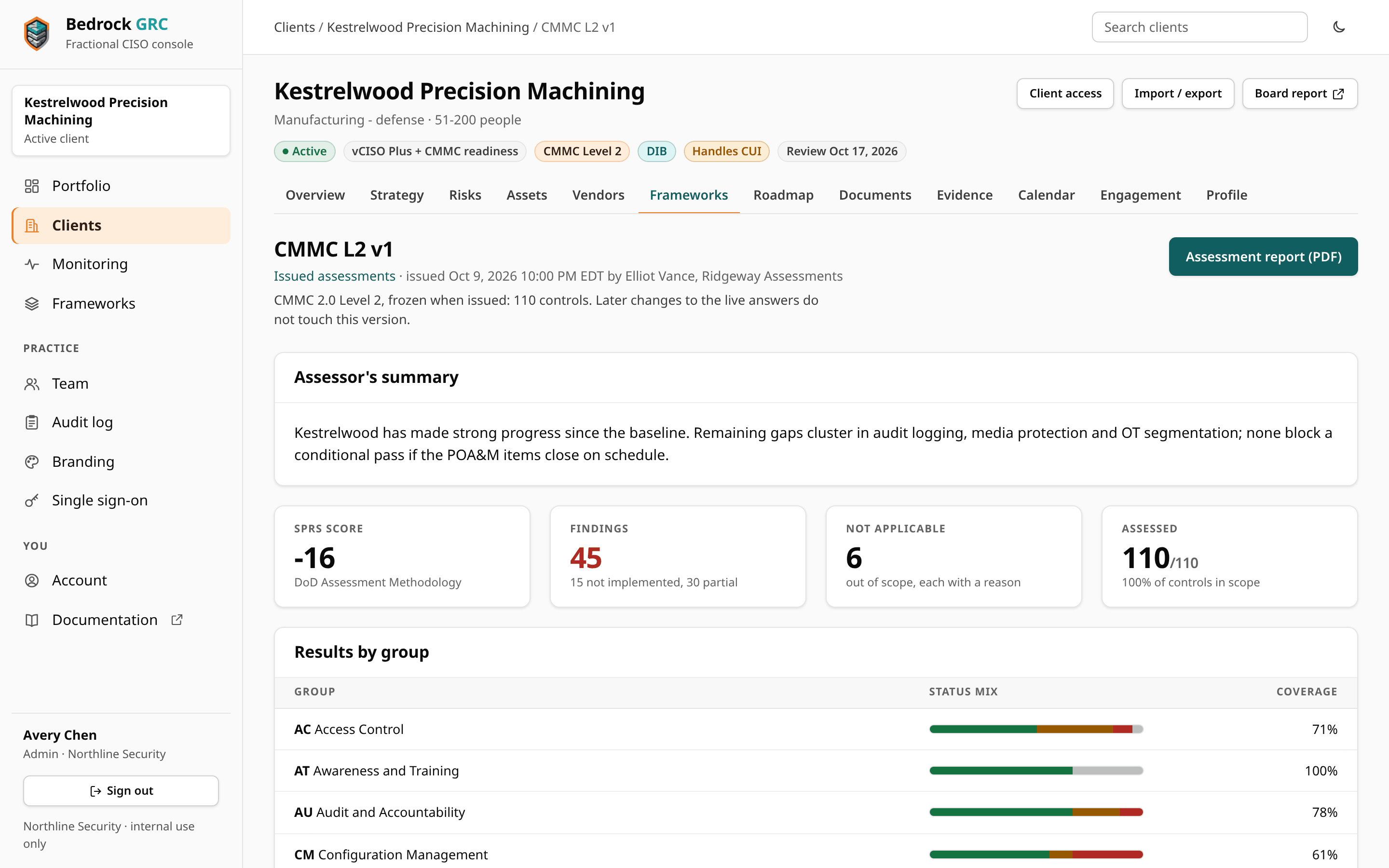
- Assessor's summary;
- tiles for the SPRS score (CMMC Level 2) or coverage, findings, not applicable controls, and maturity where the framework is rated for it (otherwise how many controls were assessed);
- Results by group, with current and target maturity where rated;
- three lists, picked with the chips under it:
- Findings: every control not implemented or partially implemented, with what was found and, where objectives were answered, which ones were not met;
- Not applicable: each control out of scope with its reason;
- Every answer and its evidence: each control's answer and the documents and files linked when it was issued.
Two notes can appear at the top of a version, and in its PDF:
- Restored from a backup: the version came from a client backup and was not issued on this deployment. The list of issued assessments marks it Restored.
- A recent sign-in reset: an administrator of this deployment reset the issuing assessor's password or two-step sign-in, or unlinked their single sign-on, in the 30 days before the version was issued. The note names the change and the day. It is read from the audit log and never changes later. Admins can reset any account, assessors included, so that a locked-out assessor can get back in; the note makes sure the firm and the client can see when that happened before an issue.
The assessment report PDF
Assessment report (PDF) downloads the version as a standalone report, built only from what was frozen, so it reads the same on any day. It carries the issuing firm's name, logo and colours from Branding, not Foxx Cyber's, and contains:
- a cover with the firm, the client, the framework and version number, and who issued it and when;
- the summary, the scope and the result;
- results by group;
- findings, with the objectives not met;
- not-applicable controls and why they do not apply;
- evidence references, with file hashes.
Every page footer carries "Not a certification", and the firm's disclaimer closes the report. Unless the firm has written its own on the Branding page, the disclaimer reads:
This report records an assessment performed by firm against the framework and scope named above, as of the date issued. It is not a certification, attestation, accreditation or authorization of any kind, and it is not a CMMC certification assessment. Results reflect what was examined and may change as the environment changes. Confidential.
Issued reports stay inside Bedrock GRC
Issued assessments and their reports are never shown in the client portal. How a report reaches the client is up to the firm, the client and Foxx Cyber.
Planning remediation from findings
Foxx Cyber staff open a version from the framework's Issued assessments. Each finding has Plan this, which opens a new roadmap item linked to that control. The form says "Planned from issued assessment vN", and the item keeps that link. Once a finding has a roadmap item, it shows Planned. See The Roadmap.
The framework's phase on the Frameworks tab follows the work: Issued while findings in the latest version still have open roadmap work, then Closed out once every one has roadmap work that is done or dropped.
Corrections and re-assessments
To correct an issued version, or to re-assess later, the firm's assessors change the live answers and issue again. The new version gets the next number; earlier versions stay as they were. Taking the framework back from the firm leaves every issued version untouched, and client backups carry issued versions as they are.