 foxxcyber/docs
Assessing Controls
Work through a framework control by control or objective by objective: status, maturity, narrative and evidence location, the not-applicable rule, SPRS scoring for CMMC Level 2, and turning gaps into roadmap work.
Each adopted framework opens into an assessment page: headline numbers, a roll-up by group, and the control tree. Each control opens into its own page where you record the client's answer.
The assessment page
From the client's Frameworks tab, choose Assess on a framework. The page shows:
- Tiles: coverage (or the SPRS score for CMMC Level 2), how many controls are assessed, gaps (not implemented, plus the partial count) and mean maturity (or, for frameworks without maturity, the not-applicable count).
- By group (named for the framework: By function for CSF 2.0, By domain for CMMC, and so on): one tile per top-level group with its own status bar. Select a tile to list only its controls.
- Filters: group, status and a text search on reference or wording, with Filter and Clear.
- Controls: the control tree, with every assessable control's status, maturity and target, SPRS points for CMMC Level 2, and when it was Last answered and by whom. Where the framework has objectives, it says how many of them are answered ("3 of 5 objectives answered"). Long lists page, and the card heading says how many controls are in scope or match the filter.
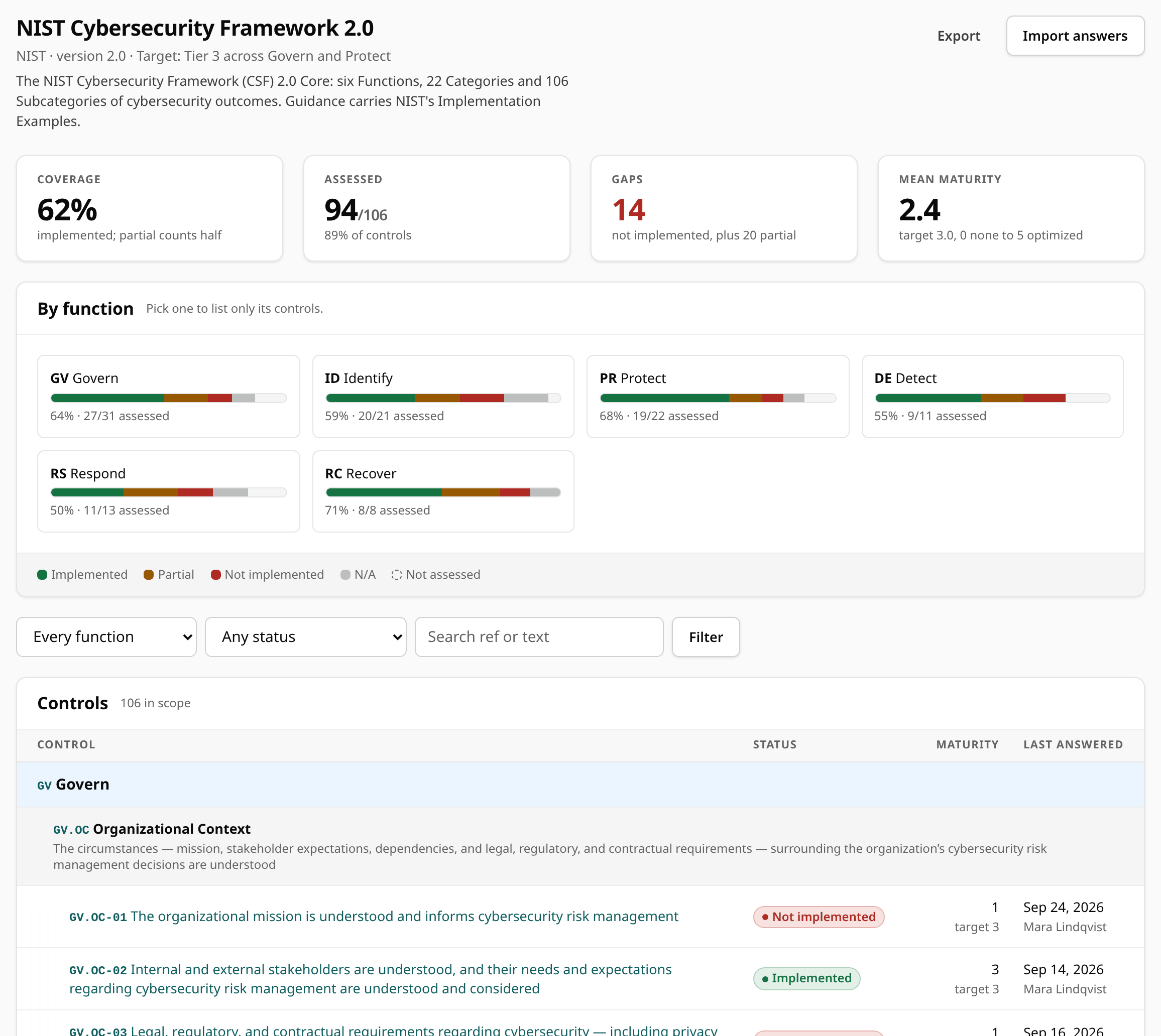
The page header links to Export (the framework's answers as a workbook) and Import answers, and for CMMC Level 2 to the eMASS results template.
Answer a control
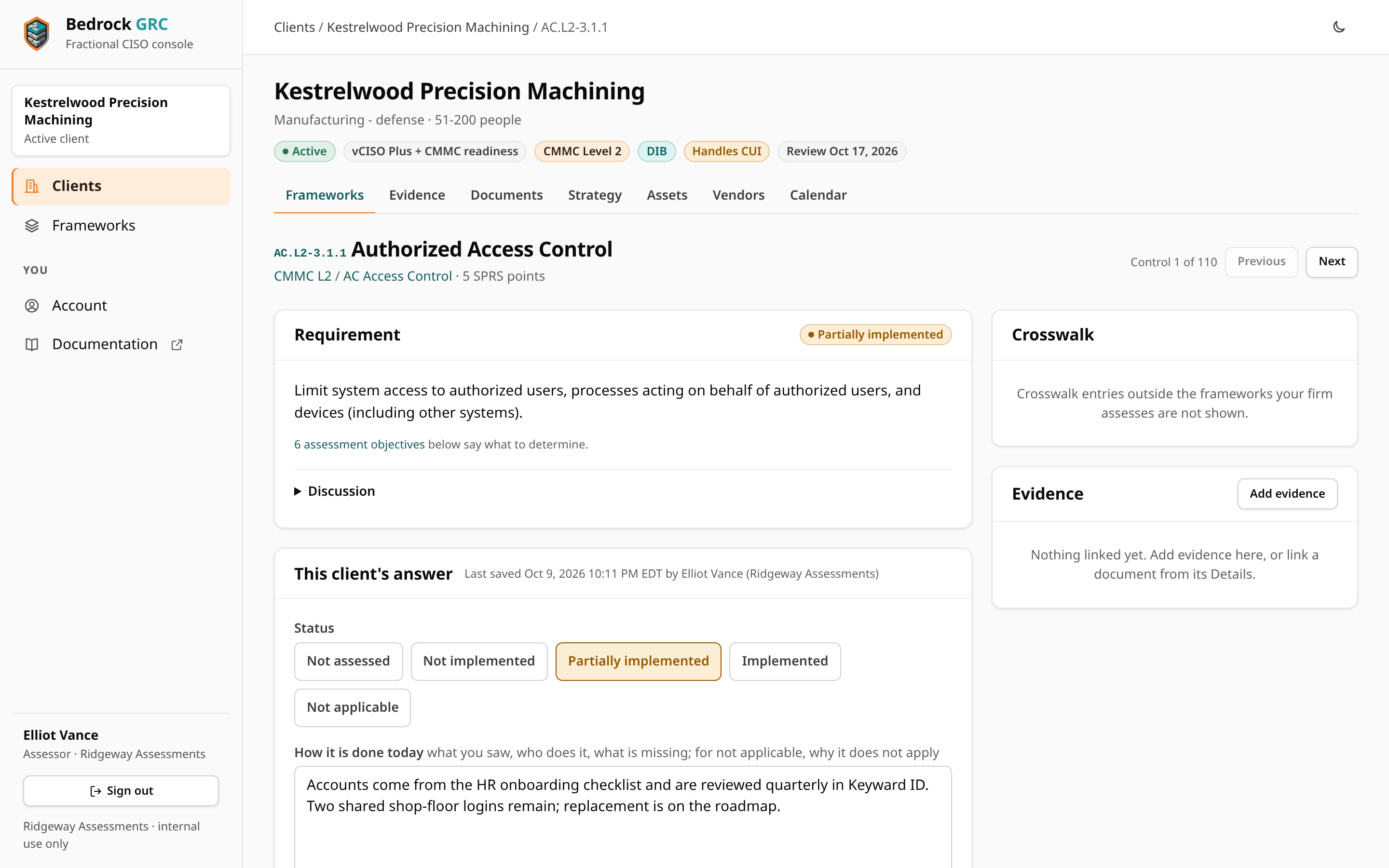
Open a control. The page names the control's place (for example "Control 1 of 110") with Previous and Next. The left side shows the Requirement: its text, the assessment objectives where the framework has them ("Determine if…" for CMMC and 800-171), and the published guidance (Implementation examples for CSF 2.0, Discussion for the others). Record This client's answer below it:
| Field | What to put there |
|---|---|
| Status | Not assessed, Not implemented, Partially implemented, Implemented or Not applicable. |
| Current maturity and Target maturity | 0 None, 1 Initial, 2 Repeatable, 3 Defined, 4 Managed, 5 Optimized. Optional. |
| How it is done today | What you saw, who does it, what is missing. For not applicable, why it does not apply. |
| Evidence | Where the proof lives: a link or a path. Not the proof itself; upload that to the Evidence library. |
Save and next moves straight to the next control, so you can work through a framework in order; Save stays on the control; Previous and Next move without saving. With the keyboard, Ctrl+Enter in the form saves (and opens the next control), and J and K move to the next and previous control. Moving to another control while changes are not saved, including after a save that was refused, shows a note first; moving again leaves without saving. Each save records who assessed it and when (shown as "Last saved … by …"), and is written to the client's audit trail.
Not applicable needs a reason
A control marked not applicable needs a reason in How it is done today. This is enforced everywhere an answer can come from: the control page, the objectives form, spreadsheet imports and eMASS imports. Older answers marked not applicable without a reason show a Justification missing badge in the tree until someone adds one.
Not-applicable controls are left out of coverage, cost no SPRS points and are left out of the maturity averages, so a client is scored only against the controls in its scope.
Objectives, one by one
CMMC Level 1 and Level 2 practices have assessment objectives, and NIST SP 800-171 Rev. 3 requirements have determination statements and organization-defined parameters (ODPs). On those control pages, below the answer, the Assessment objectives card lets you answer each of them:
- Met, Not met, N/A or blank, with a note for what was seen.
- For an ODP, Met means the value is defined, and the note holds the value the organization defined.
- Not applicable needs a reason in the note here too.
Save objectives records the answers and, unless you tick Keep the control's status as it is, sets the control's status from them:
| Objectives | Control status |
|---|---|
| Every one met (not applicable ones ignored) | Implemented |
| Any not met | Not implemented. On CMMC Level 2, IA.L2-3.5.3 and SC.L2-3.13.11 can come out partially implemented in the cases where the DoD Assessment Methodology gives partial credit. |
| Every one not applicable | Not applicable, with the objectives' reasons joined as the justification |
| Any still blank | Left as it is |
You can still answer at control level only and leave the objectives blank. The eMASS export works from the control status either way.
The side panels
The right side of a control page shows:
- Crosswalk: mapped requirements in other frameworks, with this client's answer where that framework is adopted.
- Documents and evidence linked to the control, with their lifecycle state. Add evidence starts an evidence item already linked to it.
- Roadmap work linked to the control. When the control is not implemented or partial, Plan remediation starts a roadmap item for it.
A framework a partner firm is assessing
When a framework has been handed to a partner firm, staff see its answers read-only, with a note naming the firm, and an Issued assessments button for the versions the firm has issued. The firm's assessors answer it exactly as described on this page. See Outside Assessments.
How posture is calculated
- Coverage = implemented controls ÷ applicable controls, with partial counting as half. Not applicable controls are left out of the count.
- Assessed = controls with any status other than "not assessed".
- Mean maturity averages the applicable controls that have a maturity rating.
SPRS for CMMC Level 2
CMMC Level 2 is scored with the DoD Assessment Methodology (v1.2.1). SPRS appears only for CMMC Level 2.
- Start at 110 and deduct each practice's weight (1, 3 or 5 points; the system security plan practice, CA.L2-3.12.4, carries none) unless it is implemented or not applicable.
- A practice that has never been assessed deducts in full. A self-assessment cannot claim what nobody has looked at, so the page tells you how many unassessed practices are counted as not met.
- Partially implemented deducts in full too, except for IA.L2-3.5.3 and SC.L2-3.13.11, where the methodology allows partial credit (3 points instead of 5).
- The score shows "—" until at least one practice has been assessed.
The same scoring feeds the overview, the portfolio, snapshots, the board report and the eMASS export, so they always agree.
Turn gaps into roadmap work
Every control assessed as not implemented or partial, with no open roadmap item yet, appears under Gaps without a plan on the Roadmap tab, ready to plan.
Import answers from a spreadsheet
If you assessed a client in a spreadsheet, export the framework first to get the columns, fill it in, and import it back from Import answers. Every row is previewed before anything is saved. See Import and Export.