 foxxcyber/docs
Frameworks and Baselines
Adopt frameworks from the built-in catalog, scope NIST SP 800-53 to a baseline, carry answers across frameworks with crosswalks, and record posture snapshots.
Frameworks are how you measure a client's program. The catalog is shared by every client; each client adopts the frameworks that apply to it and answers them independently.
The catalog
Frameworks in the sidebar lists the catalog's eight frameworks: NIST CSF 2.0, CMMC 2.0 Level 1 and Level 2, NIST SP 800-171 Rev. 3, NIST SP 800-53 Rev. 5 (release 5.2.0), and the HIPAA Security, Privacy and Breach Notification Rules. Each card shows the publisher, version, number of assessable controls and a link to the source, and you can download the whole framework with its crosswalks as Excel or CSV.
The catalog is part of the application. There is no custom framework import. What each framework contains, where it comes from and what is left out is on Frameworks Catalog and Sources.
Adopt a framework
Open the client's Frameworks tab and use the Add a framework card:
- Framework: pick one the client has not adopted yet. What each framework covers, under the field, describes them all.
- Target (optional, free text): for example "Tier 3 by Q4" or "SPRS 110 before renewal".
- Primary framework: the one shown on the portfolio and first on the overview. The box is ticked for the first framework you adopt; marking another one as primary moves the flag.
Then choose Add framework.
NIST CSF 2.0 is the usual backbone for a client's program; CMMC Level 1 or Level 2 and NIST SP 800-171 add the contract obligations for defense suppliers, and the HIPAA rules cover healthcare clients and their business associates.
Remove from this client, in the framework's row menu, takes a framework off the client after a confirmation. Its answers are kept, so adding it back later restores them.
The Frameworks tab
Each adopted framework has a row with:
- its name, with Primary on the primary one, the full name, how many controls are in scope and the target;
- a Status mix bar (implemented, partial, not implemented, not applicable, not assessed);
- Coverage: the implemented share of applicable controls, with partial counting as half, or the SPRS score for CMMC Level 2 (with how many practices are still unassessed);
- Assessed: the share of controls with any decided status;
- Maturity: the mean current maturity on the 0 to 5 scale, shown when a framework on the client is rated for maturity (NIST CSF 2.0 always is).
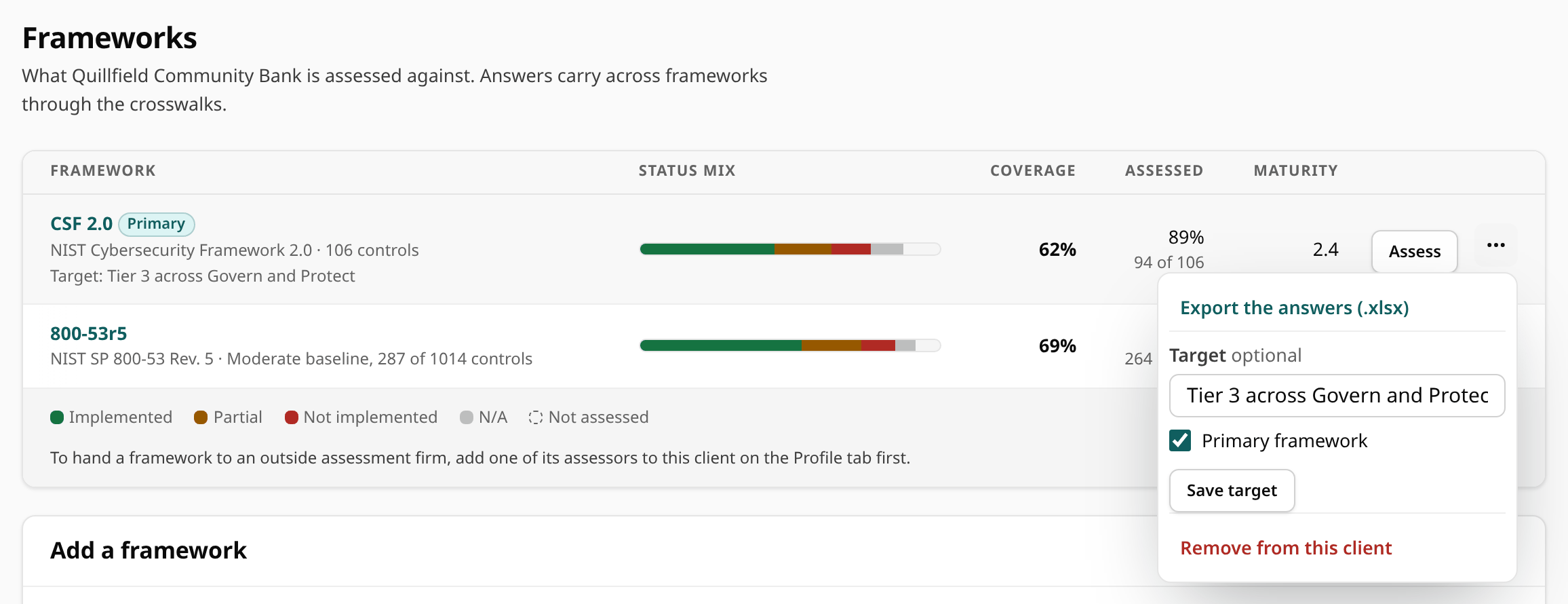
Assess opens the control-by-control assessment (it reads Open when you can only read the framework); see Assessing Controls. Everything else is in the row's menu (the button with three dots), for staff:
| Menu item | What it does |
|---|---|
| Export the answers (.xlsx) | The framework's answers as a workbook. |
| Issued assessments | Shown while a partner firm holds the framework: the versions it has issued. |
| Compare with SP 800-171 Rev 3 | On the CMMC Level 2 row only: compare with NIST SP 800-171 Rev. 3 and move the answers across. See Moving to NIST SP 800-171 Rev. 3. |
| eMASS results template | On the CMMC Level 2 row only. See CMMC Level 2 Results for eMASS. |
| Target, Primary framework, then Save target | Changes the framework's target, or makes it the primary one. |
| Fill from crosswalks | Fills unassessed controls from answers on other frameworks, after a confirmation (below). Shown on CMMC Level 1, Level 2 and NIST SP 800-171 Rev. 3. |
| Assessed by, then Save who assesses it | Admins only: hands the framework to a partner assessment firm, or back to Foxx Cyber staff. See Assigning a Firm. |
| Remove from this client | Takes the framework off the client, keeping its answers. |
Target, primary, crosswalk fills and removal need edit access to the client.
A framework a partner firm is assessing
When a framework has been handed to a firm, its row shows an Assessed by firm badge and the assessment's phase:
| Phase | Meaning |
|---|---|
| Planning | No answer from the firm yet. |
| Assessing | The firm has started answering. |
| Issued | The firm has issued a version, and some of its findings still have no finished roadmap work. |
| Closed out | Every finding in the latest issued version has roadmap work that is done or dropped. |
While a firm holds a framework, staff can read its answers but not change them: Assess reads Open, and the target, Fill from crosswalks and Remove from this client are not offered.
Scope NIST SP 800-53 to a baseline
For NIST SP 800-53, the assessment page offers a scope: every control (1,014 controls and enhancements), or one of the NIST SP 800-53B baselines:
| Baseline | Controls and enhancements |
|---|---|
| Low | 149 |
| Moderate | 287 |
| High | 370 |
| Privacy (additive) | 96 |
Pick Low, Moderate or High, tick Add the privacy baseline if it applies, and choose Save scope. Controls outside the scope are not listed or counted in posture, and their groups are marked Outside the baseline in the tree. Their answers are kept, so widening the scope later brings them back.
For other frameworks, scope is set control by control: mark a control not applicable and say why in its narrative.
Crosswalks: answer once
Crosswalks link equivalent or related requirements across frameworks:
| From | To | Source |
|---|---|---|
| CMMC Level 1 | CMMC Level 2 | The CMMC Assessment Guides' references to the same NIST SP 800-171 requirement |
| CMMC Level 2 | NIST SP 800-171 Rev. 3 | NIST's Rev. 2 to Rev. 3 change analysis |
| NIST SP 800-171 Rev. 3 | NIST SP 800-53 Rev. 5 | NIST's source controls for each requirement |
| NIST CSF 2.0 | NIST SP 800-171 Rev. 3 and SP 800-53 Rev. 5 | NIST's CSF 2.0 informative references |
| HIPAA Security Rule | NIST SP 800-53 Rev. 5 | NIST SP 800-66 Rev. 2 |
They work in two ways:
- On every control page, a Crosswalk panel lists the mapped requirements in other frameworks, with the client's answer where that framework is adopted.
- Fill from crosswalks, in a framework's row menu on the Frameworks tab, fills that framework's unassessed controls from answers the client already has elsewhere. It appears on frameworks with equivalent or subset mappings (CMMC Level 1 and Level 2, and NIST SP 800-171 Rev. 3), follows only those mappings, and copies an answer only when every mapped answer agrees; anything ambiguous is left for you. Each copied answer says where it came from ("Carried over from … by crosswalk. Confirm before relying on it.").
The crosswalk fill has three limits:
- It never copies "not applicable". Whether a control applies belongs to each framework's own scope, so a person decides it, with a reason.
- It never fills a framework a partner firm holds, and never reads one as a source: those answers belong to the firm until it issues them.
- It never overwrites a control that already has an answer.
Most mappings, including all of CSF 2.0's and the HIPAA Security Rule's, are related rather than equivalent. They inform your answer on the control page but never fill one in. The HIPAA Privacy and Breach Notification Rules have no published crosswalk, so they have none here.
Posture snapshots
Record snapshot, at the foot of the Posture history card on the Frameworks tab (with an optional Snapshot label such as "Q3 review"), captures the posture of every adopted framework at once. Posture history lists every snapshot, newest first and paged, and draws a coverage trend line per framework once there are two. For active and onboarding clients, a snapshot comes due in Monitoring about a quarter (91 days) after the last one, or after the framework was adopted.
Continue with Assessing Controls.