 foxxcyber/docs
Strategy and the Risk Register
Capture business goals and the client's risk appetite, then run a scenario-based 5×5 risk register with inherent and residual scores, treatment and sign-off.
Security work should be able to answer "why does this matter to the business?" The Strategy tab records the answer; the Risks tab holds the register that every recommendation is weighed against.
Business goals
Open Strategy, choose Add goal and add each goal the business is pursuing, with Save goal:
| Field | Notes |
|---|---|
| Goal and Description | What the business is trying to achieve. |
| How security supports it | The link between the goal and the program. |
| Horizon | 90 days, 1 year or 3 years. |
| Priority | 1 to 3. |
| Status | Proposed, active, achieved or dropped. |
| Target date and Business owner | Who owns the outcome, and by when. |
Risks and roadmap items can link to a goal. The goal list shows how many open risks and open roadmap items point at each one, a goal's own page lists them under Risks to this goal and Roadmap work for it, and the board report has a section on the goals. Back to strategy returns to the list.
Risk appetite
The same tab holds the client's risk appetite, in leadership's words:
- Appetite statement: how much risk the business will carry to reach its goals.
- Never acceptable: the outcomes leadership will not accept at any score.
- Accept up to score: the threshold on the 5×5 matrix, from 1 to 25 (new clients start at 6). Risks scoring above it need treatment or a documented acceptance.
- Review every so many months (1 to 36, default 12), plus Approved by and Approved on.
Choose Save appetite to keep it.
The threshold drives the above appetite flags on the register, the client overview, the portfolio and the board report. Once the appetite has an approval date, its re-approval comes due in Monitoring.
The risk register
Open Risks → Add risk. Each risk gets a reference (R-001) and these
fields, saved with Save risk:
| Field | Notes |
|---|---|
| Title and Scenario | Write the scenario: the threat, what it acts on, and the consequence. |
| Category | Strategic, operational, compliance, financial, reputational, technology, third party or people. |
| Asset or process | Free text naming what is at risk. Link risks to asset records from the asset register. |
| Likelihood and Impact | 1 to 5 each: Rare, Unlikely, Possible, Likely, Almost certain; Negligible, Minor, Moderate, Major, Severe. This is the inherent rating. |
| Residual likelihood and impact | The rating after treatment. Set both or neither. |
| Treatment | Undecided, mitigate, accept, transfer or avoid, plus a treatment plan. |
| Risk owner, Next review | Who owns the risk and when it is next reviewed. |
| Status | Open, treating, accepted or closed. |
| Business goal | The business goal it threatens. |
| Accepted by and Accepted on | Required when the status is accepted: who at the client signed off, and when. |
How scoring works
- Score = likelihood × impact, from 1 to 25.
- Bands: Low 1 to 4, Moderate 5 to 9, High 10 to 16, Critical 20 to 25.
- The current score is the residual score when both residual values are set, otherwise the inherent score. Lists, the portfolio and the report all use the current score.
- A risk is above appetite when its current score is above the threshold and it is neither accepted nor closed.
- Critical risks on the portfolio are open risks with a current score of 20 or more.
Reading the register
The register shows two heat maps: Current (residual) and Inherent (before treatment). In each cell, the large number is how many live risks (open, treating or accepted) sit there, and the small number is the cell's score. Cells holding risks that score above the appetite are outlined. Choose a cell's number to list just those risks; Show every live risk goes back.
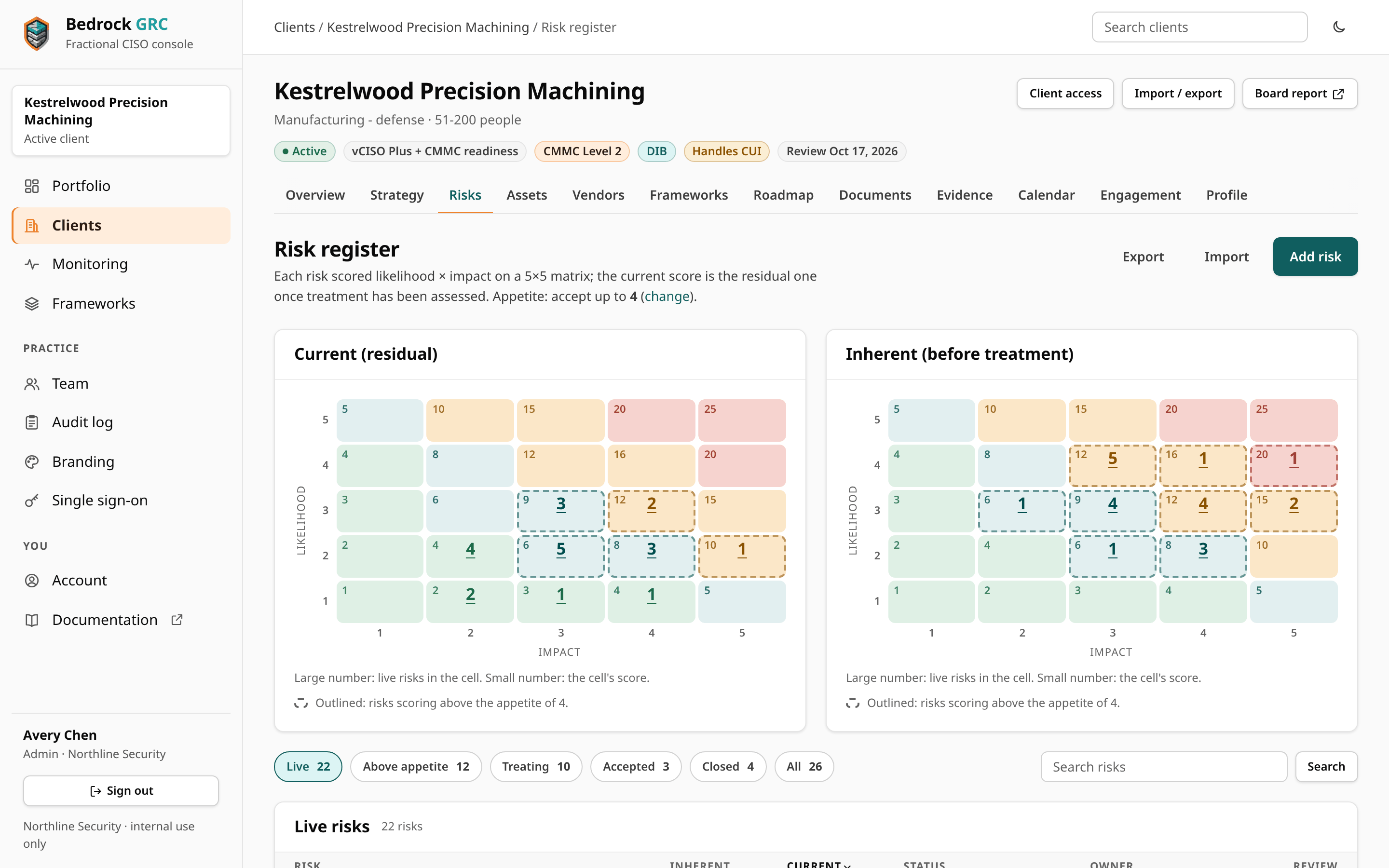
Under the heat maps, chips pick the view, each with its count: Live, Above appetite, Treating, Accepted, Closed and All. The list is headed by the view (Live risks, Risks above appetite, and so on), and Search risks finds a risk by reference, title, owner, category or goal. Choose a column heading to sort by it. Export and Import sit above the heat maps.
Connecting risks to the rest of the program
- A roadmap item can say which risk it treats; the register shows how many open items each risk has.
- Vendors and assets link to the risks they create or carry.
- Open risks with a review date appear in Monitoring when the review comes due. Open risks without a review date are counted as loose ends.
Accepting a risk is a client decision, not a consultant one. Record the client's own signatory in Accepted by, and keep the acceptance under review: an accepted risk with a review date still comes due in Monitoring.