 foxxcyber/docs
The Board Report
Generate a branded executive report of the client's security program as a page and as a PDF, built from the same numbers as the rest of the console.
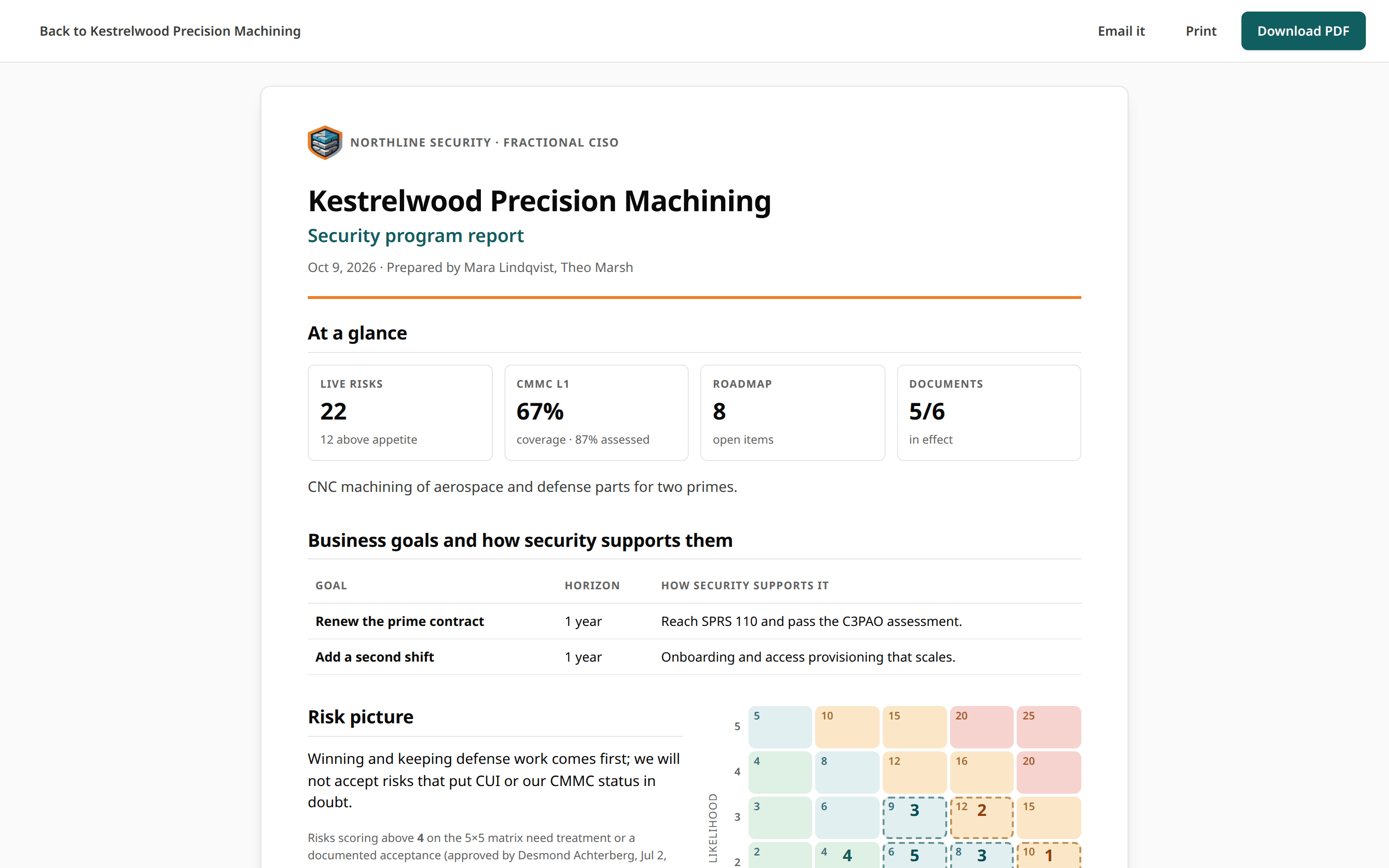
The board report is the executive summary of a client's program, written for leadership. It is always current: it is built from the client's record when you open it, from the same scoring the rest of the console uses, so the report, the overview and the portfolio never disagree.
Open it
- From any client page, choose Board report in the client header. The report opens as a page of its own, with Email it, Print and Download PDF buttons, and a link back to the client.
- From Client access, choose Download PDF or View report.
- People at the client can open it from the client portal, as a page or a PDF.
What it contains
The page and the PDF show the same sections, in the same order:
| Section | What it shows |
|---|---|
| At a glance | Headline numbers: live risks (open, treating or accepted, and how many are above appetite), framework posture (SPRS for CMMC Level 2, coverage otherwise), open roadmap items and documents in effect. |
| Business goals and how security supports them | The client's goals and the security role in each. |
| Risk picture | The risk appetite and the heat map against its threshold. In each cell, the large number is the live risks in it and the small number is the cell's score; in the PDF, dashed cells hold risks above the appetite. The heading always starts on the same PDF page as its heat map. |
| Top risks | The highest current scores, with treatment and owner. |
| Framework posture | Each adopted framework's status mix and score, including frameworks adopted but not yet assessed. A framework a partner firm is assessing is named in one line as being assessed by the firm, with none of its answers. |
| Documentation | Documents in effect, in progress, still needed and past review, plus evidence. |
| What we protect | The crown jewels from the asset register. |
| Third parties | Key vendors with criticality, data access, and last and next review. |
| Roadmap: the next six months | Upcoming work and planned spend. |
The report ends with a closing footer. By default it reads "Prepared by your practice for client leadership. This report is advice for your decisions; it is not a certification or a guarantee of security. Confidential." You can replace it under Branding.
The PDF
The PDF is generated by Bedrock GRC itself, with no third-party service or
library: a branded cover header with your logo, practice name, tagline and
contact line, then the sections flowed across US Letter pages with running
headers, footers and page numbers. The file is named after the client and
the date, for example acme-security-report-2026-09-30.pdf.
Characters in the PDF
The PDF uses the standard Helvetica font. Text outside the Western European character set (for example some accented or non-Latin names) is transliterated in the PDF. The report page in the browser shows it as typed.
Send it
To email the report to the client, with the PDF attached, a personal portal link per recipient, or both, see Emailing Clients. Without email set up, download the PDF and send it yourself.