 foxxcyber/docs
Control Implementations (SCTM)
Apply a baseline template to the SCTM, track compliance and continuous monitoring per control, and record CCI-level implementation responses in the package Catalog.
Control work in a package happens in two linked views. The SCTM (Security Controls Traceability Matrix) is the per-control ledger an assessor reads: applicability, type, responsibility, compliance status, ConMon frequency, evidence and validation method. The package Catalog is where the implementation itself is written, one CCI at a time, and the Catalog's status rolls up into the SCTM.
The reference catalog
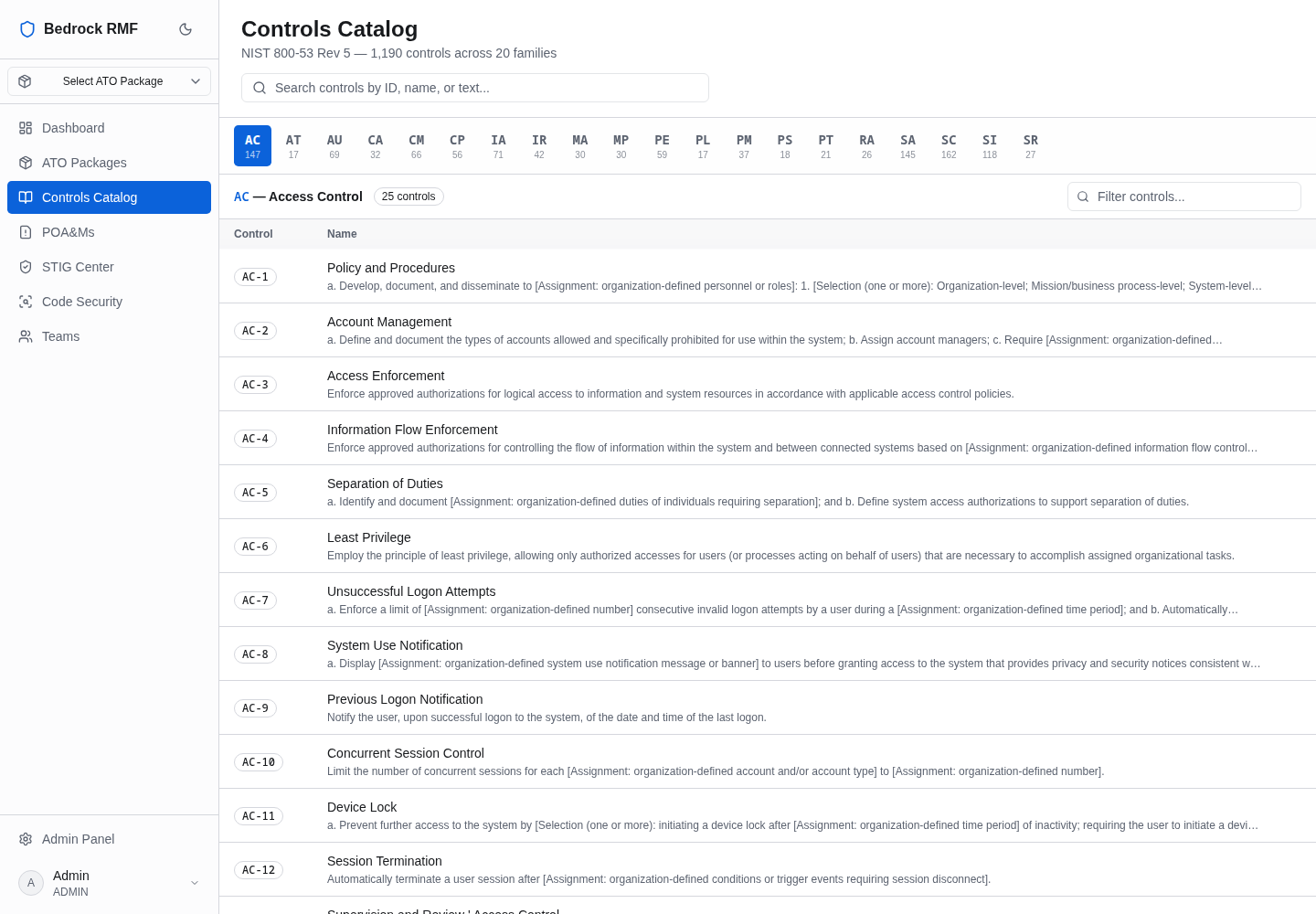
Controls Catalog in the main sidebar is the read-only NIST SP 800-53 Rev 5 reference — "1,190 controls across 20 families". Family buttons (AC … SR, each with a count) filter the table of Control / Name with the full control text expanded per row. Nothing you do here touches a package; it is there to look things up.
The SCTM
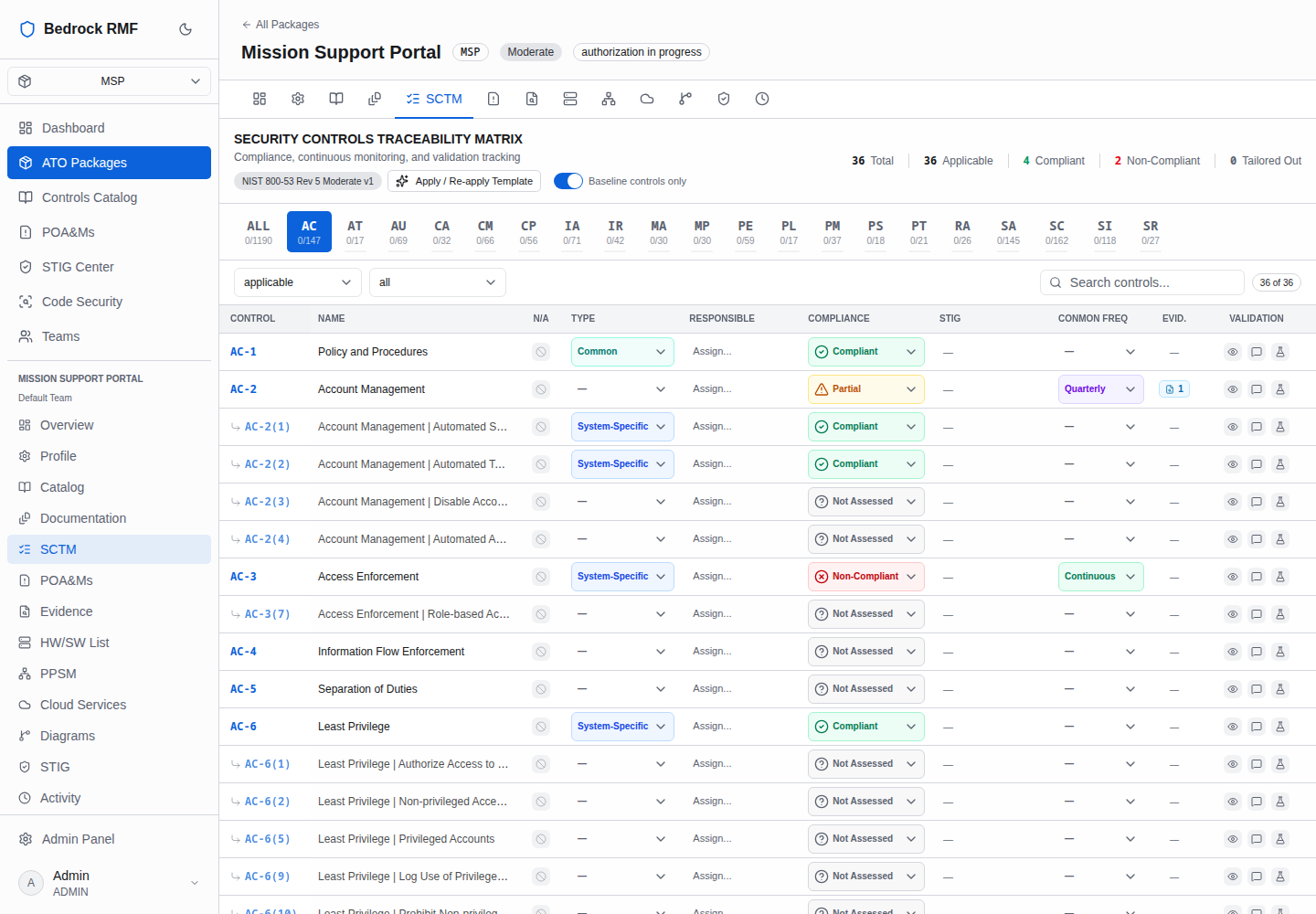
Open SCTM in the package sidebar. The page is titled Security Controls Traceability Matrix — Compliance, continuous monitoring, and validation tracking.
Apply a baseline template first
The SCTM is empty until a baseline template is applied. Click Apply Baseline Template. The dialog reads "Select a control baseline or overlay for this package. Existing tailoring and assessment data is preserved — conflicts are flagged, never overwritten." Pick a template from the combobox — NIST 800-53 Rev 5 High (522 controls), Moderate (297) or Low (126); the one matching the package's high-water mark is marked Recommended and preselected — and click Apply Template.
Applying is idempotent. If you change the package baseline later, use Apply / Re-apply Template in the SCTM header; tailoring and assessment data you have already entered is kept. The templates themselves are managed under Admin → Baseline Templates.
Reading the matrix
The header shows the applied template badge (for example NIST 800-53 Rev 5 Moderate v1), the Baseline controls only switch, and totals: Total,
Applicable, Compliant (green), Non-Compliant (red), Tailored
Out. Family buttons show compliant / catalog size for that family
(ALL 0/1190, AC 0/147 …). Filters: applicable (applicable / all /
N/A), all (type), Search controls…, and a "36 of 36" style count of
rows currently shown.
| Column | What it holds |
|---|---|
| CONTROL | The control ID; the link opens the package Catalog for that family |
| NAME | Control title |
| N/A | Tailor Out (mark N/A) — removes the control from the applicable set with a justification |
| TYPE | —, Inherited, System-Specific, Hybrid or Common |
| RESPONSIBLE | Assign… a person |
| COMPLIANCE | Not Assessed, Compliant, Partial or Non-Compliant |
| STIG | Derived from imported checklist findings — see STIG posture; you do not edit it |
| CONMON FREQ | Continuous, Daily, Weekly, Monthly, Quarterly, Semi-Annual or Annual |
| EVID. | Count badge of mapped evidence |
| VALIDATION | Examine / Interview / Test icons — the assessment methods |
Compliance is an assessment statement, not an implementation statement
COMPLIANCE in the SCTM is what you assert to the authorizing official. The implementation narrative that backs it up lives in the package Catalog below, at CCI level. Keep both current: an SCTM row marked Compliant with no CCI responses will not survive an assessor's first question.
CCI-level responses in the package Catalog
Open Catalog in the package sidebar (or click a control in the SCTM). The page is titled Controls Catalog — NIST 800-53 Rev 5 control implementation status and CCI-level responses, with totals Controls / Implemented / Partial / Not Implemented, the family buttons and Filter controls….
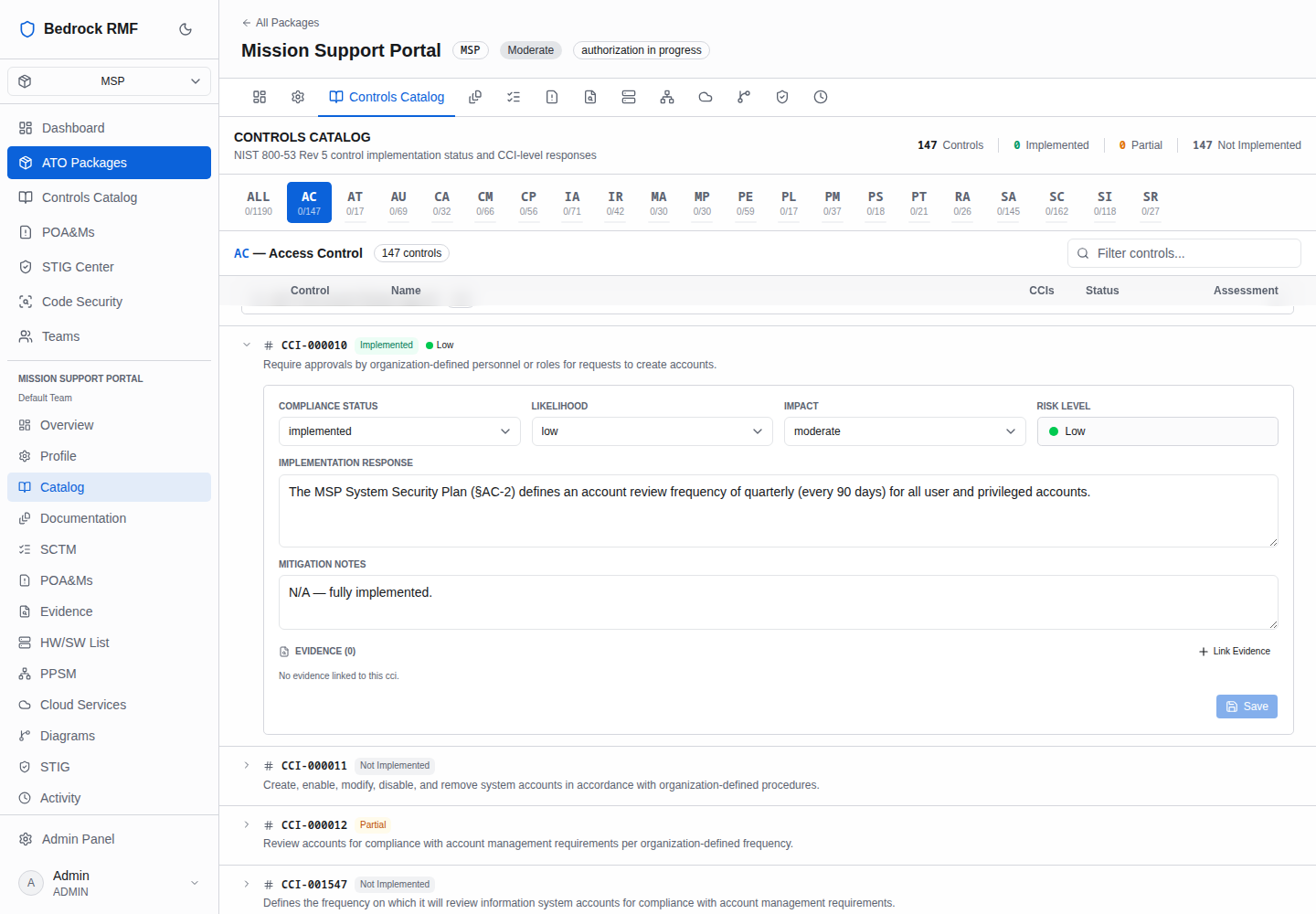
The table shows Control, Name, CCIs (count badge), Status (Not Implemented / Partial / Implemented — derived from the CCI responses) and Assessment. Click a row to expand it inline: the badge and name, CONTROL TEXT, DISCUSSION, then the CCI list.
Each CCI row (CCI-000010, a status pill and the requirement text) expands
to the response editor:
- COMPLIANCE STATUS — Not Implemented, Planned, Partial, Implemented or N/A
- LIKELIHOOD and IMPACT — Very Low, Low, Moderate, High, Very High
- RISK LEVEL — computed from likelihood and impact, read-only
- IMPLEMENTATION RESPONSE — "Describe how this CCI requirement is met…"; this is the sentence that ends up in the SSP
- MITIGATION NOTES — "Risk mitigation strategies, compensating controls…"
- EVIDENCE (n) with + Link Evidence
- Save — disabled until something changed
A control only reads Implemented when all of its CCIs are. A control with 35 CCIs and 3 answered still shows Not Implemented, and the family counts in the SCTM reflect that.
Work family by family
Use the family buttons to work one family at a time, and the Filter controls… box to jump to a specific control. Every saved response is an entry in the package Activity log ("updated Implementation (complianceStatus)"), so a reviewer can see when each CCI was last touched.