 foxxcyber/docs
Gaps
See what a package is missing, counted from the records already in it: controls, POA&Ms, documents, hardware, scan findings, security duties and risk acceptances. Each line links to the screen where you fix it.
Before a review, everyone asks the same thing: what is this package still missing? The Gaps page answers from the records the package already holds. There is nothing to fill in. The page changes nothing. Each line names the screen where a person fixes it.
Which version
The Gaps page arrived in 1.5.0.
Where to find it
- One package: open the package and choose Gaps, under Overview in the package sidebar.
- Every package you can reach: choose Gaps in the main sidebar.
The package page
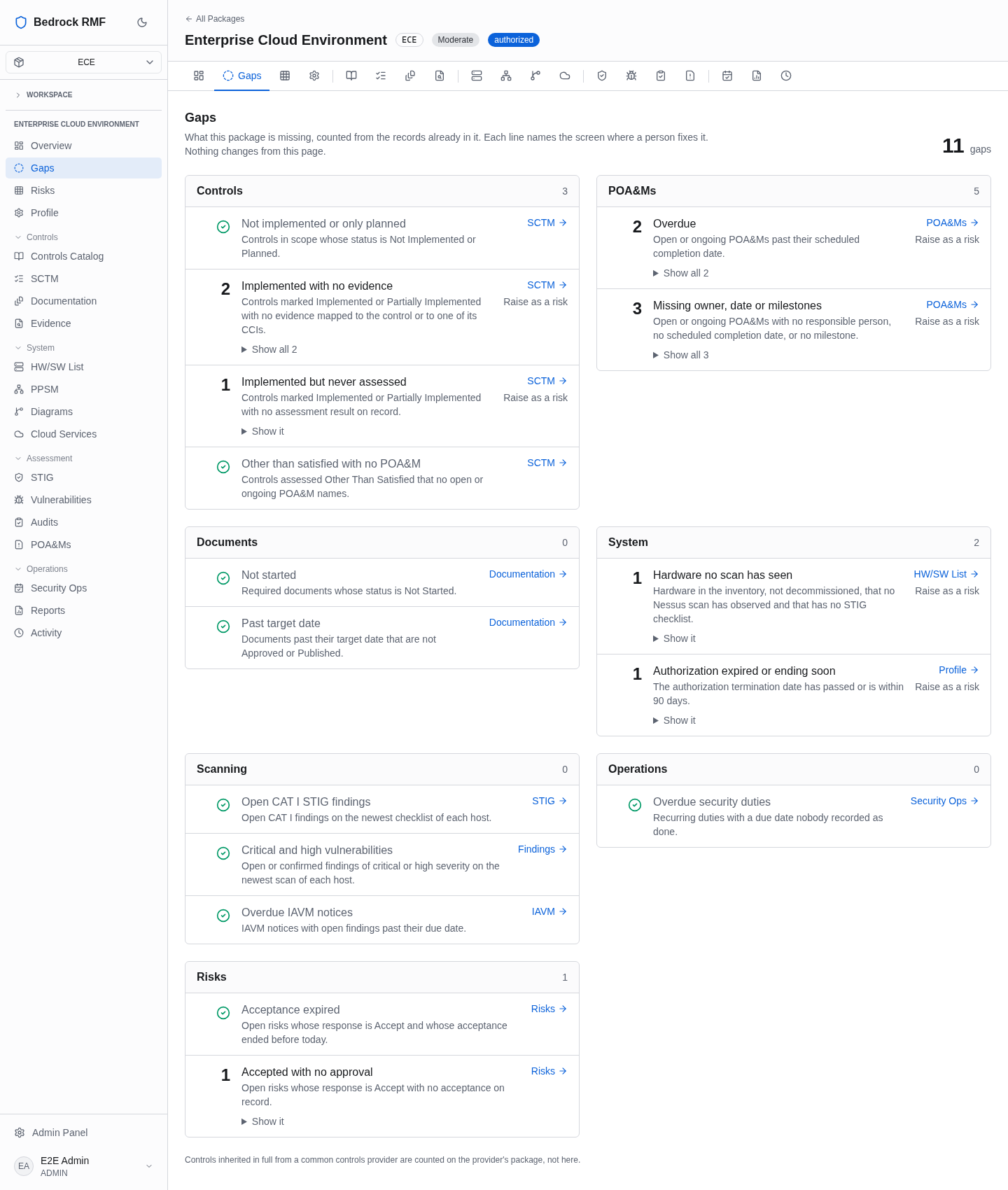
The number at the top right is the total for the package. Below it are the cards: Controls, POA&Ms, Documents, System, Scanning and Operations. After 1.5.0 there is a seventh, Risks. Each line in a card is one check.
- A line with something to fix shows a count. Show all n under it (or Show it for one record) lists the records. Click a record to open it.
- A line with nothing to fix shows a green check mark, not a zero.
- The link at the right of a line opens the screen for that check, such as SCTM or POA&Ms.
- After 1.5.0, a line with something to fix also has Raise as a risk. It opens the form for a new entry in the risk register, filled in from the check. Nothing is saved until a person rates the risk and saves it. The two lines in the Risks card do not have it: they are about risks that already exist.
What each line counts
| Card | Line | What it counts | Fix it in |
|---|---|---|---|
| Controls | Not implemented or only planned | Controls in scope whose status is Not Implemented or Planned | SCTM |
| Controls | Implemented with no evidence | Controls marked Implemented or Partially Implemented with no evidence mapped to the control or to one of its CCIs | SCTM |
| Controls | Implemented but never assessed | Controls marked Implemented or Partially Implemented with no assessment result on record | SCTM |
| Controls | Other than satisfied with no POA&M | Controls assessed Other Than Satisfied that no open or ongoing POA&M names | SCTM |
| POA&Ms | Overdue | Open or ongoing POA&Ms past their scheduled completion date | POA&Ms |
| POA&Ms | Missing owner, date or milestones | Open or ongoing POA&Ms with no responsible person, no scheduled completion date, or no milestone | POA&Ms |
| Documents | Not started | Required documents whose status is Not Started | Documentation |
| Documents | Past target date | Documents past their target date that are not Approved or Published | Documentation |
| System | Hardware no scan has seen | Hardware in the inventory, not decommissioned, that no Nessus scan has observed and that has no STIG checklist | HW/SW List |
| System | Authorization expired or ending soon | The authorization termination date has passed or is within 90 days | Profile |
| Scanning | Open CAT I STIG findings | Open CAT I findings on the newest checklist of each host | STIG |
| Scanning | Critical and high vulnerabilities | Open or confirmed findings of critical or high severity on the newest scan of each host | Vulnerabilities → Findings |
| Scanning | Overdue IAVM notices | IAVM notices with open findings past their due date | Vulnerabilities → IAVM |
| Operations | Overdue security duties | Recurring duties with a due date nobody recorded as done | Security Ops |
| Risks | Acceptance expired | Open risks whose response is Accept and whose acceptance ended before today | Risks |
| Risks | Accepted with no approval | Open risks whose response is Accept with no acceptance on record | Risks |
The Risks card comes after 1.5.0. See Accept a risk.
Rules worth knowing
- Scope. Once a package has a baseline, the control lines count only controls in the baseline or flagged for review. Controls marked Not Applicable never count.
- Inherited controls. A control inherited in full from a common controls provider is counted on the provider's package, not on yours. You could not fix it from your package. A hybrid control still counts on yours, because you keep a half of it. So does a control whose provider withdrew the offering.
- No double counting of unbuilt controls. A control that is not implemented is on the first line only. It is not counted again for having no evidence or no assessment.
- One record can be on two lines. A POA&M can be overdue and have no owner. A document can be not started and past its target date. The total adds the lines, so such a record adds two.
- One overdue duty is one gap, however many due dates it has missed.
- No made-up time limits. The only fixed number is the 90-day warning before an authorization ends. Every other date comes from a person: the POA&M's completion date, the document's target date, the IAVM due date, or the duty's schedule. There is no "scan is too old" line, because Bedrock RMF does not know how often your program must scan.
A missing line is not a zero
A line is left out when its module is turned off under Admin → Features, or when your role cannot read those records. A note at the foot of the page says how many lines are not shown. A green check mark means the check ran and found nothing.
The workspace page
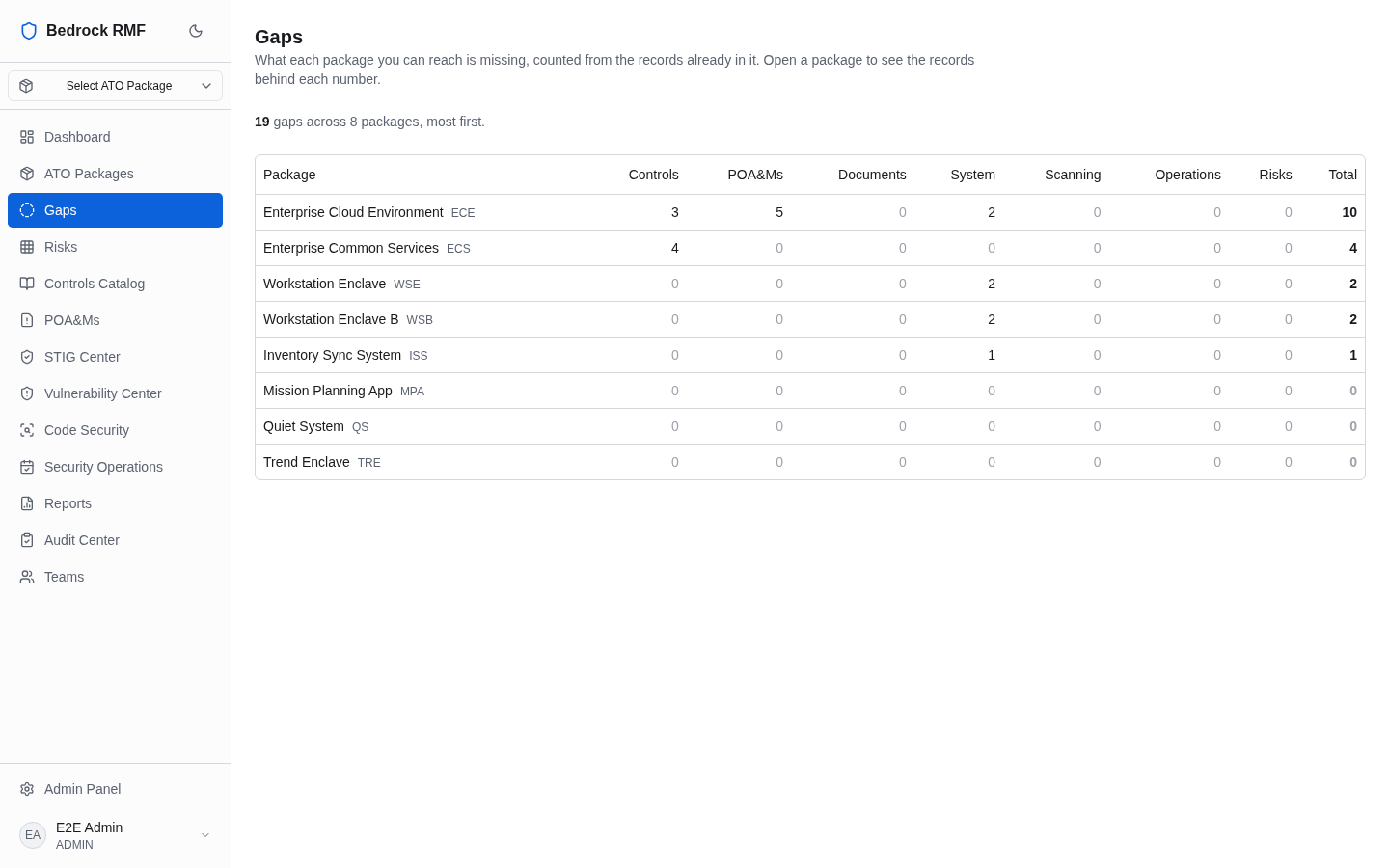
Gaps in the main sidebar lists every package you can reach, the package with the most gaps first. The columns are the cards and a Total. The page shows numbers only. Click a package name to open its Gaps page and see the records.
Where the rules come from
The checks follow the steps of the NIST Risk Management Framework. The wording is ours.
- Controls: NIST SP 800-37 Rev. 2, Tasks I-1, I-2, A-3 and A-6; NIST SP 800-53A Rev. 5, where a finding is "satisfied" or "other than satisfied"; NIST SP 800-53 Rev. 5, CA-2 and CA-5.
- POA&Ms: OMB Memorandum M-02-01, which lists what each POA&M entry holds: the responsible office, the scheduled completion date and key milestones.
- Documents: NIST SP 800-37 Rev. 2, Task R-1; NIST SP 800-53 Rev. 5, PL-2.
- System: NIST SP 800-53 Rev. 5, CM-8 and RA-5; NIST SP 800-37 Rev. 2, Tasks R-4 and M-6.
- Scanning: DISA STIG severity category I; NIST SP 800-53 Rev. 5, CM-6, RA-5, SI-2 and SI-5.
- Operations: NIST SP 800-37 Rev. 2, Tasks M-1 to M-3; NIST SP 800-53 Rev. 5, CA-7.
- Risks: NIST SP 800-37 Rev. 2, Tasks R-3, R-4 and M-6.
The full table of rules and sources is in the repository at
research/program-gaps.md.