 foxxcyber/docs
Risks
Keep a risk register for each package: what could go wrong, how likely it is, how bad it would be, what the organization decided to do, who accepted it and until when. A five-by-five map shows where the risks sit, and a report puts the register on paper.
A POA&M tracks a weakness and the work to fix it. A risk is the wider question: what could go wrong for this system, how likely is it, how bad would it be, and what did the organization decide to do about it? The Risks page of a package is its risk register. It holds one entry per risk and a map of where the risks sit.
Which version
The risk register comes after 1.5.0. It will be in the next release, with risk acceptance, proposals from an agent and the Risk Assessment Report.
Where to find it
- One package: open the package and choose Risks, between Gaps and Profile in the package sidebar.
- Every package you can reach: choose Risks in the main sidebar.
The register
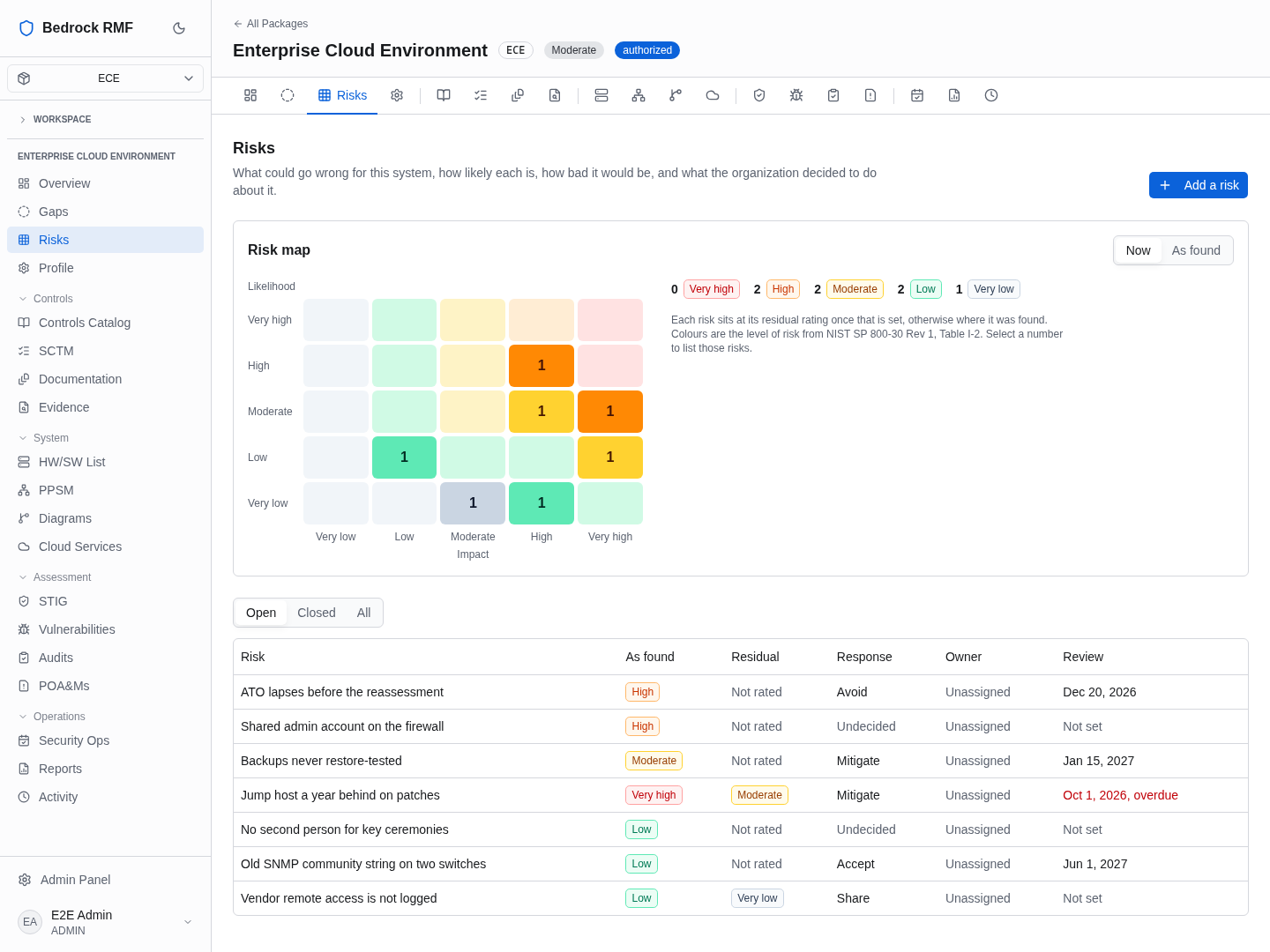
The page has two parts: the Risk map and the list of risks. On a screen 1536 pixels wide or more the map sits beside the list. On a narrower screen it sits above the list.
The list starts on open risks, the highest level at the top. Use Open, Closed and All above the list to change which risks it shows. The columns are:
| Column | What it shows |
|---|---|
| Risk | The title. Click it to open the risk. |
| As found | The level of risk from the first pair of ratings. |
| Residual | The level that remains once the response is in place, or Not rated. |
| Response | What the organization chose to do, or Undecided. Under Accept, a second line shows the acceptance: Not approved, until a date, or Acceptance expired. |
| Owner | The person or role that answers for the risk, or Unassigned. |
| Review | The date someone next looks at the risk. A date that has passed on an open risk is red and marked overdue. |
| Status | Open or Closed. Shown only under All. |
The risk map
The map is a grid of five rows by five columns. Rows are Likelihood, with very high at the top. Columns are Impact, with very high at the right. The number in a cell is how many risks have that pair of ratings. The colour of a cell is its level of risk.
- Now places each risk at its residual rating when it has one. A risk with no residual rating stays where it was found, so no risk drops off the map.
- As found places each risk at its first pair of ratings, before any response.
- Select a number to list only the risks in that cell. Show all brings the full list back.
- The counts by the map show how many risks are at each level.
The map follows the list: under Open it counts open risks, under Closed closed ones.
Add a risk
Choose Add a risk. The form is a full page.
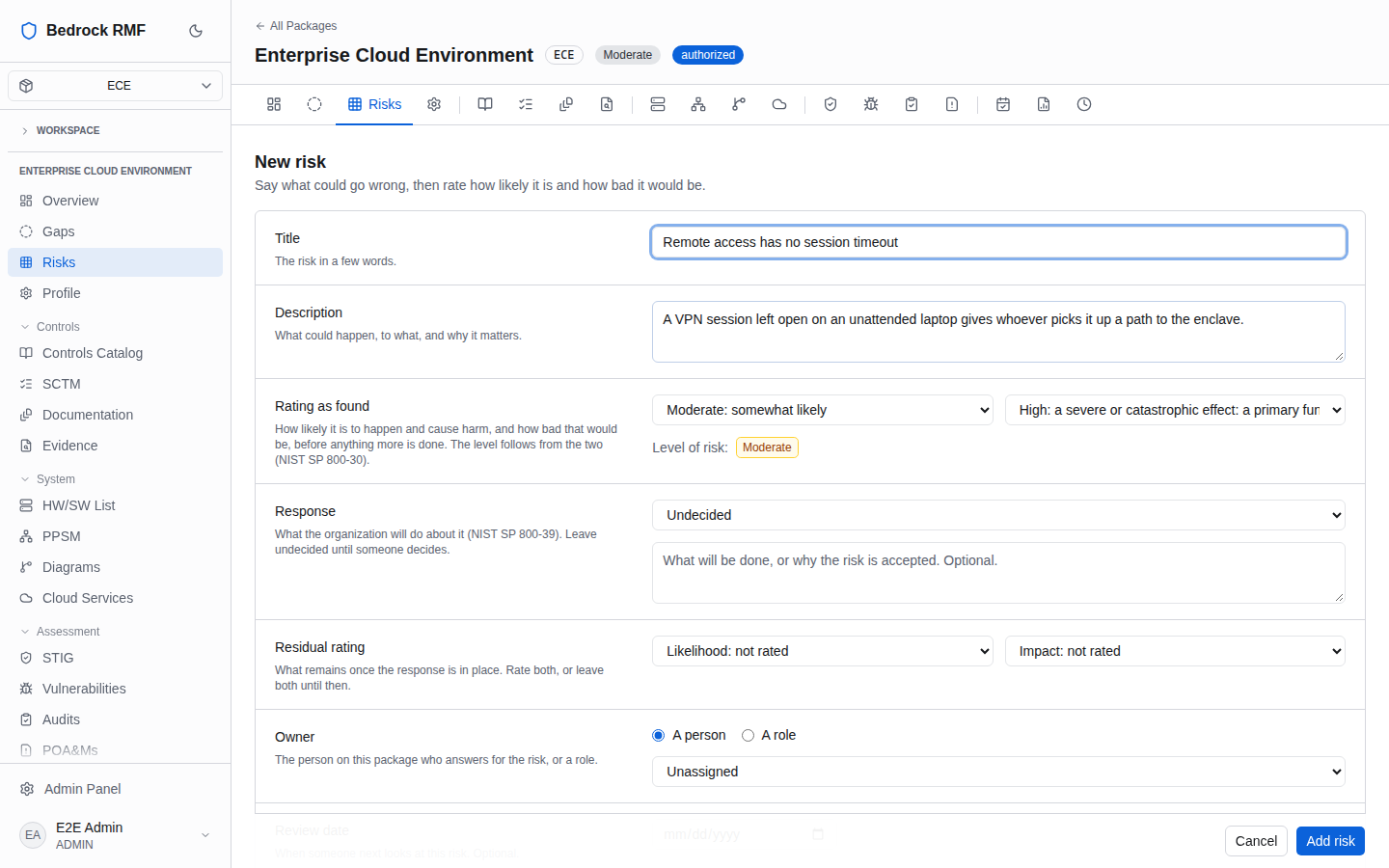
| Field | What to enter |
|---|---|
| Title | The risk in a few words. Required. |
| Description | What could happen, to what, and why it matters. Required. |
| Rating as found | Likelihood and Impact. Both are required. The level of risk appears beside them once both are set. |
| Response | Accept, Avoid, Mitigate, Share or Transfer, or leave it Undecided. The text box holds the plan: what will be done, or why the risk is accepted. |
| Residual rating | What remains once the response is in place. Rate both likelihood and impact, or leave both until then. |
| Owner | A person on this package, or a role such as System Owner. A named person takes the place of a role. |
| Review date | When someone next looks at this risk. |
| Related controls | NIST SP 800-53 control ids, separated by commas, such as SI-2, RA-5. |
| Related POA&Ms | The POA&Ms in this package that carry the work to reduce the risk. |
Choose Add risk to save. The risk opens on its own page.
You never type the level
You rate likelihood and impact. Bedrock RMF looks the level up from those two ratings and does not store it, so the level can never disagree with them.
The scale
Likelihood, impact and the level of risk all use the same five values, from NIST SP 800-30 Rev. 1. The descriptions below are in our words.
| Value | Likelihood | Impact |
|---|---|---|
| Very high | Almost certain | Several severe or catastrophic effects |
| High | Highly likely | A severe or catastrophic effect: a primary function stops |
| Moderate | Somewhat likely | A serious effect: primary functions go on, much less well |
| Low | Unlikely | A limited effect: functions noticeably worse |
| Very low | Highly unlikely | A negligible effect |
How the level is worked out
The level comes from Table I-2 of NIST SP 800-30 Rev. 1. Find the row for the likelihood and the column for the impact.
| Likelihood \ Impact | Very low | Low | Moderate | High | Very high |
|---|---|---|---|---|---|
| Very high | Very low | Low | Moderate | High | Very high |
| High | Very low | Low | Moderate | High | Very high |
| Moderate | Very low | Low | Moderate | Moderate | High |
| Low | Very low | Low | Low | Low | Moderate |
| Very low | Very low | Very low | Very low | Low | Low |
The table is not two numbers multiplied together. Impact counts for more than likelihood: an unlikely event with a very high impact is still a moderate risk, and a near-certain event with a very low impact is a very low one.
The five responses
The responses come from NIST SP 800-39, section 3.3.
| Response | What it means |
|---|---|
| Accept | The risk is within what the organization tolerates. Nothing more is done. |
| Avoid | Stop or change the activity or technology that causes the risk. |
| Mitigate | Reduce the risk with safeguards. |
| Share | Move part of the responsibility to another organization. |
| Transfer | Move all of the responsibility to another organization, as insurance does. This lowers neither the likelihood nor the harm. |
A risk has no response until someone decides one. Until then the list shows Undecided.
Open, change, close or delete a risk
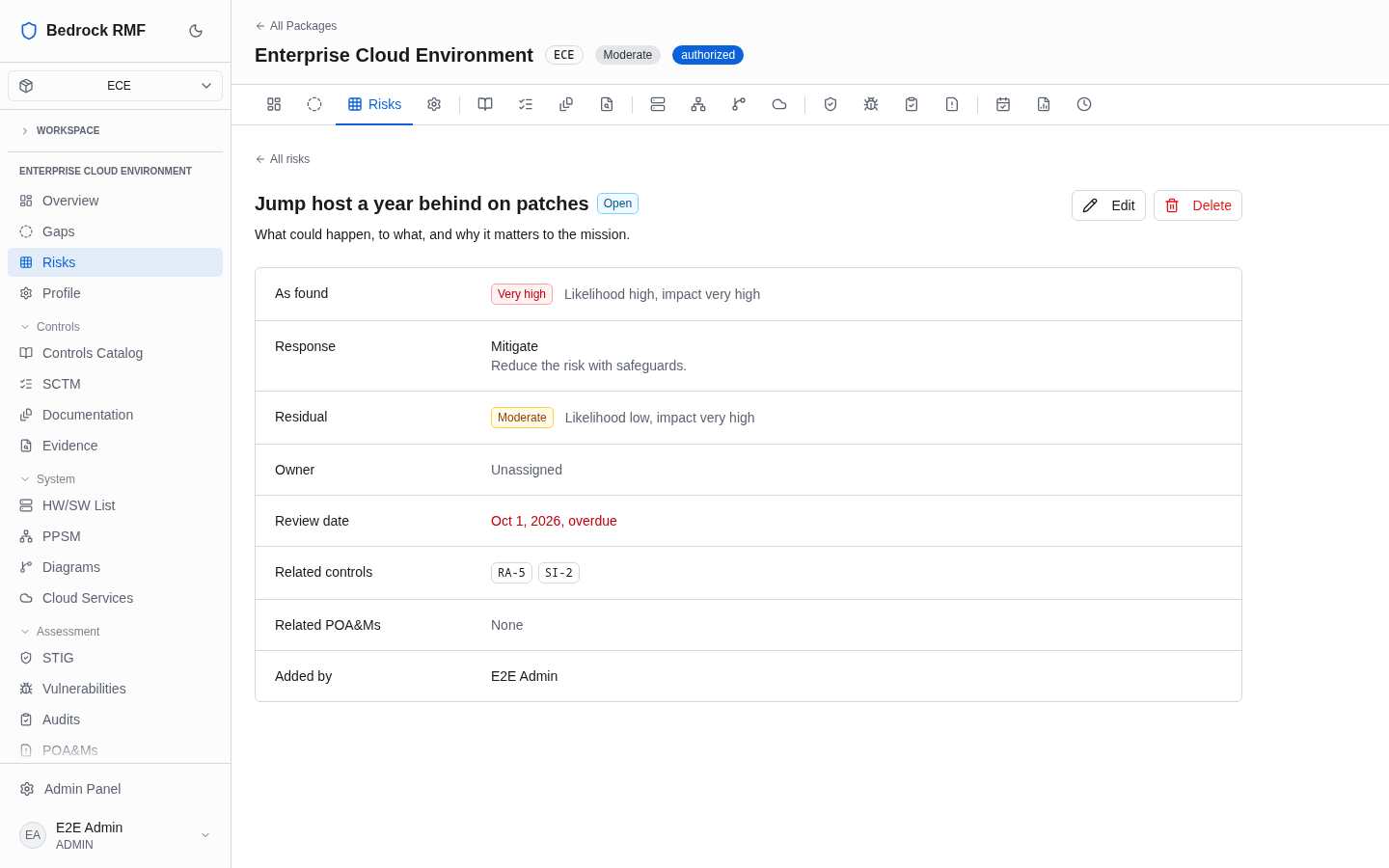
Click a title in the list to open the risk. The page shows the ratings as found, the response and its plan, the residual rating, the owner, the review date, the related controls and POA&Ms, the Gaps check the risk was raised from, and who added it.
- Edit opens the same form. It adds a Status field.
- Close a risk that no longer applies: set Status to Closed. It leaves the default list and the map but stays in the register under Closed.
- An accepted risk stays open. Accepting a risk does not end it. See Accept a risk.
- Delete removes the risk and its links to controls and POA&Ms. Bedrock RMF asks you to confirm first. Close a risk when you can, so the register keeps its history.
Accept a risk
Choosing the response Accept on the form proposes the acceptance. Anyone who can change the risk can do that. Recording the acceptance is a separate step, and it needs its own permission: Approve on Risks. NIST SP 800-37 Rev. 2 gives the acceptance of risk to the authorizing official alone, so only Admin holds the permission at first.
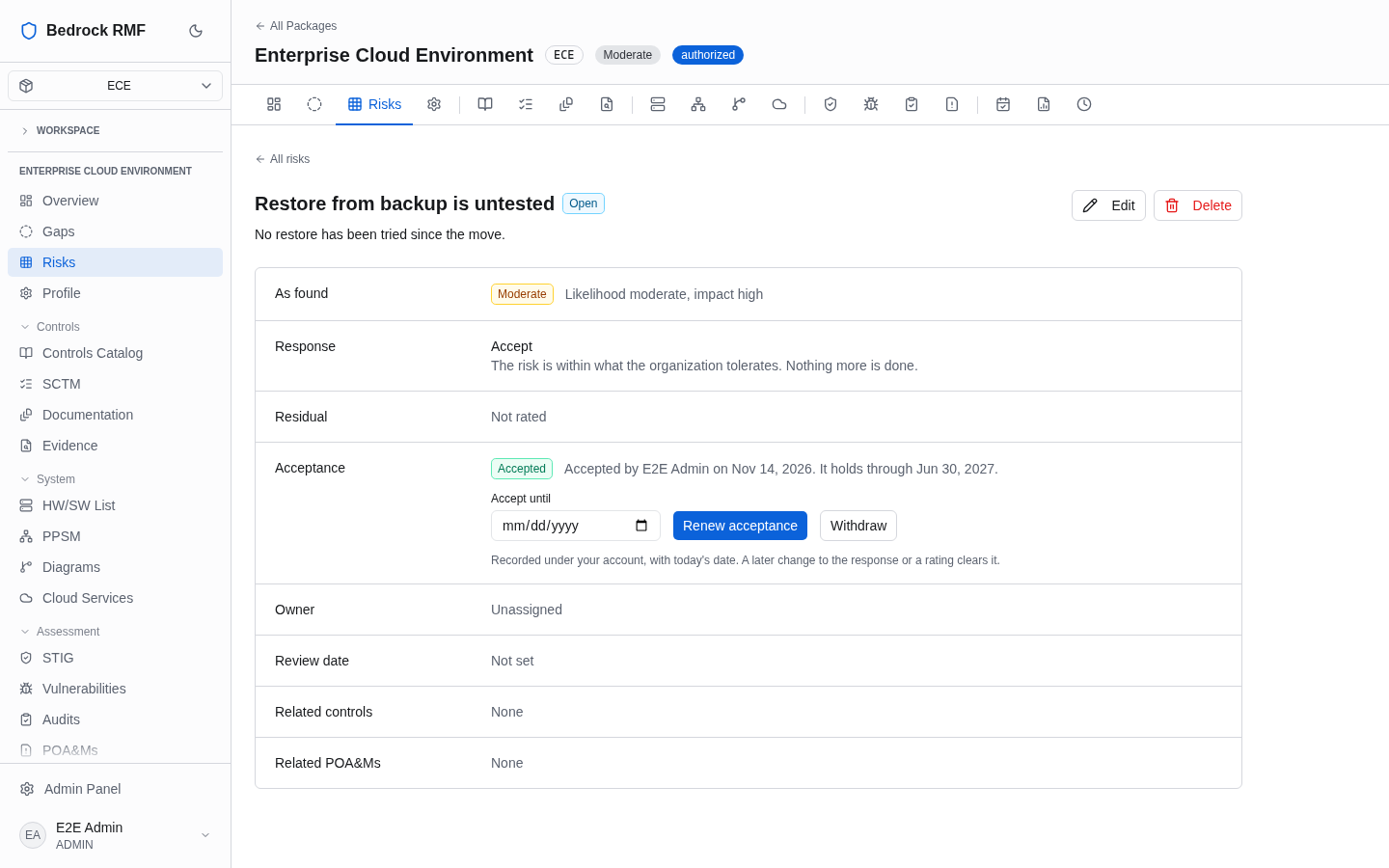
A risk whose response is Accept has an Acceptance row on its page. The row shows one of three states:
| State | What it means |
|---|---|
| Not approved | The response is Accept and no acceptance is on record. |
| Accepted | An acceptance is on record and its end date is today or later. |
| Acceptance expired | The end date has passed. |
Bedrock RMF works the state out from the record and today's date. It does not store it, so it is never out of date.
To record an acceptance:
- Open the risk.
- Under Acceptance, set Accept until. The date is required and must be after today.
- Choose Record acceptance.
The acceptance is recorded under your account, with today's date. You do not type a name: the app records who was signed in. The risk then shows Accepted by your name, the date, and the day it holds through.
- Renew acceptance records it again with a new end date.
- Withdraw removes it. Bedrock RMF asks you to confirm first. The risk goes back to Not approved.
- A change to the response, or to any of the four ratings, clears the acceptance. The person accepted one risk at one level, and that has changed. A change to the title, description, plan, owner, review date or links leaves it in place.
- An acceptance can only be recorded on an open risk.
- An API key cannot record an acceptance.
There is no acceptance without an end date. The end date brings the risk back in front of the person who accepted it.
Give the authorizing official the permission
Under Admin → Roles & Permissions, turn on Approve in the Risks rows for the role your authorizing official signs in with. A person without it sees the state and a note that the Approve permission is needed.
The Gaps page lists open risks whose acceptance has expired and open risks accepted with no approval.
Proposals from an agent
A script or an AI agent with an API key can propose a risk. A proposal is not in the register. It is not in the list, on the map, in the counts, in the report or on the Gaps page until a person files it.
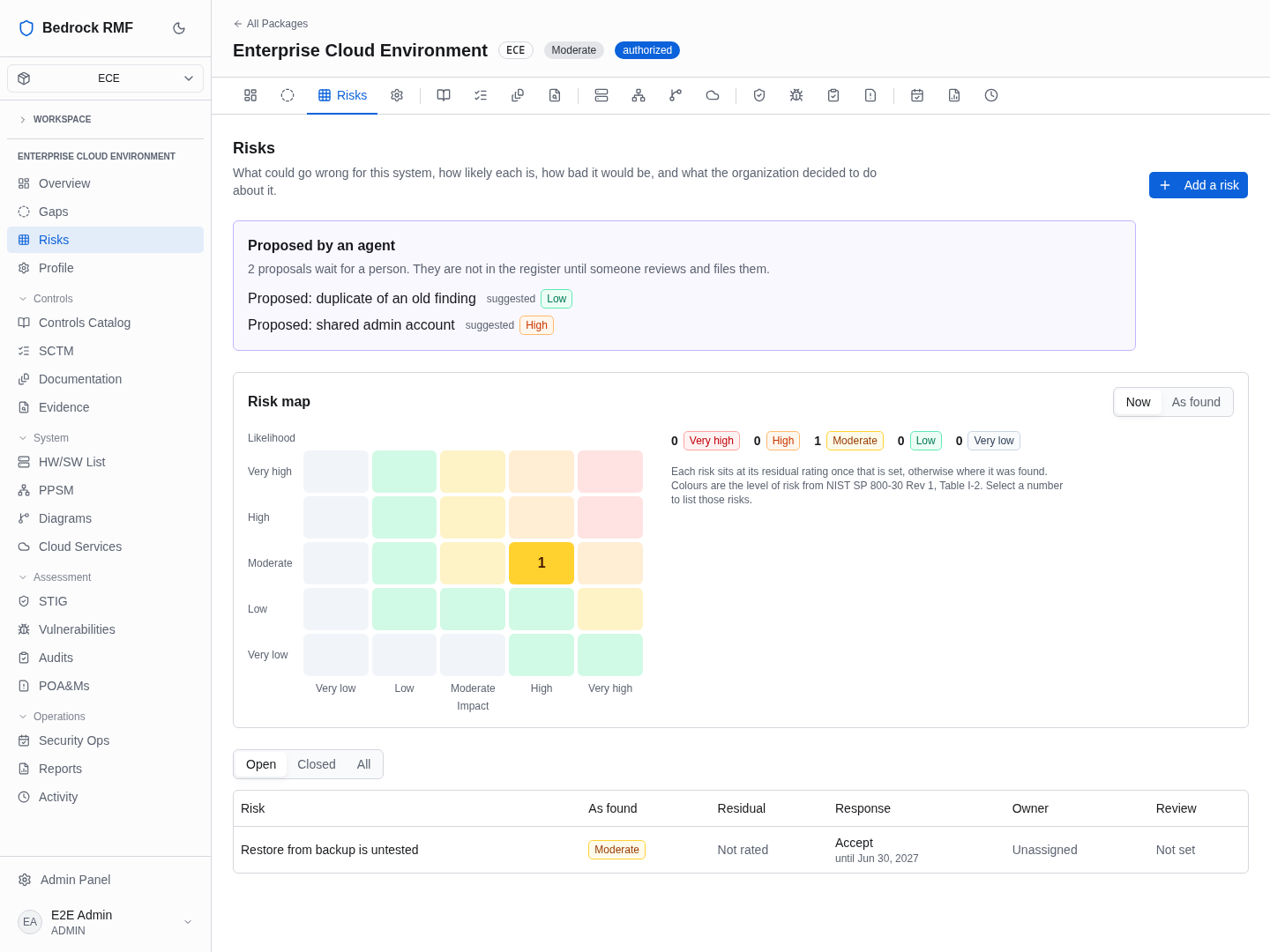
When a package has proposals, the Risks page shows them in a card named Proposed by an agent, above the map. Each line shows the title and the level the agent suggested.
- Click a proposal to open it.
- Choose Review and file. The form opens with what the agent sent.
- Check the text and the ratings, and change what is wrong. The ratings are the agent's suggestion.
- Choose File risk. The risk joins the register as an open risk.
Choose Dismiss on the proposal to remove it instead. Bedrock RMF asks you to confirm first. Filing or dismissing a proposal needs the same permission as changing a risk.
The API
| Request | Scope | What it does |
|---|---|---|
GET /api/v1/packages/{id}/risks | risk:read | Lists the risks of the package, proposals included. Each has its status, its level, its currentLevel and its acceptance state. |
GET /api/v1/packages/{id}/risks/{riskId} | risk:read | Reads one risk. The linked POA&Ms are listed only when the key also has poam:read. |
POST /api/v1/packages/{id}/risks | risk:create | Creates a proposal. The answer is 201 with the risk, its status set to proposed. |
A POST takes these fields: title, description, likelihood and
impact (all four required), and residualLikelihood, residualImpact,
response, responsePlan, ownerRole, reviewDate, controlIds and
poamIds. Ratings are very_low, low, moderate, high or very_high.
- Any other field is refused with
400. An agent cannot set the status, name a person as owner, or record an acceptance. - There is no
PATCHand noDELETE. Both answer405. - A package outside the key's reach answers
404. poamIdsneeds thepoam:readscope as well.
The Risk Assessment Report
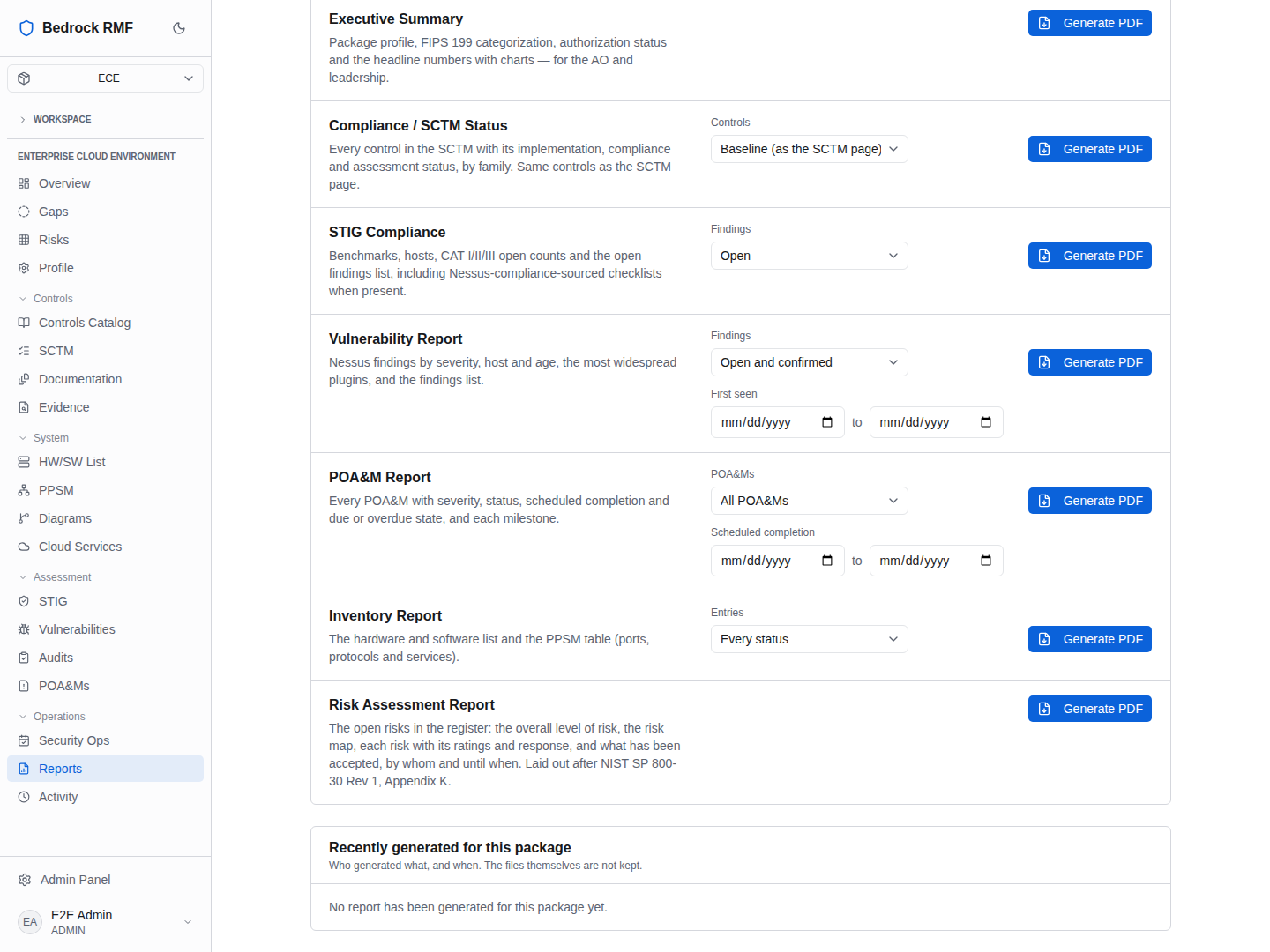
Open the package, choose Reports, and choose Generate PDF beside
Risk Assessment Report. The file is named after the package acronym and
the date, such as ECE_RiskAssessment_2026-11-14.pdf.
The report holds the open risks of the package:
- the scope: the system, its categorization and its boundary, from the package profile;
- the overall level of risk, and the number of risks at each level;
- the risk map;
- the register as a table, then each risk in detail with its ratings, response and plan;
- the acceptances: who accepted each risk, when, until what date, and which have expired or were never approved;
- how risk is rated, and the sources.
The overall level is the highest level any open risk stands at now: the residual rating when there is one, the rating as found when there is not. The report states this rule beside the level.
Proposals are not in the report. Closed risks are not in it either.
The layout follows the list of contents in NIST SP 800-30 Rev. 1, Appendix K. Bedrock RMF does not hold everything on that list: the purpose of the assessment, the assumptions and constraints, the risk tolerance, the uncertainties and the assessment team are not recorded in the app. The report says so under What this report does not hold. Attach them if your program needs them.
The report needs the Generate permission on Reports and Read on Risks. Linked POA&Ms appear only for a person who can read POA&Ms.
Raise a risk from a gap
On the Gaps page of a package, each check with something to fix has a Raise as a risk link.
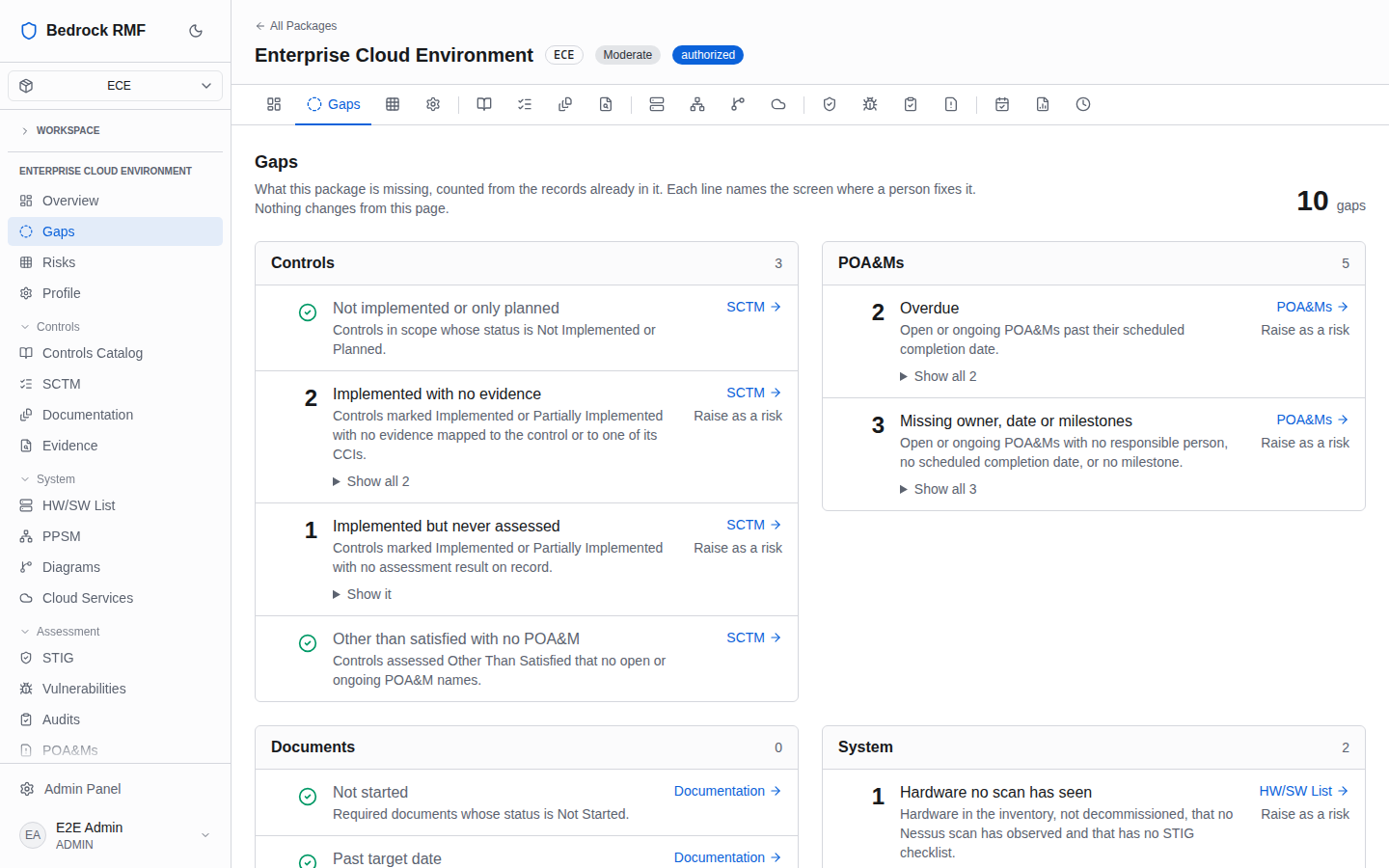
The link opens the new-risk form with the title and description filled in from the check. The ratings are blank: a person rates the risk. Nothing is saved until you choose Add risk. The risk then shows the check under Raised from.
The workspace page
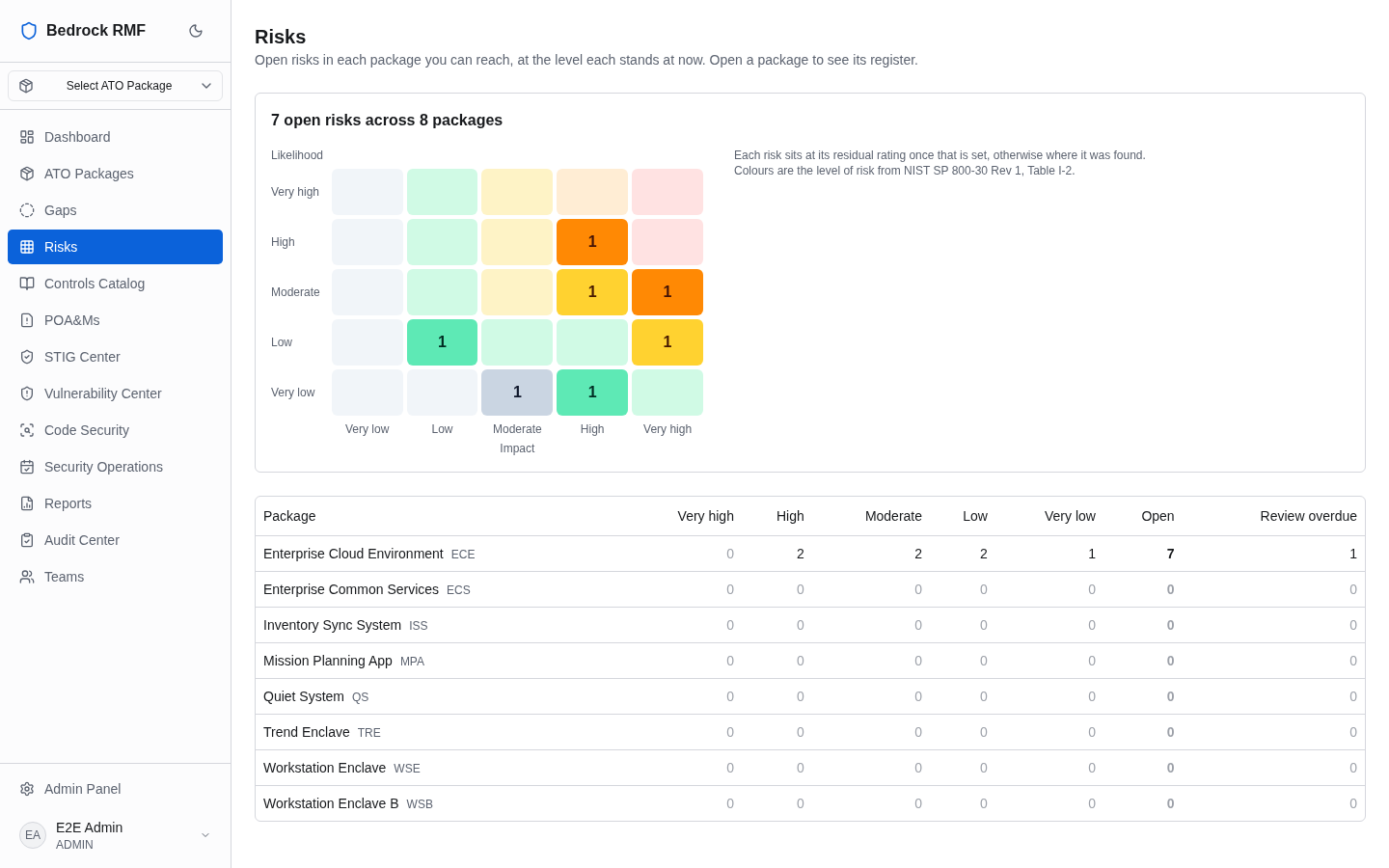
Risks in the main sidebar counts the open risks of every package you can reach. The map places every open risk at the rating it stands at now. The table has one row per package: the number of open risks at each level, the total under Open, and the number whose review date has passed under Review overdue. The package with the most serious risks is first. Click a package name to open its register.
Who can do what
| Role | Read | Add | Change | Delete | Approve |
|---|---|---|---|---|---|
| Admin | Yes | Yes | Yes | Yes | Yes |
| ISSM | Yes | Yes | Yes | Yes | No |
| ISSO | Yes | Yes | Yes | No | No |
| Auditor | Yes | No | No | No | No |
| ISSE | No | No | No | No | No |
Approve is the permission to record, renew or withdraw an acceptance.
- You see only the risks of packages you can reach.
- A custom role has no access to risks until an administrator grants it under Admin → Roles & Permissions, in the Risks rows.
- Linking POA&Ms also needs read access to POA&Ms. A role without it sees no POA&Ms on a risk and cannot change the links. Links another person made stay as they are.
- If you run Bedrock RMF from source, run
npm run db:seed:rolesafter the upgrade to add the new grants. The container images do this for you.
The audit log
Adding, changing and deleting a risk each write an entry to the audit log. A change records the ratings, the response and the status as they were before and as they are now.
These actions also write an entry:
| Action | When |
|---|---|
risk.accepted | An acceptance is recorded or renewed. The entry holds the end date. |
risk.acceptance_withdrawn | An acceptance is withdrawn. The entry holds what it was. |
risk.updated | A change cleared an acceptance. The entry holds the acceptance that was cleared. |
risk.proposed | An API key proposed a risk. The entry names the key. |
risk.proposal_dismissed | A person dismissed a proposal. |
Where the rules come from
- Scale and level of risk: NIST SP 800-30 Rev. 1, Guide for Conducting Risk Assessments, Appendix G (likelihood), Appendix H (impact) and Appendix I (Table I-2).
- Responses and residual risk: NIST SP 800-39, Managing Information Security Risk, section 3.3, Task 3-1.
- Status (open or closed) and the review date are ours. NIST SP 800-39 makes monitoring the fourth step of managing risk, so each risk carries the date of its next review.
- Who accepts a risk, and the end date: NIST SP 800-37 Rev. 2, Tasks R-3 and R-4 (the authorizing official accepts risk and cannot hand that to someone else; an authorization has a termination date) and Task M-6 (the official keeps reviewing whether the risk remains acceptable).
- The report: NIST SP 800-30 Rev. 1, Appendix K. The appendix says its list is a guide, not a template.
- Proposals: ours. A scanner or an agent proposes, and a person files.
The wording in the app is ours. The full notes are in the repository at
research/risk-register.md
and
research/risk-acceptance.md.