 foxxcyber/docs
IAVM compliance
See which DISA IAVA, IAVB and IAVT notices your Nessus findings reference, record a due date and an acknowledgement for each one, and export the result for an inspector.
DISA publishes vulnerability notices under the Information Assurance Vulnerability Management (IAVM) program: IAVA alerts, IAVB bulletins and IAVT technical advisories. An inspector asks two things about each one: is it still open on any host, and did the team act on it in time.
Bedrock RMF answers both from the scans you already import. Nessus and ACAS
write the notices a plugin answers into every finding, as references such as
IAVA:2020-A-0510-S. The IAVM tab reads those references. There is
nothing new to import, and scans imported before the feature existed are
covered too.
Which version
IAVM compliance arrived in 1.4.0. It is part of the Vulnerability Center module, so it is hidden when that module is turned off under Admin → Features.
Where to find it
- One package: open the package, choose Vulnerabilities, then the IAVM tab.
- Every package you can reach: choose Vulnerability Center in the main sidebar, then the IAVM tab.
The package tab
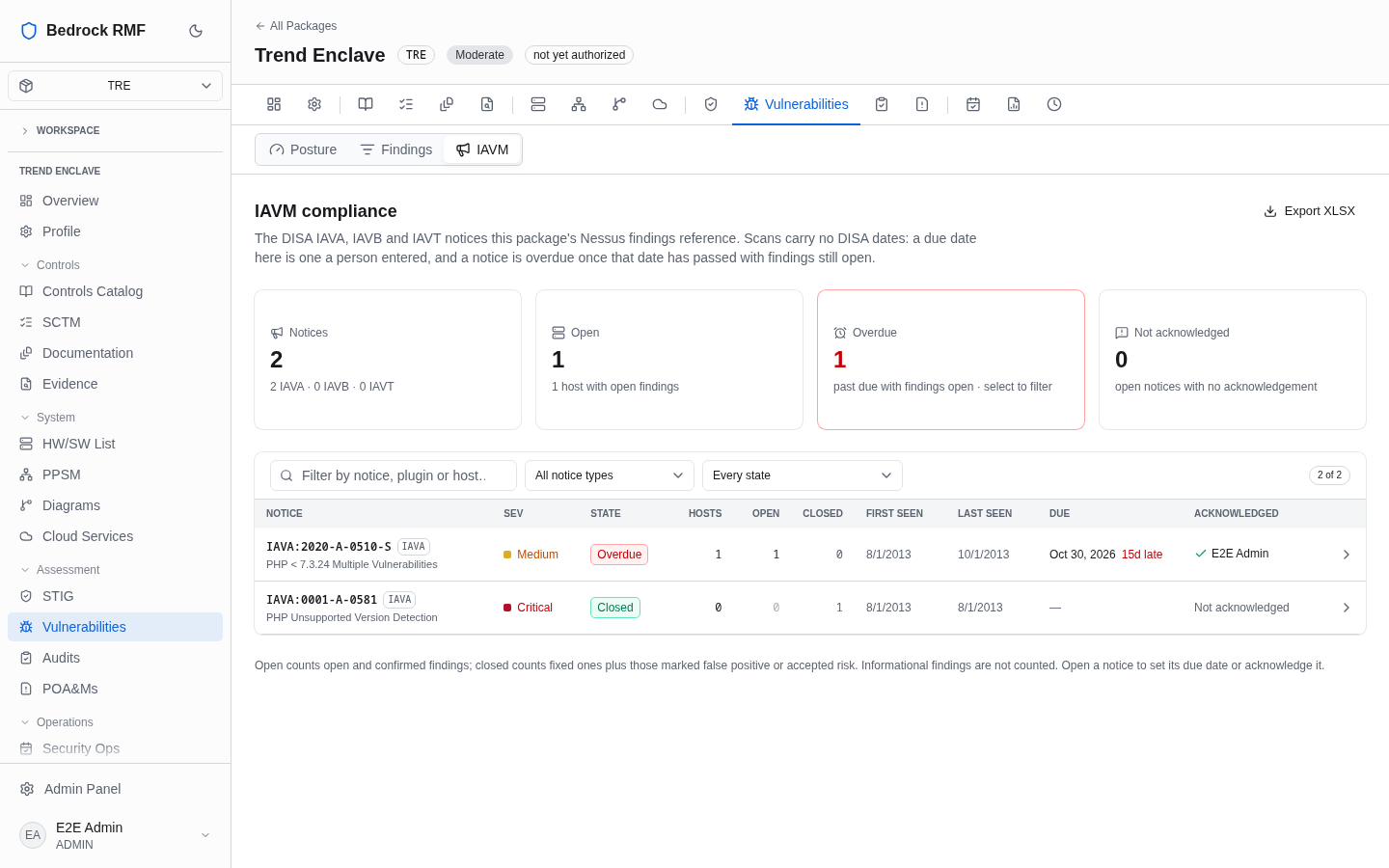
Four tiles summarise the package:
| Tile | Meaning |
|---|---|
| Notices | how many notices the findings reference, split by IAVA, IAVB and IAVT |
| Open | notices with at least one open finding, and how many hosts those are on |
| Overdue | notices past their due date with findings still open. Select the tile to filter the table |
| Not acknowledged | open notices nobody has acknowledged |
The table has one row per notice: its number and type, the plugin that reported it, the worst severity among its findings, its state, hosts, open and closed counts, when it was first and last seen, the due date and who acknowledged it. Narrow it with the search box (notice, plugin or host), the notice type, or the state. The filters are part of the page address, so a filtered view can be bookmarked or sent to someone.
How a notice gets its state
| State | When |
|---|---|
| Open | at least one finding that references the notice is open or confirmed |
| Overdue | open, and the due date a person entered has passed |
| Closed | no open findings are left: they are fixed, or marked false positive or accepted risk |
Three rules are worth knowing:
- Scans carry no DISA dates. Nothing is overdue until a person enters a due date for that notice.
- A re-scan closes a notice. When a later scan of the same hosts no longer reports the findings, they count as fixed and the notice closes.
- Informational findings are not counted. A notice that only an informational plugin references does not appear.
One notice
Select a row to open the notice.
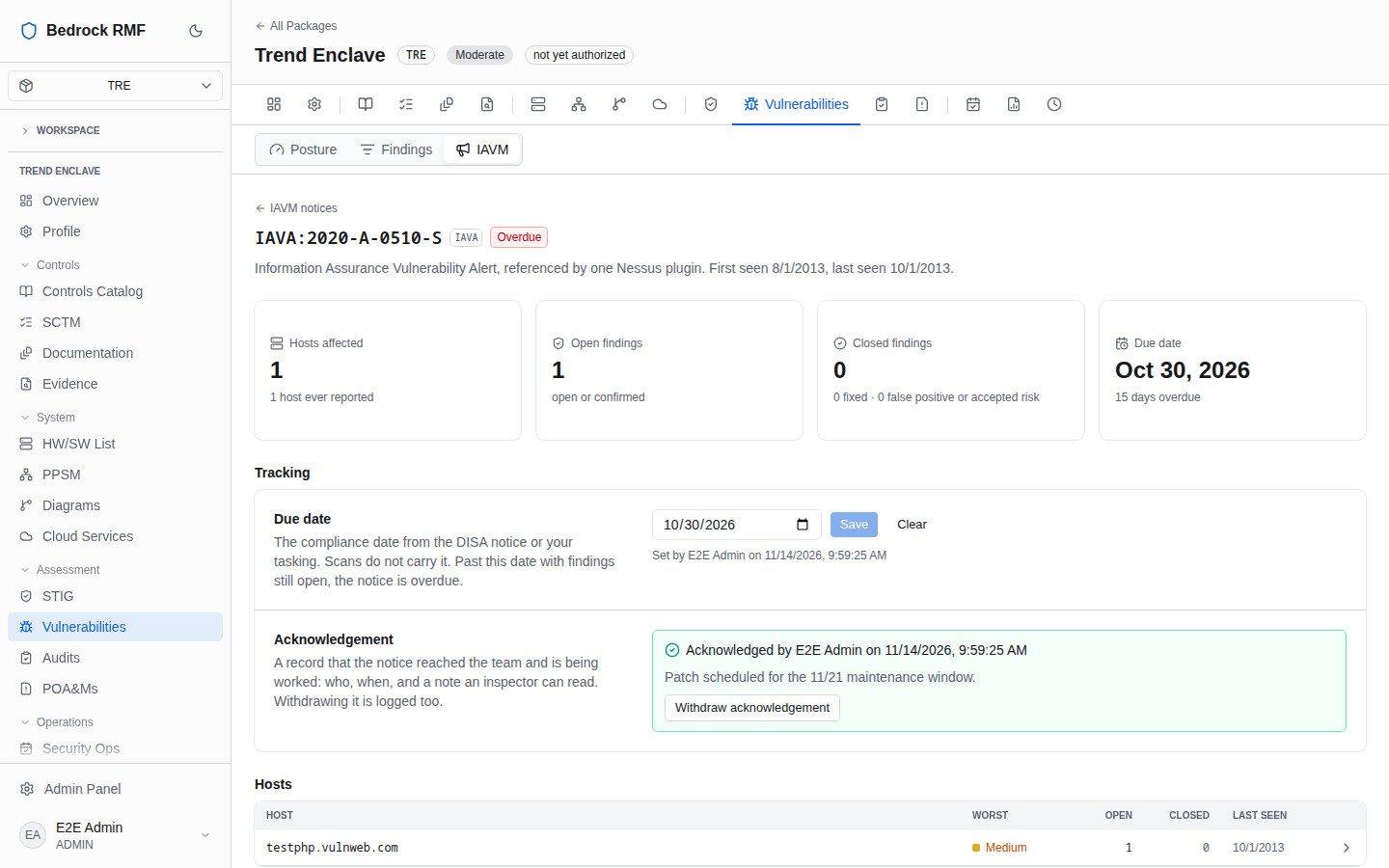
The page shows the hosts affected, open and closed finding counts, and each host with its worst severity. Under Tracking a person records two things for this package:
- Due date: the compliance date from the DISA notice or your tasking. Enter it and choose Set due date. Clear removes it.
- Acknowledgement: a record that the notice reached the team and is being worked. Add an optional note, such as the maintenance window the patch is scheduled for, and choose Acknowledge. The page then shows who acknowledged it and when. Withdraw acknowledgement removes it.
Tracking history at the bottom lists every change to the due date and the acknowledgement, with the person and the time.
Due dates and acknowledgements belong to one package. The same notice in another package has its own.
Across the workspace
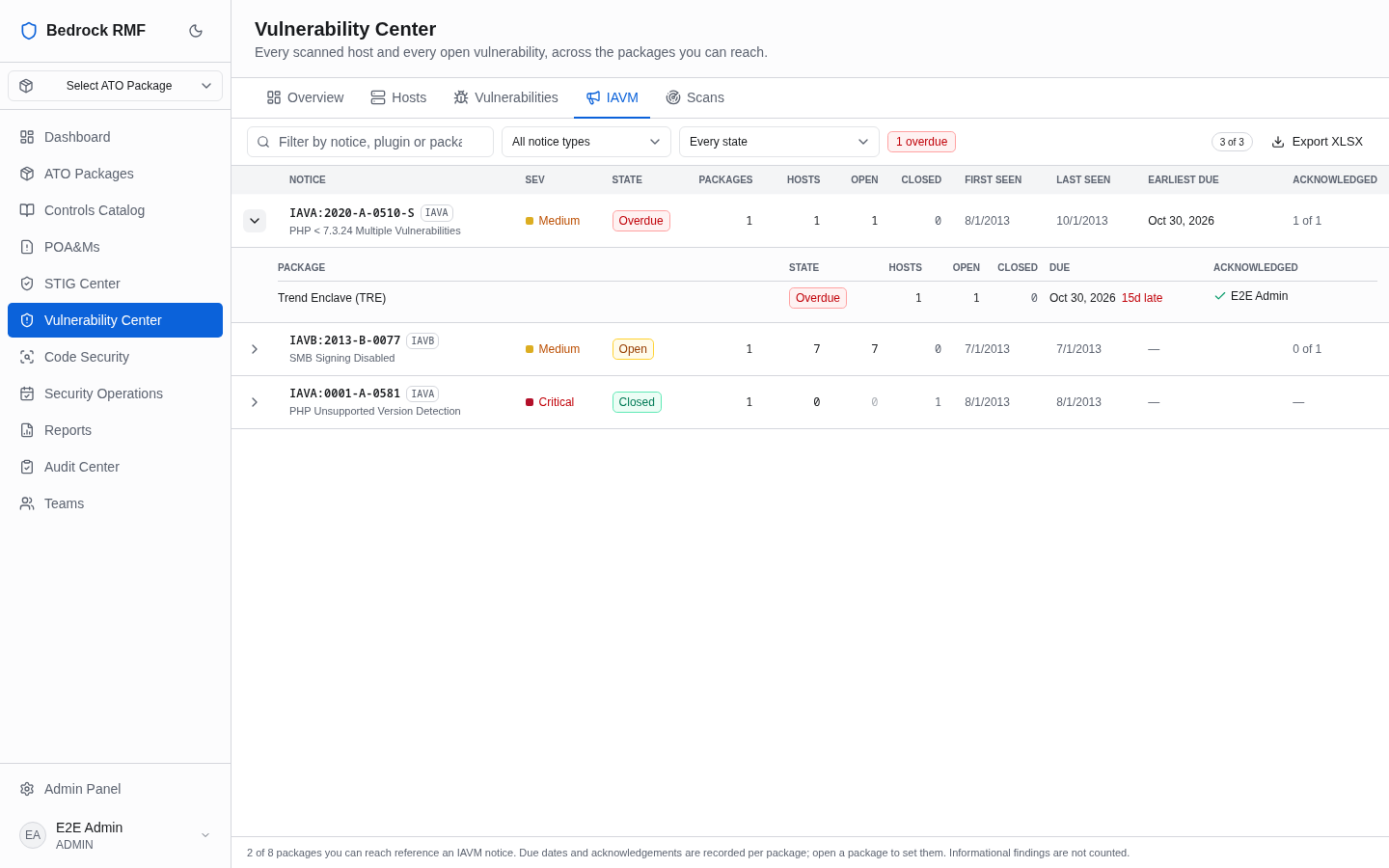
The IAVM tab of the Vulnerability Center adds each notice up across the packages you can reach: how many packages reference it, hosts, open and closed counts, the earliest due date among the packages where it is still open, and how many of those packages have acknowledged it. The row shows the most urgent state: Overdue if it is overdue in any package.
Expand a row to see where the notice stands in each package. Select a package to open the notice there and set its due date or acknowledge it.
Packages you cannot reach are never counted or named, on the page or in the export.
Export for an inspector
Export XLSX writes what the tab shows to an Excel workbook.
| From | File | Sheets |
|---|---|---|
| A package | <ACRONYM>_IAVM_<date>.xlsx | IAVM: one row per notice with state, severity, due date, days past due, open, fixed and suppressed counts, affected hosts, first and last seen, who acknowledged it, the note, who set the due date, and the plugins |
| The workspace | Workspace_IAVM_<date>.xlsx | Notices: one row per notice across packages. By Package: one row per notice and package |
Permissions and the audit log
| To | You need |
|---|---|
| See the tabs and export | nessus:read on a package you can reach |
| Set or clear a due date, acknowledge, withdraw | nessus:update on a package you can reach |
An Auditor can read and export but cannot change anything.
Setting or clearing a due date, acknowledging, withdrawing an acknowledgement and every export are written to the audit log.
What it does not do
- It does not download notices or dates from DISA. A notice appears only when a scan finding references it.
- It does not track TASKORDs or FRAGORDs.
- It does not open POA&Ms on its own. Use the scan-driven POA&M queue for a finding you cannot fix by the due date.