 foxxcyber/docs
Continuous Monitoring
Track review freshness and evidence health across your controls.
With a package selected, click ConMon in the sidebar to open the Continuous Monitoring page.
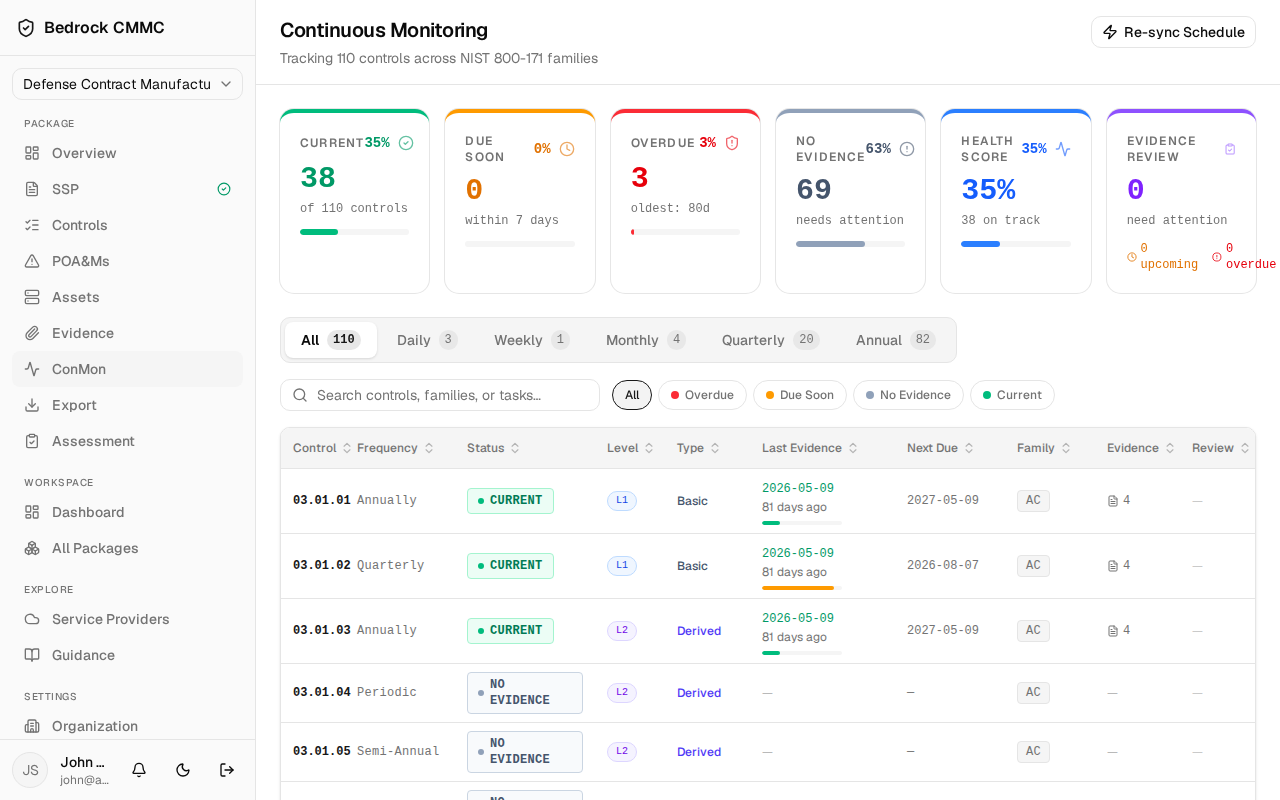
Initializing the schedule
The first time you visit, click Initialize Schedule in the top-right to build a review schedule for the package's controls. After that, the button reads Re-sync Schedule and refreshes the schedule against the current control set.
Reading the page
Six cards across the top summarize monitoring health:
- Current — controls whose evidence reviews are up to date.
- Due Soon — reviews due within 7 days.
- Overdue — reviews past their date (with the oldest age).
- No Evidence — controls with nothing linked yet.
- Health Score — an overall percentage with an "on track" count.
- Evidence Review — artifact reviews needing attention, split into upcoming and overdue.
Below the cards:
- Frequency tabs — All, Daily, Weekly, Monthly, Quarterly, Annual — each showing its control count.
- Search controls, families, or tasks… plus status filter pills: All, Overdue, Due Soon, No Evidence, Current.
- The controls table with Control, Frequency, Status, Level, Type, Last Evidence, Next Due, Family, Evidence, and Review columns.
At the bottom, an Evidence Expiring Soon card appears when artifacts expire within 90 days.
Reviewing a control
Click any row to open the control's review panel (a slide-over sheet):
- The top shows the control's frequency, family, last evidence date, and next due date, plus a status banner explaining what's needed.
- A procedures area lets you record the monitoring check procedure for this control — enter text and save it for next time.
- Linked Evidence lists the artifacts attached to this control. Click Link Evidence (or Manage) to open the picker and search the package's evidence repository; click Review next to an artifact to submit an evidence review without leaving the sheet.
- Footer buttons: View Full Control jumps to the control's detail page; Evidence Repository opens the package's Evidence list.
ConMon health also drives notifications: overdue control reviews and expiring evidence can generate alerts in the notification bell and email digests, depending on your settings under Settings → Notifications.