 foxxcyber/docs
Creating a Package
Start a new Eval package by naming the system and picking a CMMC level.
A package (an "Eval package") holds everything for one system's CMMC effort: its controls, POA&Ms, assets, evidence, SSP, and monitoring schedule.
Steps
- Click New Package — it's in the top-right of both the Dashboard and the Eval Packages list. The New Eval Package form opens.
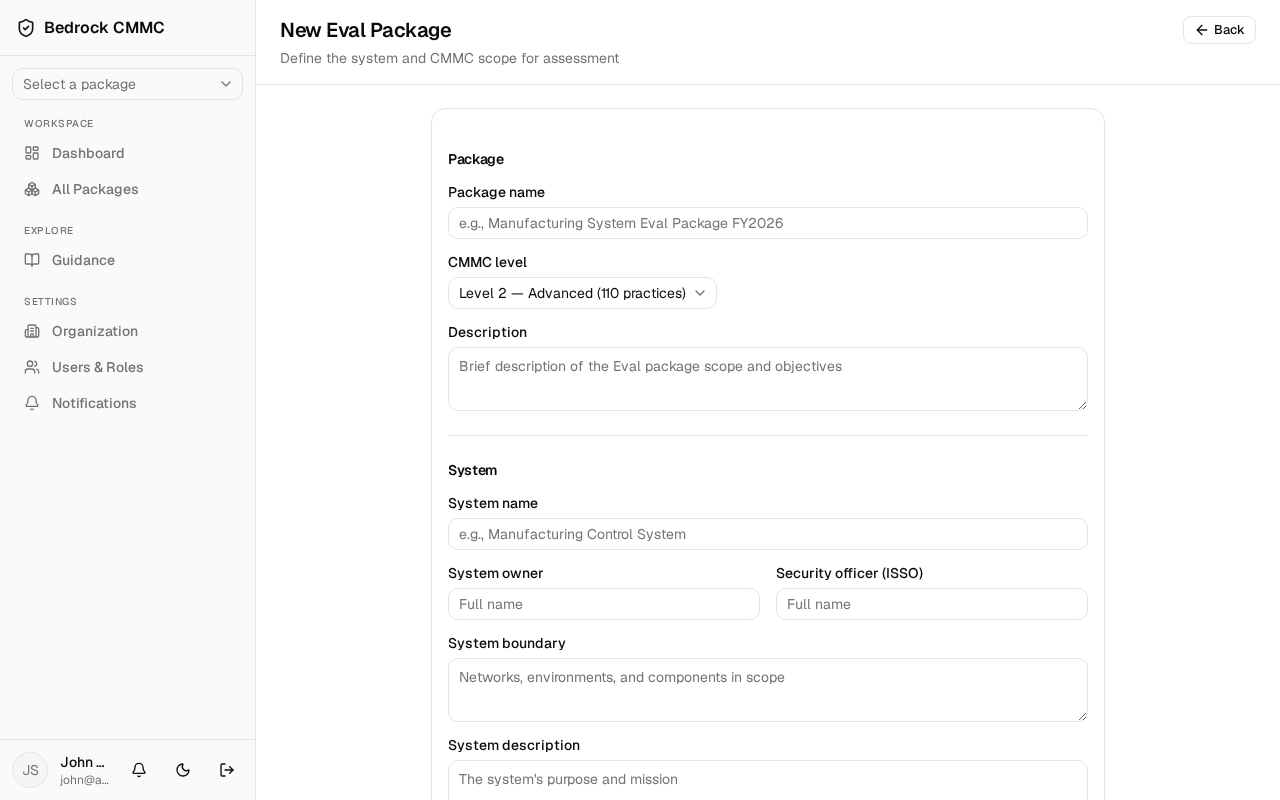
- In the Package section, fill in:
- Package name (required, at least 3 characters) — e.g., "Manufacturing System Eval Package FY2026".
- CMMC level — choose Level 1 — Foundational (17 practices) or Level 2 — Advanced (110 practices). This determines which controls the package tracks.
- Description (optional).
- In the System section, fill in:
- System name (required).
- System owner and Security officer (ISSO) (optional).
- System boundary — networks, environments, and components in scope.
- System description — the system's purpose and mission.
- Click Create package. You land on the new package's Overview page, and the package appears in the sidebar's package selector.
The CMMC level seeds the package's control set when it is created. The other fields can be edited later and also feed the generated System Security Plan.