 foxxcyber/docs
Billing & plans
What you pay for, how the trial works, and where to change a card or cancel.
Praevio bills per avenue — the distinct kinds of coaching you actually run — at $5 per month each.
An avenue is:
- each active team,
- each active class, and
- one flat charge covering personal training, however many clients you have.
A coach with two teams, a class, and eleven clients pays for four avenues. A coach with eleven clients and nothing else pays for one.
The free trial
New accounts start on a 14-day free trial with everything available. The trial converts to a paid subscription unless you cancel, which is why the billing page shows the days remaining while you are on it.
The billing page
Billing in the sidebar opens the summary.
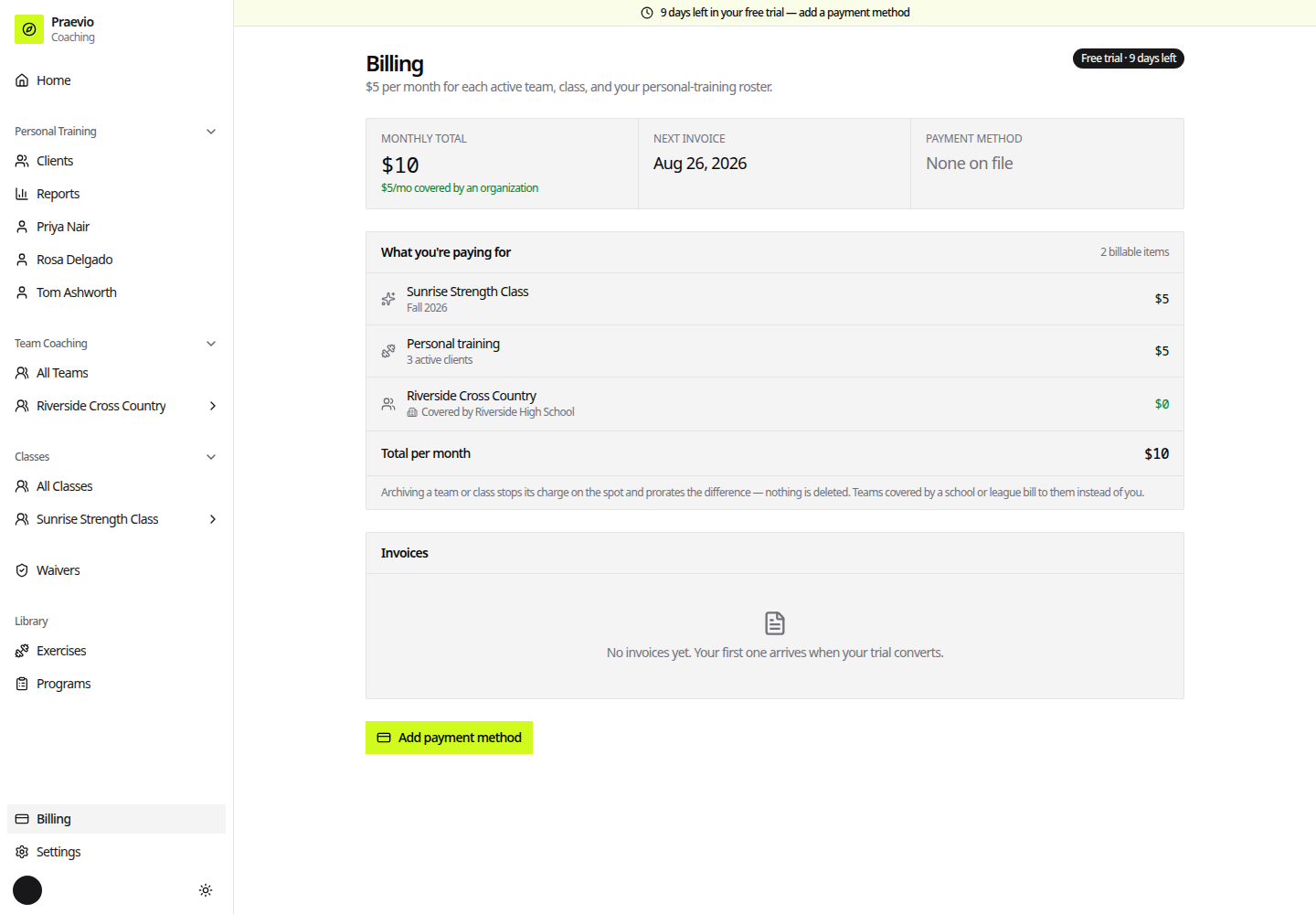
Status — a badge naming where the account stands: Free trial (with days left), Active, Payment issue, Trial ended, Past due, Canceled, or Complimentary. Accounts with complimentary access see a note that no payment is needed.
Monthly total — the charge per month, alongside Next invoice or Access until depending on the status.
What you're paying for — the itemised list, by name, so the total is checkable. Each active team, class, and your personal-training line appear individually. Items an organization has sponsored are listed too, at $0, marked Covered by and the organization's name. See Sponsored seats & shared schedules.
Payment method — the card on file, or None on file.
Invoices — a table of past invoices with date, amount, status, and a PDF download. Before your first conversion it reads No invoices yet. Your first one arrives when your trial converts.
Changing a card or cancelling
- Add payment method appears while no subscription exists and opens checkout. It stays disabled until you have something billable — the page explains Create a team, class, or add a client first.
- Manage billing appears once a subscription exists. It opens the secure payment portal, where you update your card, download past invoices, or cancel.
What changes the bill
The charge follows what is active in your account:
- Archiving a team or class stops its charge. Records stay viewable and can be brought back by unarchiving.
- Marking your last active client inactive stops the personal-training charge. Marking any client inactive while others remain active changes nothing, because personal training is one flat avenue.
The amount charged is always recalculated from what is genuinely active in your account at the time, not from a stored count. Archive a team and the next invoice reflects it.
To create the thing you are paying for, see Creating a team or class.