 foxxcyber/docs
The 6180.49A annual report
Generate, complete, and certify FRA Form 6180.49A from the inspection and test events you have already filed.
FRA Form 6180.49A — the Locomotive Inspection and Repair Record — is not a document you sit down and type once a year. In RailCompliant it is assembled from the inspection and test events you have already filed against the locomotive. Keep the events accurate through the year and the annual report is largely written by the time you open it.
Opening the report
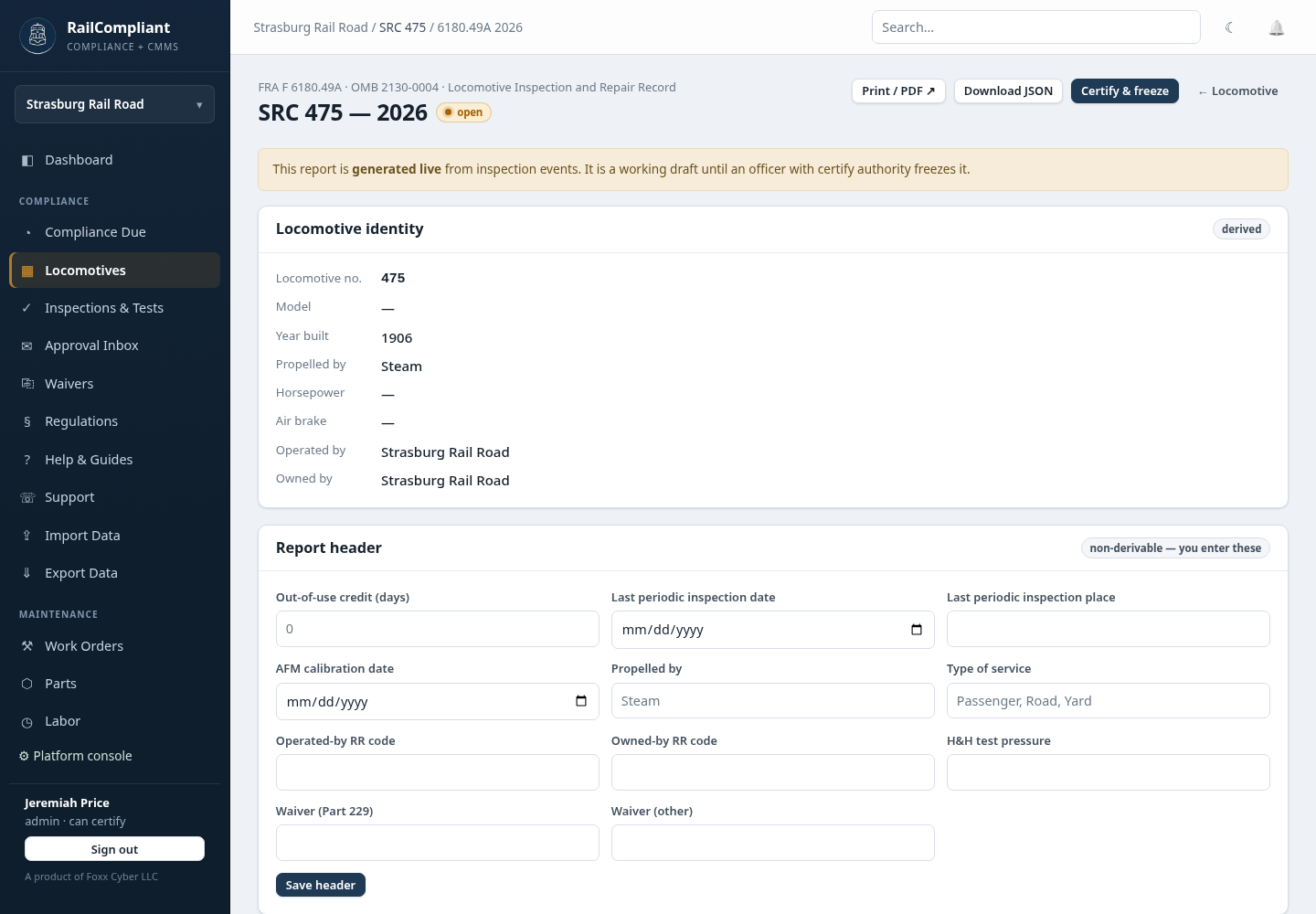
From a locomotive's page, open its 6180.49A for the year you are reporting. The page header shows the locomotive and the report year, a status badge (open until it is certified), and four actions: Print / PDF, Download JSON, Certify & freeze, and ← Locomotive to go back.
A banner states the position plainly: the report is generated live from inspection events, and it is a working draft until an officer with certify authority freezes it.
What the report derives on its own
The Locomotive identity block is marked derived — locomotive number, model, year built, propelled by, horsepower, air brake, and the operated-by and owned-by railroad names come from the locomotive record. Correct them on the locomotive, not here.
The header fields you fill in
The Report header block is marked non-derivable — you enter these. These are the values no event can supply:
- Operated-by RR code and Owned-by RR code — the reporting codes, as distinct from the railroad names shown above.
- Propelled by and Type of service.
- Out-of-use credit (days) — days claimed against the calendar interval under § 229.33.
- Last periodic inspection date and Last periodic inspection place.
- AFM calibration date — the air-flow-method calibration.
- H&H test pressure — the hydrostatic and hammer test pressure.
- Waiver (Part 229) and Waiver (other) — references to any relief the locomotive operates under.
Click Save header to store them. You can revise the header as often as you like while the report is open.
The generated body
Periodic inspections (§ 229.23) lists this year's inspections with date, place, items, the person conducting, and who certified. Tests lists each required test — event recorder, annual tests, hand and park brake, air brakes levels 1 through 3, and hammer and hydrostatic — with its interval, and the date, place, person, and certifying officer, split between this year and the previous occurrence.
If a row reads "—" or the report looks wrong, the fix is almost always a missing or mis-dated inspection event, not the report. Go back to Inspections & tests, correct the event, and reopen the report.
Certifying and freezing
Certify & freeze is available to an officer with certify authority. It takes an exact copy of the report as it stands at that moment and stores it. From then on the page renders that frozen copy rather than re-deriving the report, so later edits to the underlying events cannot change what was certified. Certifying an already-certified report does nothing.
The certification block carries the statutory warning that a false entry on the form is punishable by fine or imprisonment (18 U.S.C. § 1001).
Printing and exporting
Print / PDF opens the print-formatted record for signature and filing. Download JSON exports the report's data — the frozen snapshot if the report is certified, the live assembly if it is not.