 foxxcyber/docs
The compliance dashboard
How RailCompliant works out what is due, and what to do about it.
Compliance Due answers the question the shop asks every morning: what is due, and on what. It computes every tracked obligation for every locomotive from the records you have filed, rather than from a date someone typed into a calendar.
Reading the board
The page opens with three counts — overdue, due soon, and current — and then one row per locomotive and obligation:
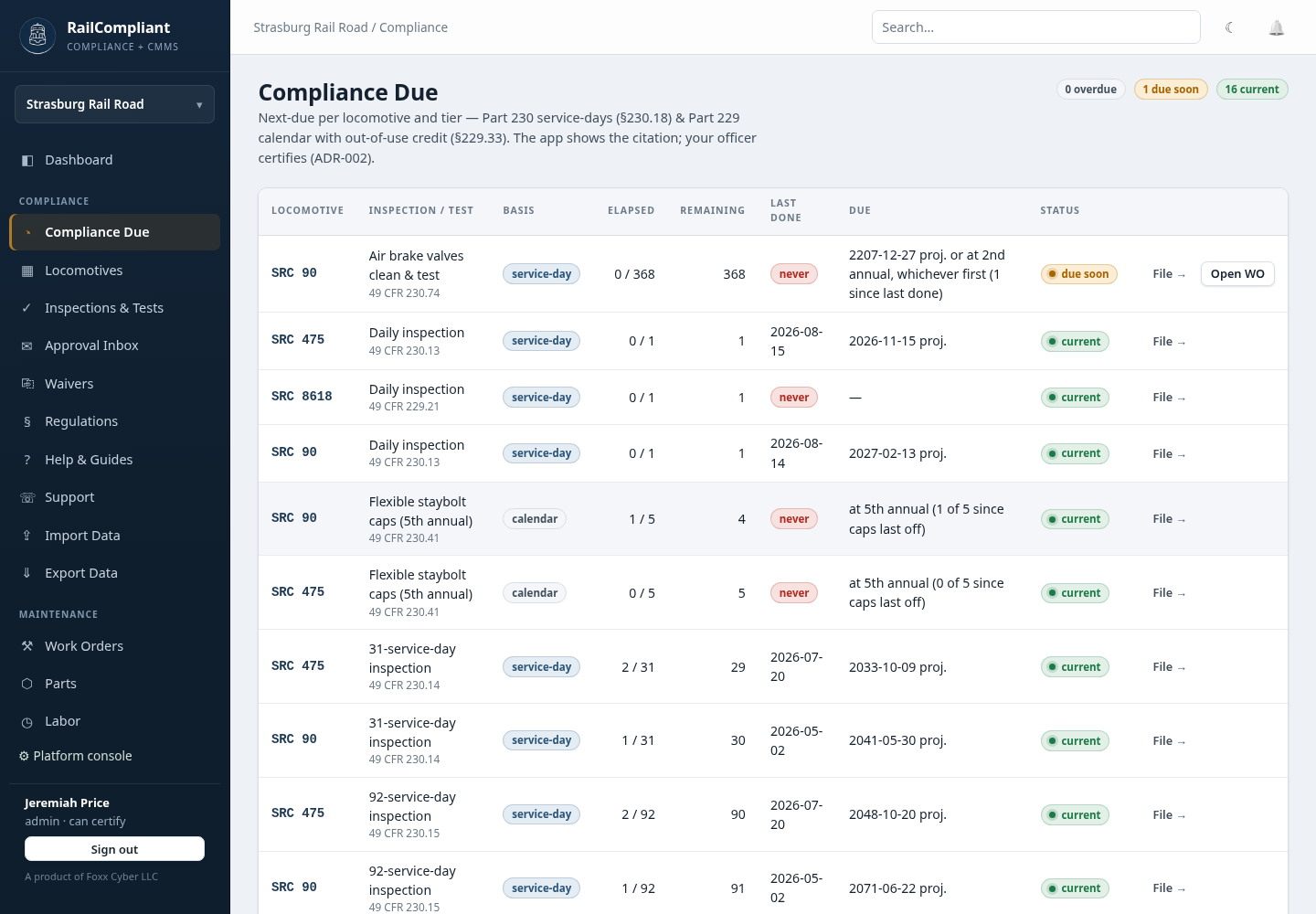
| Column | What it tells you |
|---|---|
| Locomotive | The engine the obligation belongs to |
| Inspection / test | The obligation, with its CFR citation linked |
| Basis | Whether it is counted in service days or calendar days |
| Elapsed | How much of the interval has been used |
| Remaining | What is left before it comes due |
| Last done | The date the obligation was last cleared, or "never" |
| Due | The due date, or the condition that will trigger it |
| Status | current, due soon, or overdue |
The last column holds a File → link that opens a new inspection already pointed at the right locomotive and the right form.
The same table, narrowed to one engine, appears as Interval status on each locomotive's detail page.
The two clocks
Obligations are counted on one of two bases, and the difference matters.
Service days count days the locomotive was actually in service, not days on the calendar. An engine that ran twelve days last year has used twelve service days, whatever the date says. RailCompliant collects service days from three places and deduplicates them per date:
- dates the locomotive appears in an excursion,
- dates with a mileage entry, and
- days logged directly with Log day on the locomotive page.
Filing a daily inspection also records a service day for that date.
Calendar days count wall-clock time regardless of use — the Part 230 annual and the Part 229 obligations work this way.
For service-day obligations the app also projects a likely calendar date from how much the locomotive has been used recently, so you get an estimate of when the interval will run out at your current operating rate as well as the raw count remaining.
The superset rule
Part 230 inspections are a nested hierarchy: daily is contained within the 31-day, which is contained within the 92-day, which is contained within the annual, which is contained within the 1472-day. Each tier includes every item below it.
RailCompliant applies that: completing a higher tier resets the clocks of the tiers beneath it, because the higher inspection necessarily covered them. Filing an annual clears the daily, 31-day, and 92-day clocks at the same time; you do not file four records for one job.
What is tracked
49 CFR Part 230 — steam
- Daily inspection — §230.13, one service day
- 31 service day inspection — §230.14
- 92 service day inspection — §230.15
- Annual inspection — §230.16, within 368 calendar days
- 1472 service day boiler inspection — §230.17, 1472 service days or 15 years, whichever comes first
- Flexible staybolt caps — §230.41, due at every fifth annual since the caps were last removed, and also satisfied by a 1472
- Air brake valves clean and test — §230.74, 368 service days or the second annual, whichever comes first
49 CFR Part 229 — diesel and modern
- Daily inspection — §229.21
- 92-day periodic inspection — §229.23
- Annual inspection — §229.27
Service-day counting for Part 230 follows §230.18, and the Part 229 calendar basis allows out-of-use credit under §229.33.
Turning a due item into work
Two buttons turn the board into shop work:
- Open a work order for a single due item, straight from its row.
- Open work orders for everything overdue in one action.
RailCompliant also opens these automatically as obligations come due, so an interval does not lapse because nobody was watching the board. Each auto-opened work order is tied to the specific obligation it covers, so running the sweep again — or clicking the button yourself — does not create a second work order for the same thing.
Completing the work order is not the same as clearing the obligation. The clock resets when the inspection record is filed, so finish the job by filing the inspection — see Recording inspections & tests.
Completing a Part 230 inspection also creates the FRA filing deadlines that follow from it; those are tracked separately on FRA filings. To read the underlying rule for any row, follow its citation into the regulations library.