 foxxcyber/docs
Rolling stock
Track coaches, cabooses, and freight equipment alongside the locomotive fleet, with their own record pages, runs, and photos.
Rolling Stock holds the cars and non-powered equipment your railroad owns — coaches, cabooses, flats, boxcars, gondolas, tank cars, and open-air cars. It sits under Operations in the sidebar.
The list
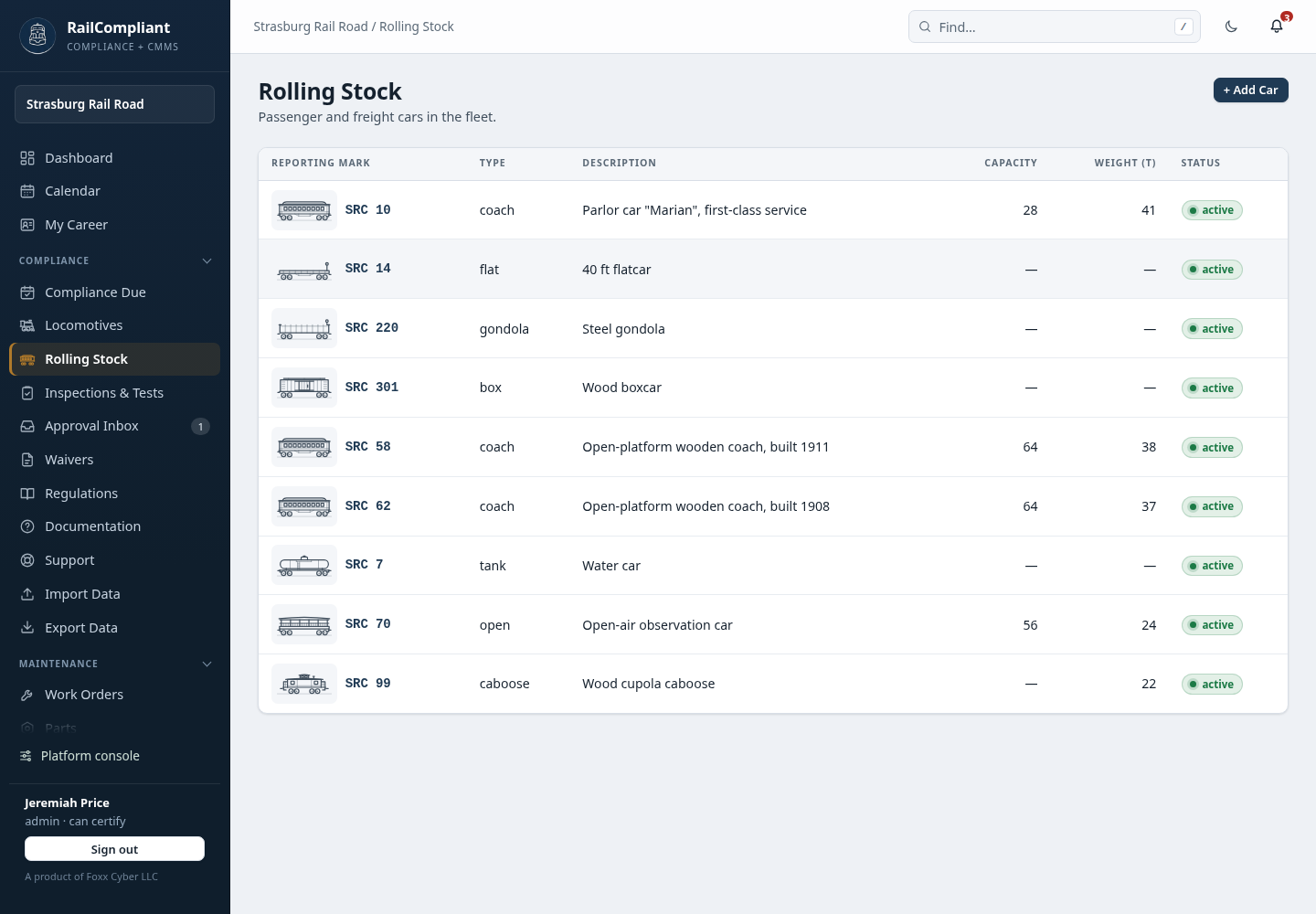
The list shows Reporting mark, Type, Description, Capacity, Weight (t), and Status. Click a row to open the car, or click + Add Car to create one.
Each row starts with a small picture of the car: its cover photo if it has one, and otherwise a drawing of its type, so a caboose looks like a caboose and a tank car like a tank car.
Adding a car
The form is short:
- Reporting mark — the car's mark and number.
- Car type — coach, caboose, flat, box, gondola, tank, open, or other.
- Description — what it is in plain words, for example "Heritage open-window coach".
- Capacity — seats.
- Weight — the car's light weight in short tons. Fill it in: it is what the app uses to work out the trailing tonnage of every run the car is in. See Excursions.
- Status — active or inactive. Only active cars can be added to a run's consist, so a car out of service drops off the pickers without being deleted.
- Notes — anything else worth recording.
Click Create car to save.
The car's record page
A car's page is laid out like a locomotive's: the reporting mark, type, and status across the top with Edit and Delete, tabs for the record, and a panel on the right. Its Procedures tab lists the pages of every shop procedures book that is for the car.
Overview — the car's details (reporting mark, type, description, capacity, weight, status, notes), with maintenance cost to date and the car-miles it has run.
Maintenance — every work order aimed at this car, with priority, status, and cost, and + New work order to raise another; then Parts used on the car. Maintenance cost to date is paid labor plus parts across all of the car's work orders, the same rule as a locomotive's.
Runs — every excursion the car was part of, with the date, kind, status, trips, and miles. Car-miles are counted the same way as a locomotive's miles: miles per trip multiplied by trips, and only for runs that actually ran. A cancelled run, or a planned run dated in the future, is listed but marked not counted.
Photos — the same gallery as a locomotive: upload JPEG, PNG, or GIF photos several at a time, sort by when they were added or when they were taken, and choose the cover. See Photos and public restoration pages.
History — the permanent audit ledger of changes to the record.
The panel on the right shows the cover photo (or, until there is one, a drawing of the car's type with an Add a photo link), a status note — out of service, open work orders, or in service since its last run — the key figures (type, capacity, weight, runs, car-miles, maintenance cost), and quick actions for New work order, Add photos, and Runs.
Where rolling stock is used
Two places elsewhere in the app refer to these records:
- Excursion consists. When you build a train for a run you assign locomotives and cars to it, so the consist for any given day is part of the record, and each car's weight feeds the run's tonnage. See Excursions.
- Work orders. A work order can be aimed at a locomotive, at a car, or at neither for general shop work. See Work orders.
FRA locomotive inspection obligations do not apply to rolling stock, so cars do not appear on the Compliance Due board and have no inspection intervals, forms, or filings. Keep them here for maintenance history, cost, runs, and consist records.