 foxxcyber/docs
Crew & qualifications
Keep a roster of everyone who works on the equipment, and record who is designated to do what.
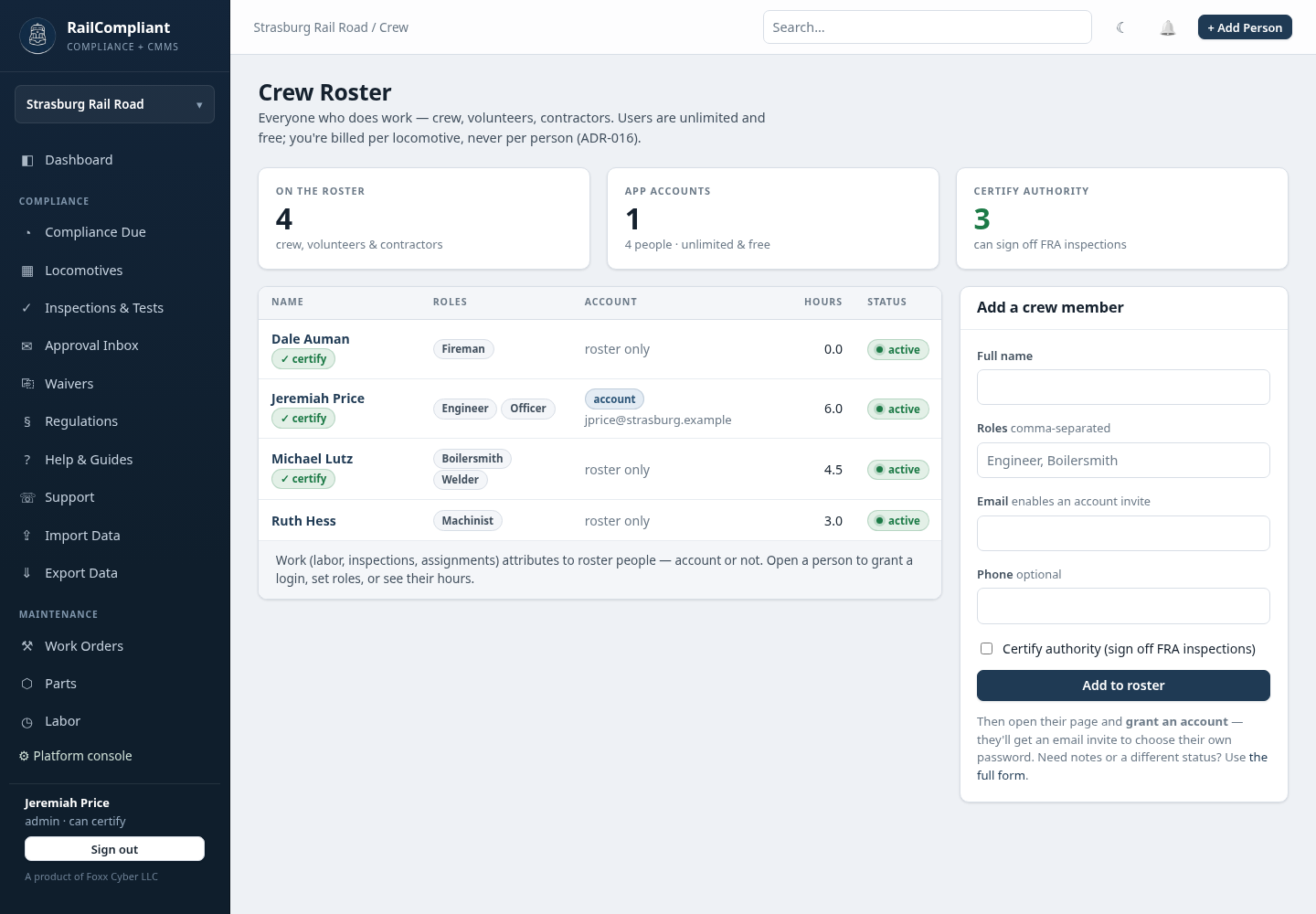
Click Crew in the sidebar. The roster is everyone who does work — paid staff, volunteers, and contractors — whether or not they ever sign in. An app account is a separate thing layered on top, and most of a railroad's roster will never need one.
This separation matters because work attributes to roster people. A volunteer who spent forty hours on a firebox needs to appear in the labor history and the grant report; they do not need a password.
Adding a person
Click Add Person for the short form: Full name, Roles
(comma-separated, such as Engineer, Boilersmith), Email, Phone,
and a Certify authority checkbox. Click Add to roster.
Open the person and click Edit for the rest:
- Status — Active or Inactive. Former crew stay on the roster; their history has to remain answerable.
- Can certify — the marker showing this person holds officer authority to sign off inspections.
- Default labor kind — volunteer, paid, or contractor. This is what labor entries pre-fill with, so you rarely have to think about it when logging hours.
- Skilled rate — an hourly dollar figure used to value this person's volunteer time. Leave it blank to fall back to the national Independent Sector rate.
- Rate basis — the documentation behind that rate, for example "BLS boilermaker median 2026". Federal grant rules (2 CFR 200.306) expect a stated basis, not a number someone picked.
- Notes.
The roster page
The list shows each person's roles, whether they hold an app account, their total hours logged, and their status. Three counters across the top summarize the roster: how many people are on it, how many have accounts, and how many hold certify authority.
Open a person for their detail page: contact details, total hours and cost, and a full labor history with every entry linking back to the work order, inspection, or excursion it came from. A Record history panel at the bottom shows every change made to their record.
Qualifications and designations
RailCompliant does not issue certifications. What it records is the shape the regulations actually use: a designation, the evidence behind it, and an expiry. Section 229.21 requires that daily inspections be done by a designated qualified person — the designation record is the compliance evidence.
Grant one from the Qualifications & designations panel on a person's page:
- Qualification — pick a type. The seeded list follows FRA vocabulary: Designated daily inspector (49 CFR 229.21 / 230.13), Competent 31/92-SD inspector (230.14–.15), Periodic inspection supervisor (229.23(e)), Brake inspector (232.711), Locomotive engineer (Part 240), Conductor (Part 242), and First aid / CPR. Your railroad can add its own types.
- Granted — the date the designation was made.
- Expires — leave blank to use the type's default validity period.
- Granted by — the person who made the designation.
- Basis — the evidence line, in your own words. "OJT with J. Smith, 40 hrs" is the shape to aim for.
Click Grant / renew.
Renewing never deletes. The previous designation flips to expired and a new row is added, so the question an inspector actually asks — "was this person designated on the day they signed this?" — always has an answer. Records for former crew persist for the same reason.
Click Wallet card for a printable card of a person's active designations, sized to carry.
As designations approach expiry, RailCompliant emails administrators a digest and raises an alert once one is close to lapsing or has lapsed. Both are configurable — see Notifications.
Giving someone a login
The App account panel on a person's page is where an administrator grants access: an email address, a role, and optionally certifying authority. The person receives a link to choose their own password — nobody shares credentials. Certifying authority granted here is what the approval chain checks when routing an inspection for signature.
Full detail is in Users & access.