 foxxcyber/docs
Locomotives
Add locomotives, read the detail page, and log service days, fuel, and mileage.
The Locomotives page is your fleet roster and the anchor for everything else in RailCompliant. Inspections, work orders, fuel, mileage, the Form 4 card, and the annual report all hang off a locomotive record.
The roster
The list is headed Locomotive Roster and shows one row per engine: Reporting mark, Type, Description, Pressure / HP (MAWP in psi for steam, horsepower for diesel), and Built. Click any row to open it. + Add Locomotive sits at the top right.
Adding a locomotive
One record type covers every kind of motive power. Steam-only fields sit alongside diesel-only fields and you fill in whichever apply.
- Reporting initials and Number — together these make the reporting mark shown everywhere else.
- Type — Steam, Diesel-electric, or Electric.
- Year built, Description, and Builder — the description is the line that identifies the engine at a glance, for example "4-8-0 Mastodon".
- Boiler No. and MAWP in psi — steam only. MAWP is normally set by certifying the Form 4 boiler specification rather than typed here.
- Model, Horsepower, and Air brake — diesel and electric.
- Fuel type (coal, oil, diesel), Fuel capacity, Fuel unit, and Water capacity in gallons for steam. These are what the app uses to work out consumption per mile and estimated range.
The compliance baseline
Two fields at the bottom of the form matter enormously for a fleet coming onto the app mid-life, and are easy to skip:
- Service days since last boiler inspection — the 1472-day count carried over from your existing records.
- Last 1472 / boiler inspection date — preferred if you know it.
Without these the interval engine assumes the engine has never been inspected and starts every clock at zero, which will make a locomotive that is perfectly current look as though it has decades of margin left. Fill them in from your existing paperwork when you create the record.
Click Create locomotive to save. The record and its first history entry are written together.
The detail page
The header shows the reporting mark, type, description, year, and builder, with Edit, Delete, and a link back to the roster. Tabs run across the top — Overview, Compliance, Maintenance, Fuel & service, Photos, and History — and a summary panel on the side repeats the key facts with quick links to File inspection, New work order, 6180.49A, and Log fuel / service day.
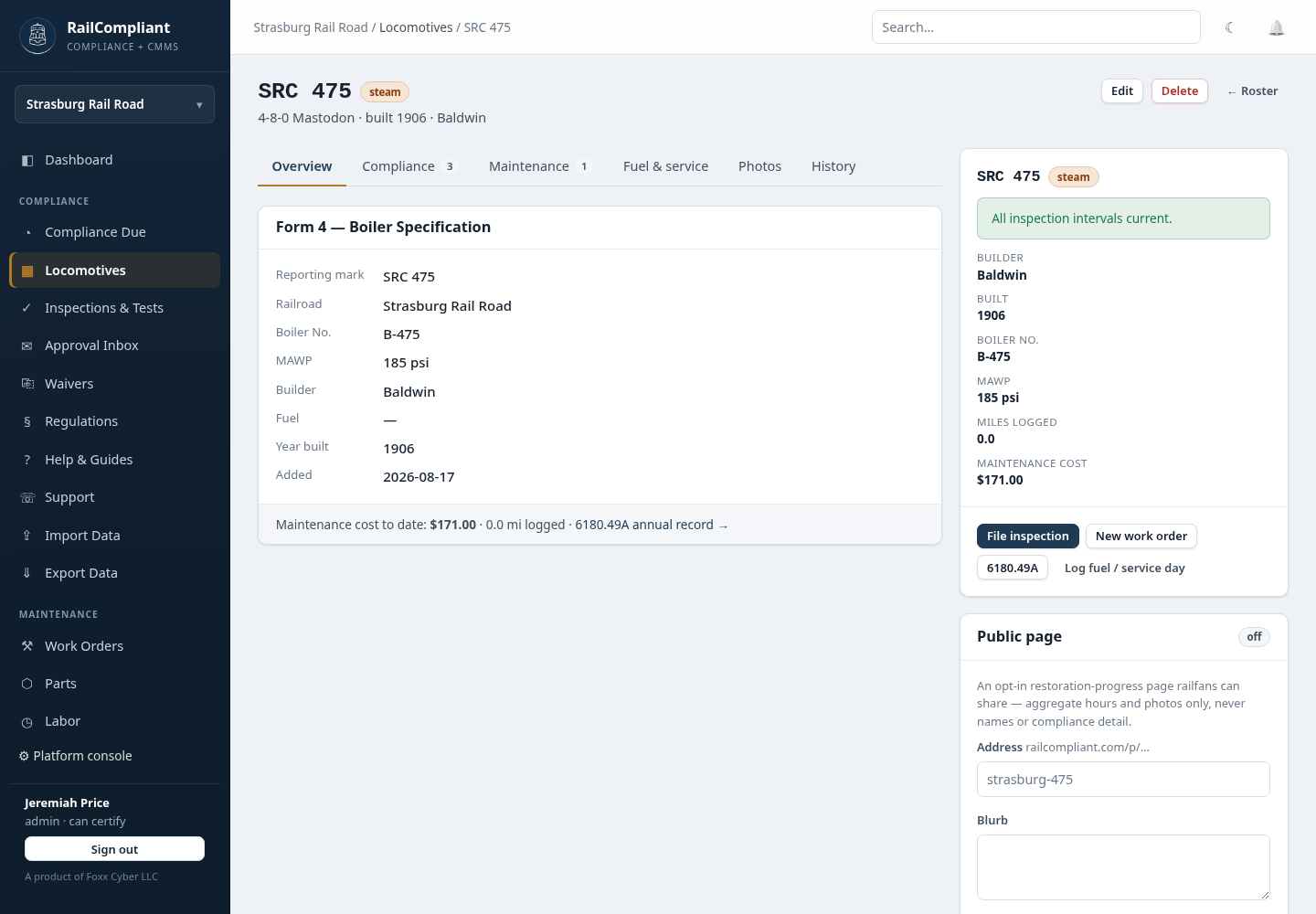
Overview carries the Form 4 identity block: reporting mark, railroad, boiler number, MAWP, builder, fuel, year built, and when the record was added, plus maintenance cost to date and miles logged.
Interval status is the locomotive's own due schedule. Each row is an obligation with its Citation, Last done, Due, and Status — current, due soon, or overdue — and a link that takes you straight to filing the inspection that clears it. It is the same calculation as the fleet-wide compliance dashboard, narrowed to one engine.
Inspections & tests lists what has been filed against this locomotive with + New inspection, and links out to the audit binder, Form 4, Form 5, and the 6180.49A annual record.
Work orders lists open and closed jobs with priority, status, and cost, followed by Parts used via work orders and the running maintenance cost — labor plus parts across every work order for this engine. See Work orders.
Fuel, water & mileage shows total miles broken into run miles and manual miles, then a table of consumables with quantity added, cost, consumption per mile, cost per mile, and estimated range from the capacity you entered.
Photos is the gallery, and Record history is the permanent audit ledger for the record — action, when, by whom. See Photos and public restoration pages.
Logging service days, fuel, and mileage
Three small forms live under Fuel & service, and they are what keep the compliance clocks honest.
- Log day records a service day — the engine was in service but no run was logged. Service days are what most Part 230 intervals count.
- Add under the fuel form records a fill: Category (fuel or water), Kind (coal, oil, diesel, water), Qty, Unit, an optional From store to draw the quantity out of a consumable store, and $/unit. Picking a store defaults the unit cost from that stock and decrements it.
- Add miles records manual mileage with a date, for running that did not come from a logged excursion.
Service days are deduplicated per date across excursions, mileage entries, and days you log here, so recording the same day twice does not double-count. See Fuel and mileage.
Editing and deleting
Edit reopens the same fields; the change is recorded in the history with what it was before and after. Delete removes the locomotive permanently. Deleting is refused where the record is still in use, and because deletion also removes the anchor for that engine's inspections, prefer editing over deleting for anything with history behind it.
Active waivers and special approvals covering the locomotive are shown on the detail page so relief is visible next to the obligation it applies to.