 foxxcyber/docs
Requirements and ConMon items
Set the rules program offices must meet: how often to scan, how fast to fix, how long an ATO may run, which compliance methods count, and the recurring ConMon items.
An Authorizing Official (AO) owns the risk. The way an AO shapes the risk is by setting requirements: rules that flow down the organization to every program office. This guide is for the AO, and the DAO and AODR can do the same steps. The component's CIO/SISO can set requirements for the component.
Four ideas make requirements easy to reason about:
- They inherit down the tree. A value set on a component applies to every authorizing area and program office below it, unless a lower level tightens it.
- A lower level can only tighten. Smaller is stricter for every number of days or months, "required" is stricter than not, accepted methods can only narrow, required artifacts only accumulate. If you try to loosen something, the page tells you which unit set the limit, for example Must be 30 days or fewer: AFRL AO requires 30.
- Each package sees the effective rule. That is the strictest value on the way down, with the unit that set it named beside it.
- A change shows at once. Standing is recalculated on every view, so a new requirement is reflected immediately in every package below.
Open the requirements
Step 1. Use the unit switcher to choose your authorizing area (or the component).
Step 2. Choose Requirements in the sidebar.
- You see: four tabs, each with a count of values set at this unit: Compliance, Vulnerabilities, ConMon items and Authorization. Each setting shows its effective value and a pill: Set here, or Inherited from the unit that set it.
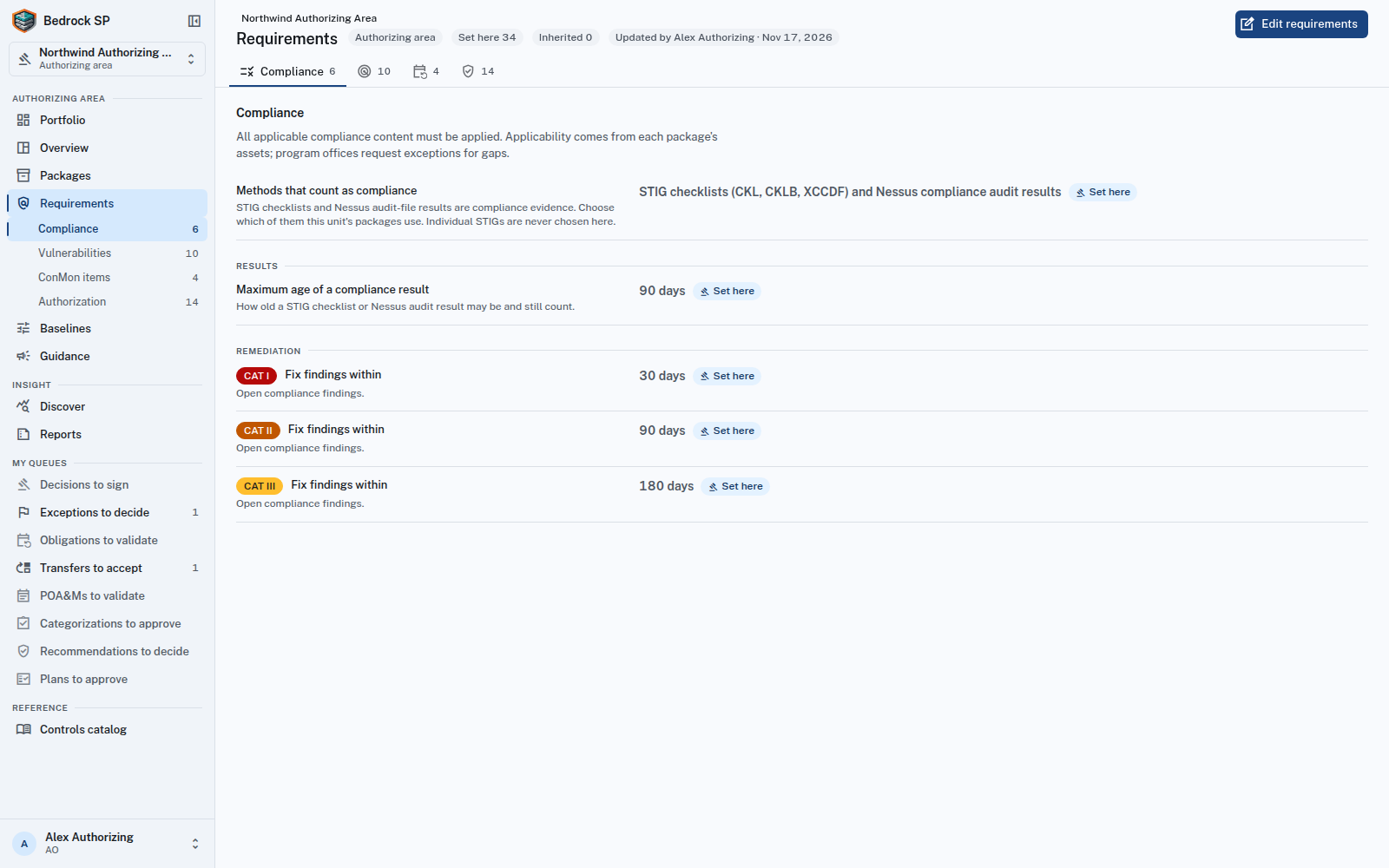
Step 3. Choose Edit requirements.
- You see: an Editing pill, the values become editable, and a bar at the bottom counts your changes. A value you set has Use inherited beside it to drop your override.
Compliance
Compliance means STIG checklists and Nessus audit-file results.
| Setting | What it does |
|---|---|
| Methods that count as compliance | Which of STIG checklists and Nessus audit results the packages may use. You choose the methods, never individual STIGs: Bedrock SP always applies all the content that applies. |
| Maximum age of a compliance result | How old a checklist or audit result may be and still count. |
| Fix findings within (CAT I, CAT II, CAT III) | How many days an open compliance finding may stay open, by severity. |
Vulnerabilities
Vulnerabilities means Nessus (ACAS/Tenable) vulnerability scans.
| Setting | What it does |
|---|---|
| Scan at least every | How often assets must be scanned. |
| Maximum age of a scan result | How old a scan may be and still count. |
| Credentialed scans | Scans must authenticate to the asset. |
| Fix Critical, High, Medium, Low findings within | Days from first detection. |
| Acknowledge an IAVM within | Days from the notice's release. |
| IAVM compliance date | Comply by the due date on each IAVM notice. |
| CTO compliance date | Comply by the suspense date on each Cyber Tasking Order. |
ConMon items
ConMon (continuous monitoring) is the list of recurring duties that keep an authorization standing, such as a daily log review. You write the list. The program office decides how it carries each one out.
Step 1. Open the ConMon items tab and choose Add item.
- You do: give it a Title and Description, a Category (Assessment, Scan, Review, Test, Report or Other), how often it recurs in Every (days), and the Evidence the program office provides.
- You see: a row in the list with the Item, Category, Frequency, Evidence and Set at (the unit that added it).
Step 2. An item set by a unit above yours is shown with Shorten frequency. You may only make it more frequent. Use inherited frequency goes back.
Each item becomes a recurring obligation on every package below. The program office submits evidence, and the SCA validates it. See Obligations evidence.
Authorization
| Setting | What it does |
|---|---|
| Longest ATO and Longest IATT | The longest an authorization may run, in months or days. A decision is checked against these when it is saved. |
| Assess at least every | How old the last completed security assessment may be, 1 to 120 months. |
| Open a POA&M for a CAT I, II or III finding within | Days from the day an assessment finding is recorded. If nothing is set the defaults are 30, 60 and 90. |
| Artifacts every package carries | Documents every package must hold: for example the System Security Plan, Security Assessment Plan and Contingency Plan. They only accumulate down the tree. |
| Baseline by categorization | For Low, Moderate and High systems, which baseline applies. See Baselines. |
Save
Step 1. Choose Save requirements.
- You see: the page returns to its read view. If a value breaks the tighten-only rule, the message names the unit above you that set the limit, and nothing is saved. Reload fetches the latest if someone saved at the same time. Discard throws your changes away.
Where the rules show up
Every setting turns into a check on each package's Standing page, and the page says which requirement drove the check. See Standing checks.