 foxxcyber/docs
How the pieces connect
One page, one diagram: how the AO's rules flow down to program offices, how assessors sit between, and how standing flows back up.
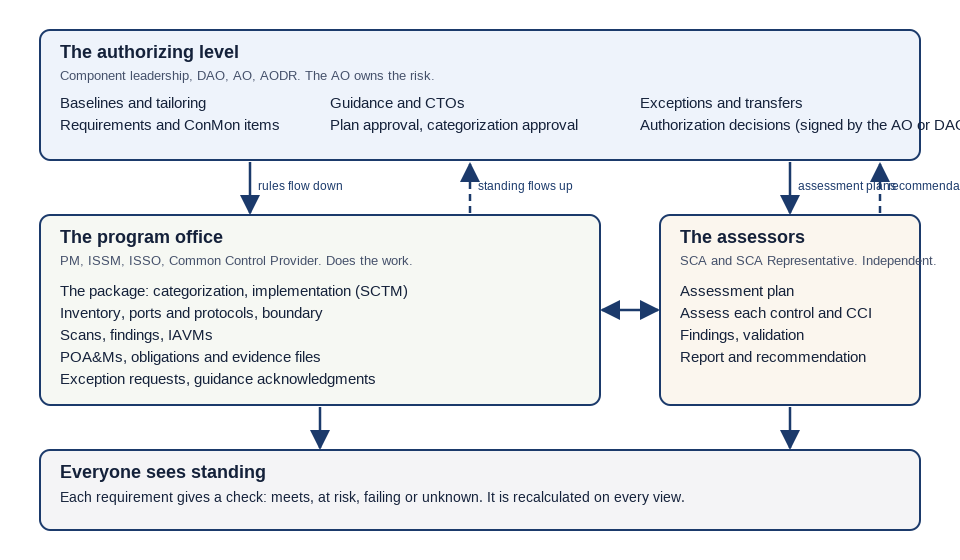
Read the diagram from the top.
1. Rules flow down
The authorizing level sets the rules once, and they apply to everything below:
- Baselines say which controls a system must carry for each impact level. An AO tailors a NIST baseline, publishes it as a numbered version and names it in the requirements.
- Requirements say how current things must be: how often to scan, how long a finding may stay open, how long an ATO may last, which compliance methods count, which artifacts every package carries, which ConMon items are due and how often.
- Guidance and CTOs are orders and directives to a unit or one package.
Rules follow the organization tree: component, then authorizing area, then program office. A level may only make a rule stricter, never looser. The effective rule for a program office is the strictest value on the way down, and the page says which unit set it.
2. The program office does the work
Each system has a package. The program office keeps it: it categorizes the system, documents how each control is implemented, lists the hardware, software, ports and connections, uploads scans and evidence, writes POA&Ms and answers the obligations that come due. Scans fill in a lot of this automatically; see Scans and tokens.
3. The assessor is in the middle
Each package is assigned an assessor organization. Its SCA writes an assessment plan that the AO or AODR approves, then assesses every CCI of the controls in scope and records what they find. A finding that is not compliant becomes a POA&M the program office must open. The SCA also validates the evidence the program office submits for obligations and POA&Ms, and finishes with a report and a recommendation to the AO.
4. Standing flows back up
Every requirement turns into a check on each package: Meets, At risk, Failing or Unknown. Standing is never stored. It is worked out each time someone looks, from the package's current data and its program office's effective requirements. So the AO's Portfolio page, a unit's Overview and a package's Standing page can never disagree.
5. The AO decides
The AO (or DAO) signs the authorization decision: ATO, ATO with conditions, IATT or DATO, with a termination date. Conditions become obligations. The AODR prepares the decision, but only the AO or DAO signs. Exceptions, transfers and the SCA's recommendations all end in an AO decision with a typed signature.
6. It never stops
After a decision, the package is in Monitor. Obligations recur, scans keep arriving, and standing keeps changing. The Portfolio shows what changed "since you last looked", and the Briefing prints the picture for a meeting.
Find your guide
Executive and DAO: Executive and DAO. AO: Authorizing Official. AODR: AODR. SCA: SCA. PM, ISSM, ISSO: Program office.