 foxxcyber/docs
Findings, POA&Ms and obligations
Answer what the assessment found with a POA&M, finish POA&Ms with evidence, and submit evidence for each obligation that comes due.
Three kinds of work come to a program office. Each ends with evidence that the assigned SCA team validates.
Assessment findings
When the SCA marks a CCI non-compliant, a finding opens and you get an obligation: Open a POA&M: AC-2 CCI-000015 (CAT II). It is due a number of days after the finding, set by the AO's requirements (30, 60 and 90 days for CAT I, II and III unless the AO set shorter). See Findings for the SCA's side.
On a native package a draft POA&M is already created for the finding. Open it from the POA&Ms page, fill it in and Start it. That completes the obligation.
POA&Ms
A POA&M (Plan of Action and Milestones) is the plan to fix a weakness: what is wrong, what reduces the risk meanwhile, who owns it, the milestones and the date.
Step 1. Open POA&Ms. To make one yourself choose New POA&M.
- You see: a table of Number, Title, CAT, Control, Source, Scheduled, Milestones, Residual risk and Status.
- New POA&M asks for a Title, the Weakness, the Source and the Severity (CAT I, II or III), and creates a Draft.
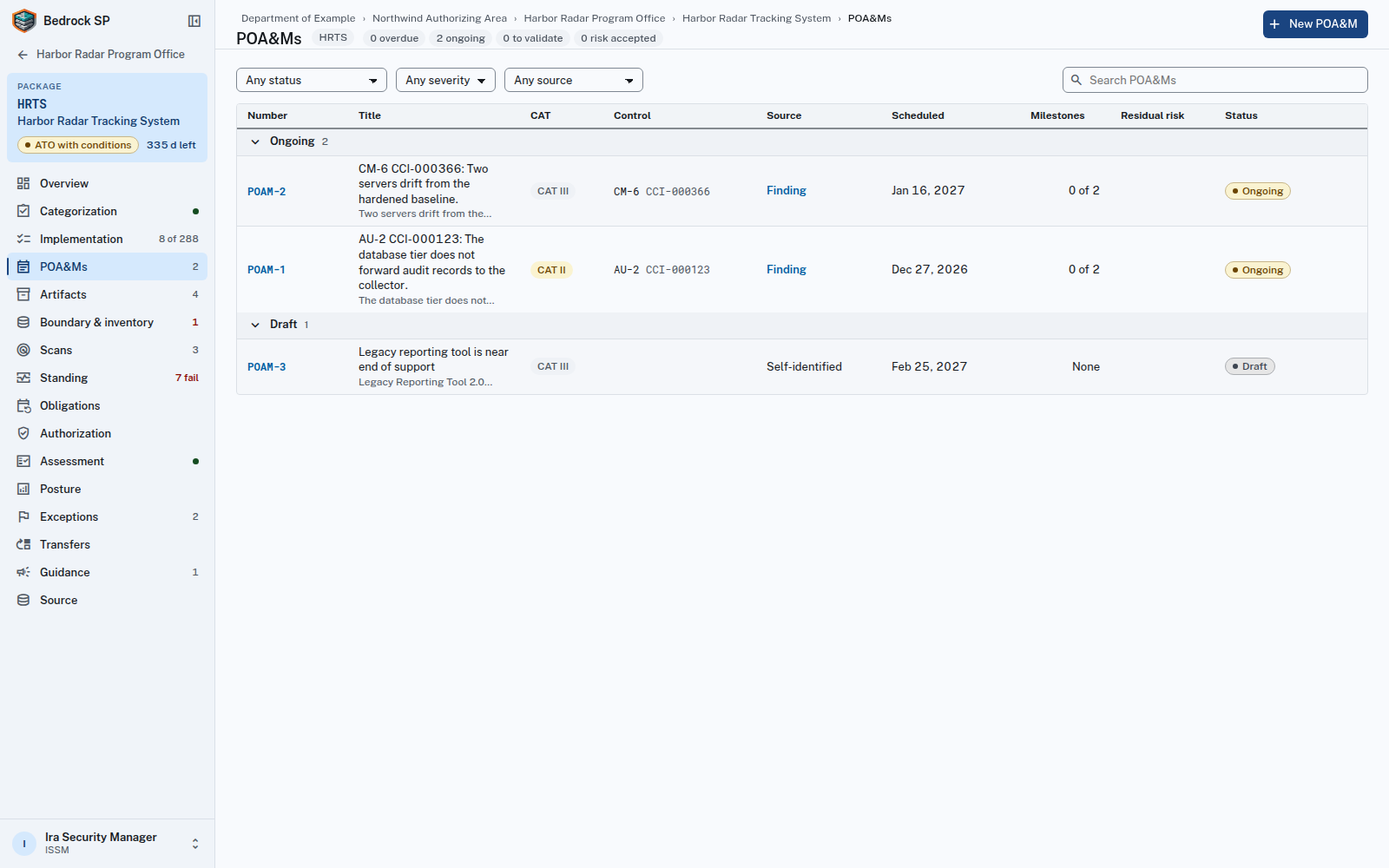
Step 2. Open the draft and choose Edit. Fill in the Weakness, Mitigations, Resources, Point of contact and Scheduled completion. Choose Add a milestone for each step, with its due date.
Step 3. Choose Start.
- You see: the status becomes Ongoing. Starting needs a schedule and at least one milestone.
Step 4. As each milestone is done, choose Complete on it.
Step 5. When every milestone is complete, choose Submit completion. Describe what you did and attach evidence.
- You see: the status becomes Completion submitted. The SCA sees it in POA&Ms to validate. They Validate it (it becomes Completed) or Return it with a note (it becomes Returned, and you fix and resubmit).
If an ongoing POA&M cannot be finished before its date, the AO or DAO can Accept risk on it, with a signature, a rationale and an end date no later than the package's authorization. It then shows Risk accepted. When the end date passes it returns to Ongoing.
A POA&M past its scheduled completion date makes the standing check Overdue POA&Ms fail.
Obligations
An obligation is something you owe with a due date. The sources are:
- ConMon items the AO requires, which recur. For example a daily log review.
- Conditions of your current ATO.
- Guidance the AO asked you to acknowledge (see the next page).
- CTOs you must comply with.
- Findings that need a POA&M.
Step 1. Choose Obligations in the package sidebar, or Obligations due in My queues.
- You see: the items in groups: Overdue, Returned, Due ≤ 14 d, Awaiting validation, Upcoming and Validated (30 d). Each row shows the Obligation, its Source (ConMon · unit, ATO condition, Guidance · title, CTO number, Finding · …), the Cadence, Due and State.
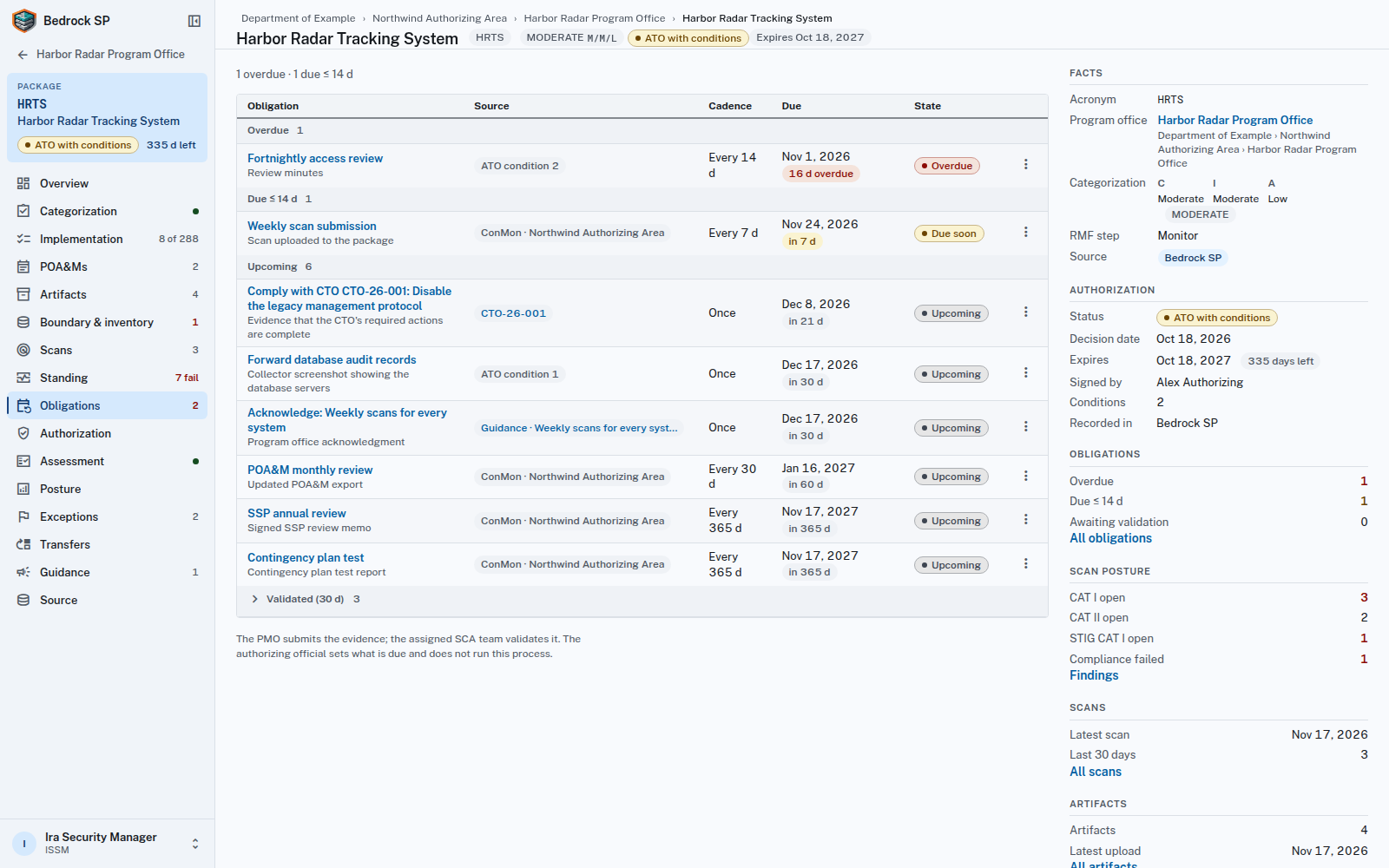
Step 2. Open the row menu and choose Submit evidence (Resubmit evidence if it was returned).
- You see: the obligation's facts and the form: What you did, Link to the evidence (optional) (a web address), and Attach files (optional). You can pick files already stored with the package or upload new ones.
Step 3. Choose Submit.
- You see: the state becomes Awaiting validation. The SCA validates it or returns it with a note. When it is validated and the obligation recurs, the next one is due the same interval after the validation.
You can never validate your own submission. If your package has no SCA team, the AODR, DAO or AO validates.
What turns a check red
An obligation that is overdue fails the matching standing check. One that is due within 14 days, or has waited more than 14 days for validation, warns.