 foxxcyber/docs
Legacy connector and cutover
Bring packages in from the legacy PMO app by live sync or a bundle file, map each legacy office to a program office, and later cut everything over to native records.
Bedrock SP can take packages from the legacy PMO app in two stages. First the connector copies them in and keeps them current, read-only. Later the one-time cutover turns them into native packages and retires the legacy app.
Map and sync
Step 1. Choose Connectors.
- You see: Legacy PMO backend, with Live sync (it says Not configured on this server when no legacy system is set up), Import a legacy bundle, Last sync, PMO mapping and Sync runs.
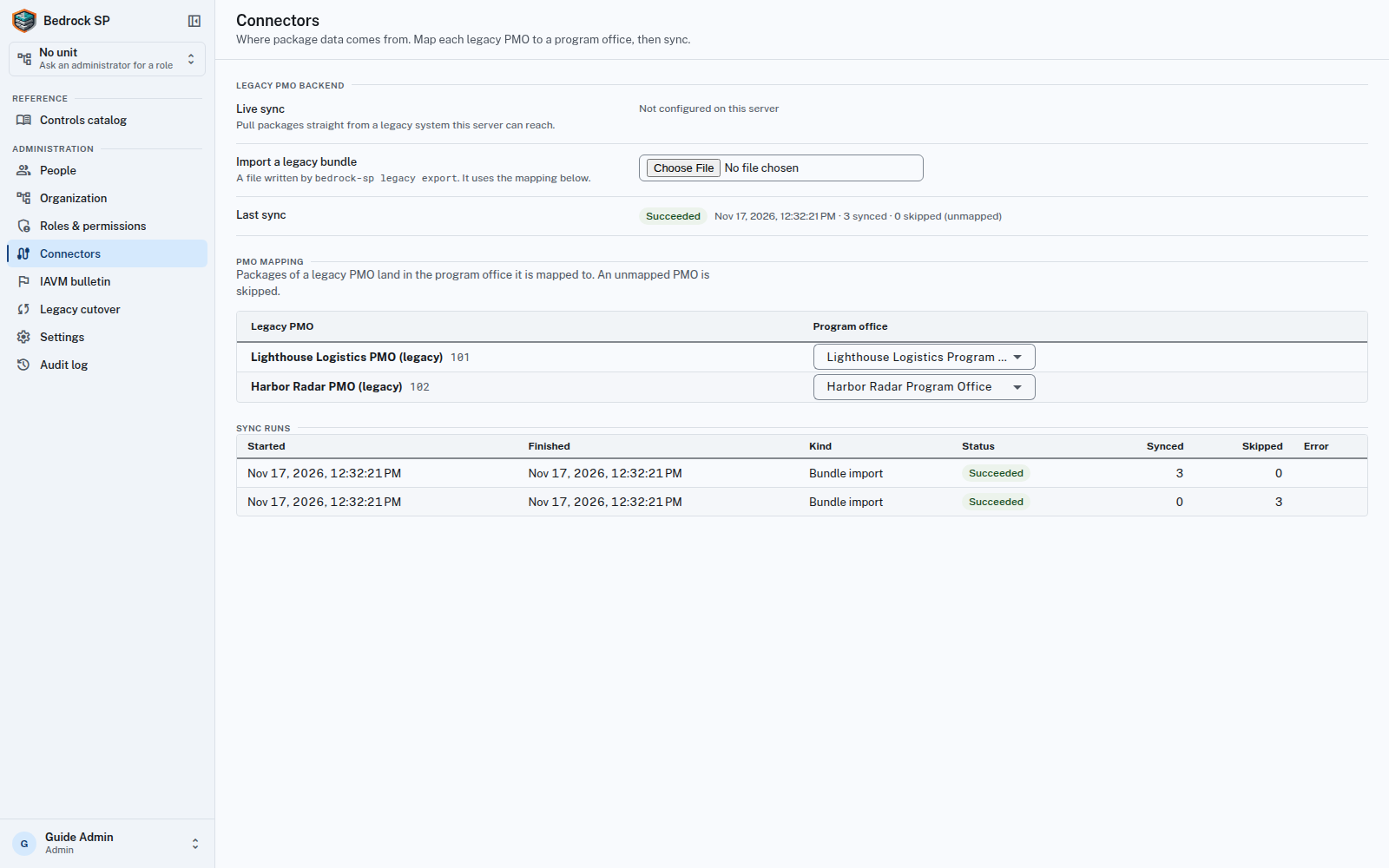
Step 2. Under PMO mapping, choose a Program office for each Legacy PMO. Choose Save mappings. A legacy office with no mapping is skipped and counted.
Step 3. Bring the data in:
- Live sync: choose Sync now. One run at a time. It reads the PMOs and their packages, POA&Ms, systems, STIG findings and the latest Nessus report of each system.
- Import a legacy bundle: when the legacy app cannot be reached, someone exports a bundle
file with the
bedrock-sp legacy exportcommand. Choose the file here. New legacy offices arrive unmapped, and the answer lists them. Map them and import again.
Step 4. Sync runs lists each run with its Started, Finished, Kind (live or bundle), Status, how many packages were Synced and Skipped, and any Error. A failed run leaves the data as it was. Importing the same bundle again changes nothing.
Packages from the connector are legacy: read-only in Bedrock SP, shown with Managed in the legacy app until cutover. The one exception: hosts that scans find are added to a legacy package's hardware so they can be reviewed.
The cutover
The Legacy cutover page moves every legacy package into Bedrock SP, with its controls, POA&Ms, documents, test plans, inventory and history. It is one-way. Afterwards the legacy app is retired, and syncing or importing from it stops.
Switched off until you turn it on
The cutover is switched off on the server by a setting until scan ingest is live for your installation, because scan posture is not carried over: a cut-over package's vulnerability and compliance checks read from scans uploaded to Bedrock SP. The dry run always works, so you can rehearse. The page shows Switched off while the cutover is not enabled.
Step 1. Choose Legacy cutover.
- You see: Status, then 1. Dry run and 2. Cut over and Run history.
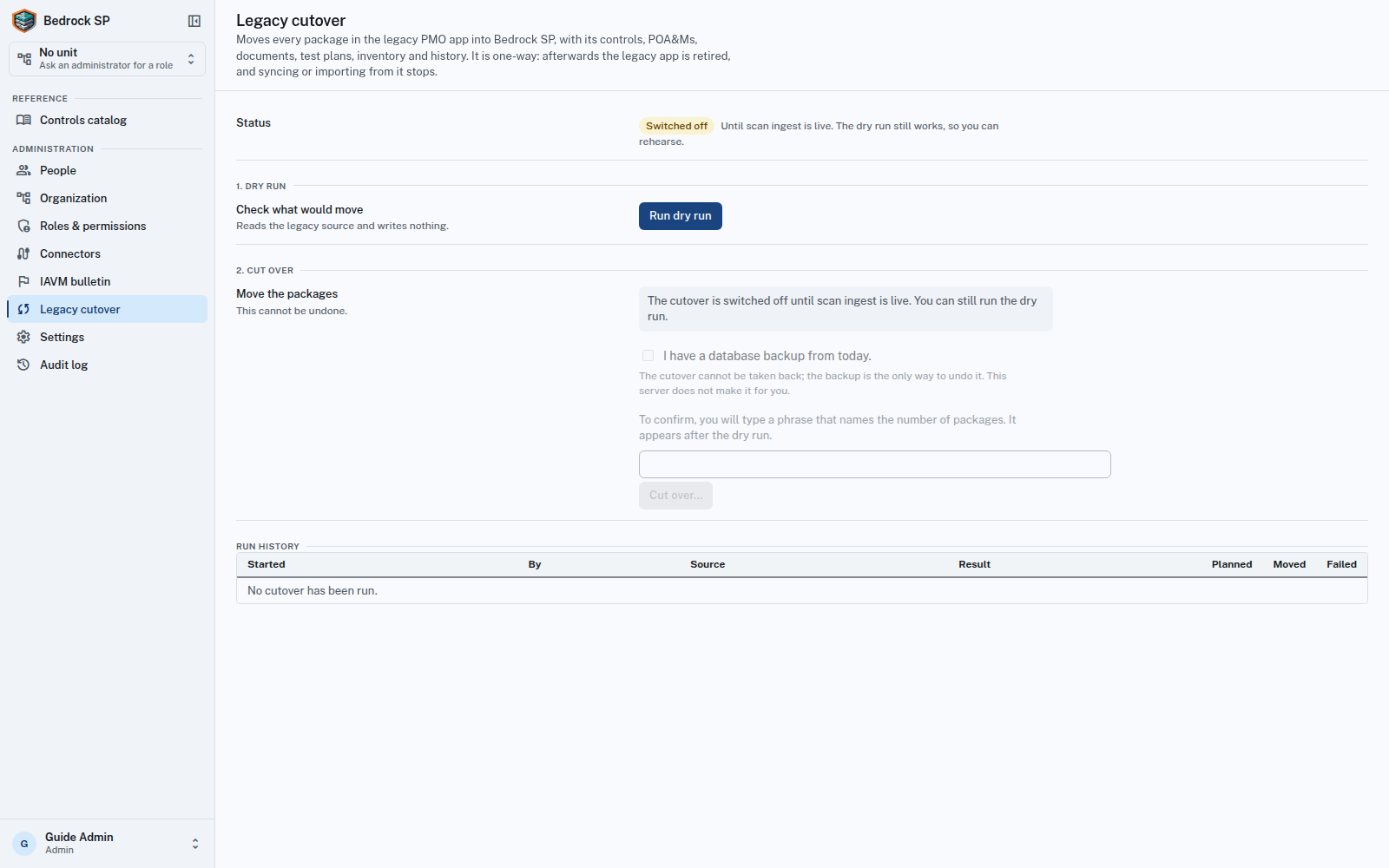
Step 2. Dry run. Under Check what would move run the dry run. It reads the legacy source and writes nothing.
- You see: for each package, what would move (controls, POA&Ms, documents, test plans, hardware, software, ports), warnings, and anything blocking: a legacy office with no mapping, a duplicate acronym in the target office, files that need storage or the virus scanner that is missing, or a package the source no longer has. Download report (CSV) keeps it.
Step 3. Take a backup. Make a database backup from today. Bedrock SP does not make it for you, and it is the only way to undo a cutover.
Step 4. Cut over. Tick I have a database backup from today. Type the phrase the page
asks for, such as CUT OVER 12 PACKAGES, and confirm.
- You see: a run record. Each package is its own transaction. A package that fails stays legacy and is reported, and the others go ahead. Running again takes the packages still legacy.
What the cutover does to a package:
- It becomes native, keeps its number from the legacy app and the same people see it.
- Its categorization becomes an approved categorization marked as imported.
- Implementations become the package's SCTM. The program office's self-assessments become notes on the CCIs.
- POA&Ms keep their numbers. Documents are scanned and stored. Test plans become read-only artifacts. Hardware, software and ports map to the inventory.
- The current legacy authorization becomes a signed decision marked as imported.
Open a Run history entry for the result, the errors and each package's outcome.
Scan posture is not migrated
After the cutover, upload current scans for each package (or give its program office a token). Until you do, the package's vulnerability and compliance checks show unknown.