 foxxcyber/docs
Access and permissions
How Foxx HQ decides who sees and does what: departments, member and lead roles, organization-wide and department-only areas, admin-area grants, and the Who can…? lookup.
Almost every "why can or can't this person see it?" question comes down to four things:
- Which departments the person belongs to.
- Their role in each: member or lead.
- Where each department sits: a department can sit inside another.
- Which feature areas each department has enabled.
Company administrators sit above all of it. Admin-area grants add company-wide reach in one area for one person.
Before you start
- You must be a company administrator to change access or use Who can…?.
- An area that is switched off under Modules is hidden from everyone, whatever their access.
Organization-wide and department-only areas
| Feature area | Kind | Who can use it |
|---|---|---|
| Human Resources | Organization-wide | Everyone (their own records, leave, timecards, expenses) |
| Knowledge Base | Organization-wide | Everyone |
| Project Tracker | Organization-wide | Everyone |
| Document Library | Organization-wide | Everyone |
| Forms & Attestations | Organization-wide | Everyone |
| Procurement | Organization-wide | Everyone (requisitions) |
| Chat | Organization-wide | Everyone |
| Training | Organization-wide | Everyone |
| Notes | Organization-wide | Everyone (their own notebook) |
| Maintenance | Organization-wide | Everyone can request maintenance; members of a department with Maintenance run it |
| Volunteers | Organization-wide (off until an administrator turns it on) | Everyone can sign up for shifts; leads of a department with Volunteers coordinate it |
| Finance | Department-only | Members of a department with Finance enabled |
| Inventory & Assets | Department-only | Members of a department with Inventory enabled |
| CRM & Sales | Department-only | Members of a department with CRM enabled |
| Marketing | Department-only | Members of a department with Marketing enabled |
| Giving (nonprofits) | Grants only | Company administrators and holders of the Giving grants |
- Organization-wide areas are open to every employee. Enabling one on a department does not decide who gets in. It lets that department's leads run the area's management screens for their part of the organization.
- Department-only areas are invisible until enabled on a department. Only that department's people see them.
- For Finance, Inventory and Maintenance, being a member of the department is enough for full use of the area's screens.
A department's name means nothing by itself. A department called "Finance" does not switch on the Finance area. Enable the area on the department: Administration → Departments → the department → Feature areas → Enable.
Three levels of reach
| Who | Reach |
|---|---|
| Company administrator | Everything: every area, every record, every setting, Administration. |
| Area administrator (holds an area's admin grant) | That one area, company-wide: every record in it, whoever owns it, and the area's settings. |
| Department lead | Their own department and every department below it. Never a sibling, a parent, or the rest of the company. |
Leading a department never gives company-wide reach on its own. If a lead should run an area for the whole company, give them that area's admin grant.
Give someone an admin-area grant
- Open Administration → Users and click the person.
- In the Access card, click Grant beside the area. Revoke takes it away.
The grants are: HR admin, Finance admin, Knowledge base admin, Project tracker admin, CRM admin, Forms admin, Procurement admin, Chat admin, Training admin, Marketing admin, Document library admin, Maintenance admin, Giving admin, Giving entry and Volunteers admin.
There is no Notes grant: opening, moving or deleting someone else's notebook is for company administrators only. A company administrator already holds every area, so the grants don't apply to them.
Area settings (CRM pipelines and fields, HR leave types and benefits, Finance accounting settings, Marketing settings, Maintenance codes and rates, Volunteers settings, Notes limits) belong to company administrators and that area's administrators.
Giving: grants only
Giving holds donor data, so departments never give access to it. Company administrators and holders of Giving admin run all of it. Holders of Giving entry enter gifts and deposit batches and see only what they entered. Giving is offered only when the organization type is nonprofit.
Payments: company administrators only
Connecting Stripe or PayPal and handling the events HQ couldn't match belong to company administrators only, because it is money. No grant reaches it. The catalog, subscriptions, payments and pay links belong to whoever runs Finance.
Employees, volunteers and contractors
Every person has a type, set on their page under Administration → Users (Person type → Change…):
- Employee: the default.
- Volunteer: the least access. Self-service in every area, whatever their departments say, except Volunteers, where they count like anyone else. They see their own profile but not the staff directory, and are left out of payroll, benefits, leave accruals and HR's leave, timecard and benefits screens.
- Contractor: works like an employee, but is listed apart in People and left out of payroll, benefits and leave accruals.
A company administrator is never limited by their type.
Records with an owner
Knowledge Base spaces, Document Library libraries, Tracker projects, Chat channels, form templates and Training courses are owned by the company, a department or a team:
| Who | What they can do |
|---|---|
| Members of the owning department or team | Read and write |
| Leads of the owning department or any department above it; managers of the owning team | Administer: settings, sharing, visibility, members, owner |
| The area's administrators and company administrators | Administer, whoever owns it |
| Everyone else | Nothing, until it is shared with them or made visible to the whole organization |
An administrator of a record can set its visibility (private or organization), share it with a person, department or team (read, or read and write), or hand it to another owner. To let one outsider into one project or space, share it with them from its settings. No role change is needed.
CRM records belong to people: you work the records you own, unowned ones, and ones shared with you; a lead also sees those of everyone in their department and below; CRM administrators see everything.
Who approves requests
Leave, timesheets, expenses and requisitions climb an approval chain:
- the person's reports-to manager, when one is set;
- the leads of their department, then of each department above it, nearest first;
- the company administrators.
The area's administrators can also decide (HR for leave, timesheets and expenses; Procurement for requisitions). Nobody approves their own request, and leads of the same department never approve each other.
Look it up: Who can…?
Who can…? answers "who can do this, and why?" from the same rules every screen checks.
- Open Administration → Who can…?.
- Pick an Area. Only areas that are on are listed.
- Under Can, pick what they should be able to do: Use it (everyday work), Own it (the area's screens, for their part of the organization), Administer all of it (every record and its settings, company-wide), and in some areas questions about one person, such as approving their requests. A question about one person also asks you to pick the person.
- Everyone who can is listed, each with the reasons.
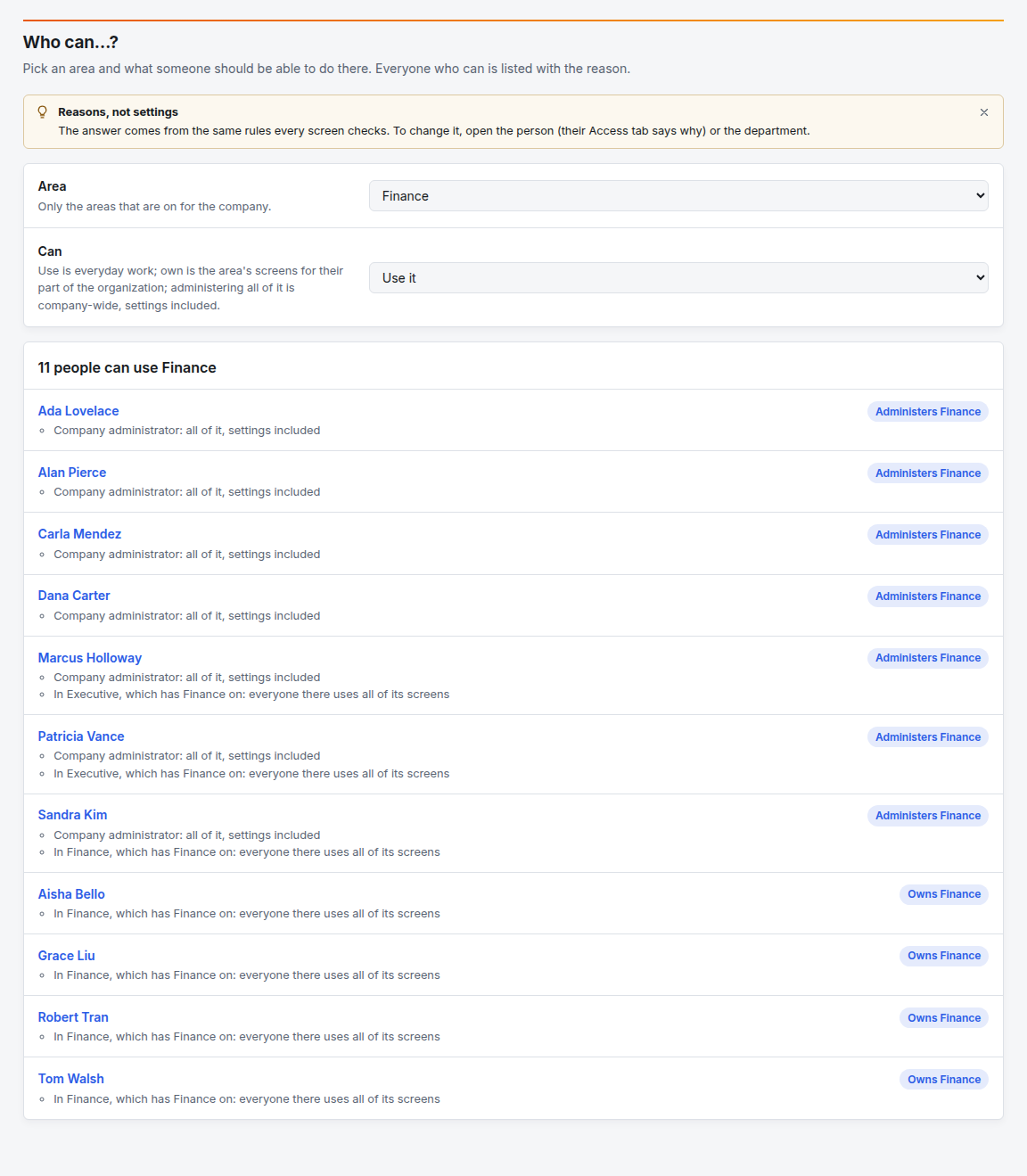
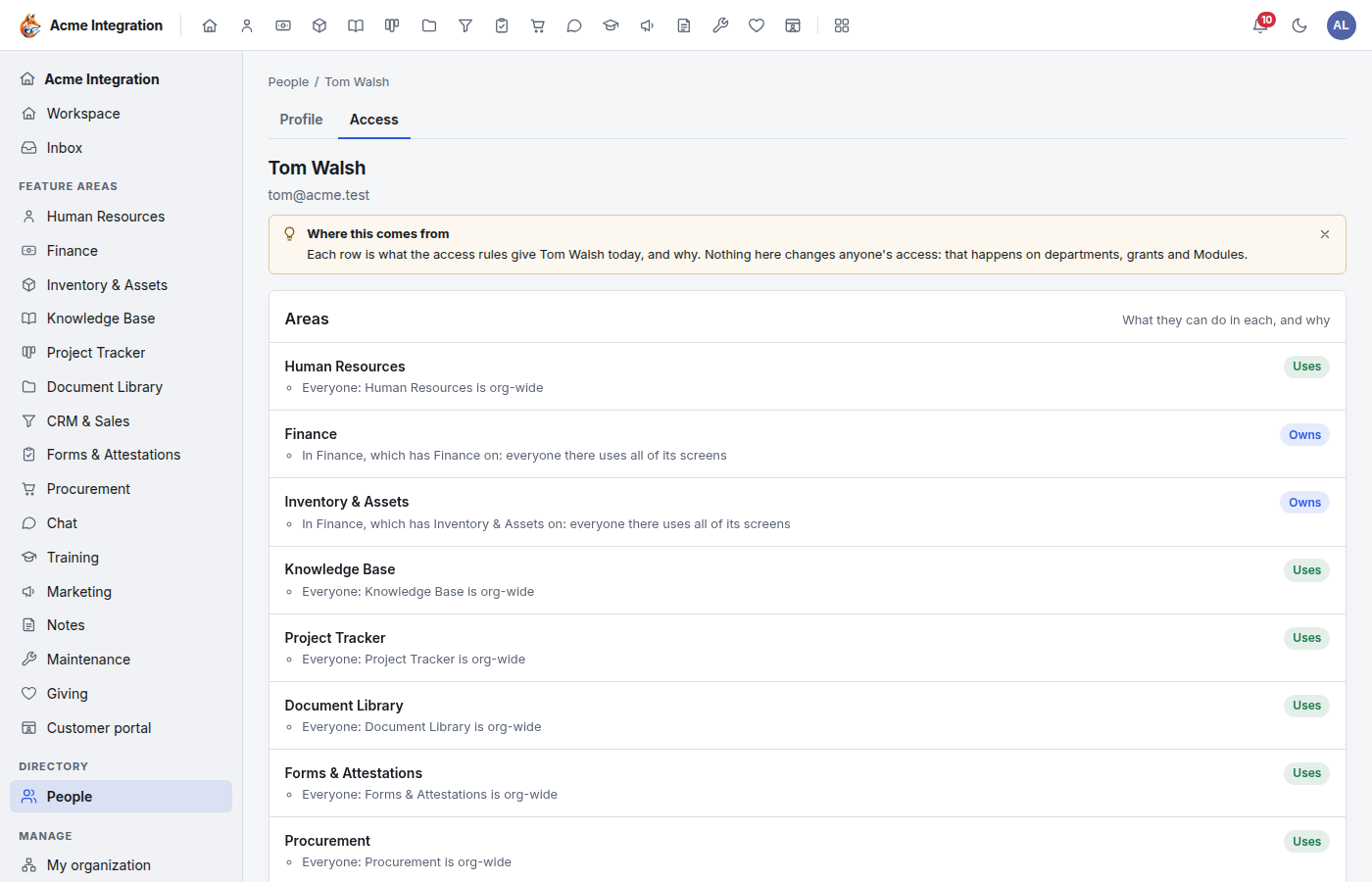
To change an answer, open the person or the department; the list is the result of their settings, not a setting itself. Click a name to open the person's Access tab, which shows every area, what they can do there and why, their departments and teams, their reporting line, and who decides their requests.
Troubleshooting
Someone can't see an area I expected. In order, check: the area is on under Modules; the area is enabled on one of their departments (for department-only areas); their person type is not Volunteer; and for Giving, that they hold a Giving grant. Who can…? shows the result.
"Our Sales lead used to see every deal; now only their team's." Leads reach their own department and the ones below it. Give them CRM admin to run CRM for the whole company.
"Why can this person see Tracker, Knowledge Base or Procurement when I never enabled anything?" Those areas are organization-wide by design. Enabling one on a department only decides who manages it there.
Giving isn't in the area list. The organization type must be nonprofit and Giving must be on under Modules.
Who approves a lead's own leave? Their reports-to manager if they have one, otherwise the leads of the department above theirs, then the company administrators.