 foxxcyber/docs
Audiences and appeals
Send a campaign to the right people with static lists and rule-based segments, link a campaign to a Giving campaign as a fundraising appeal, and read the appeal's results.
An audience decides who a campaign goes to. Consent still decides whether: a campaign to an audience mails only the people in it who are confirmed newsletter subscribers and not on the suppression list. Everyone else in the audience is counted and left out.
An appeal is a campaign linked to a Giving campaign, so every gift that comes back through it is counted.
Before you start
- Marketing must be on, and you must be a Marketing owner (a department lead, the Marketing admin grant, or a company administrator) to build, change or delete audiences. Other Marketing members can see audiences and their counts. See Marketing and newsletters.
- A rule reads another area's records, so using it takes access to that
area:
- CRM label and Lifecycle stage rules: you can use the CRM.
- Customer rules: you are a Finance owner.
- Giving rules (gave recently, gave at least, fund, campaign, LYBUNT, SYBUNT): you are a company administrator or hold the Giving admin grant. Leading a department never gives this.
- Volunteer rules: you are a Volunteers coordinator.
- For appeals: the organization type is Nonprofit, Giving is on, the Giving campaign exists, and its page (or your donation page) is published. See Giving campaigns.
Lists and segments
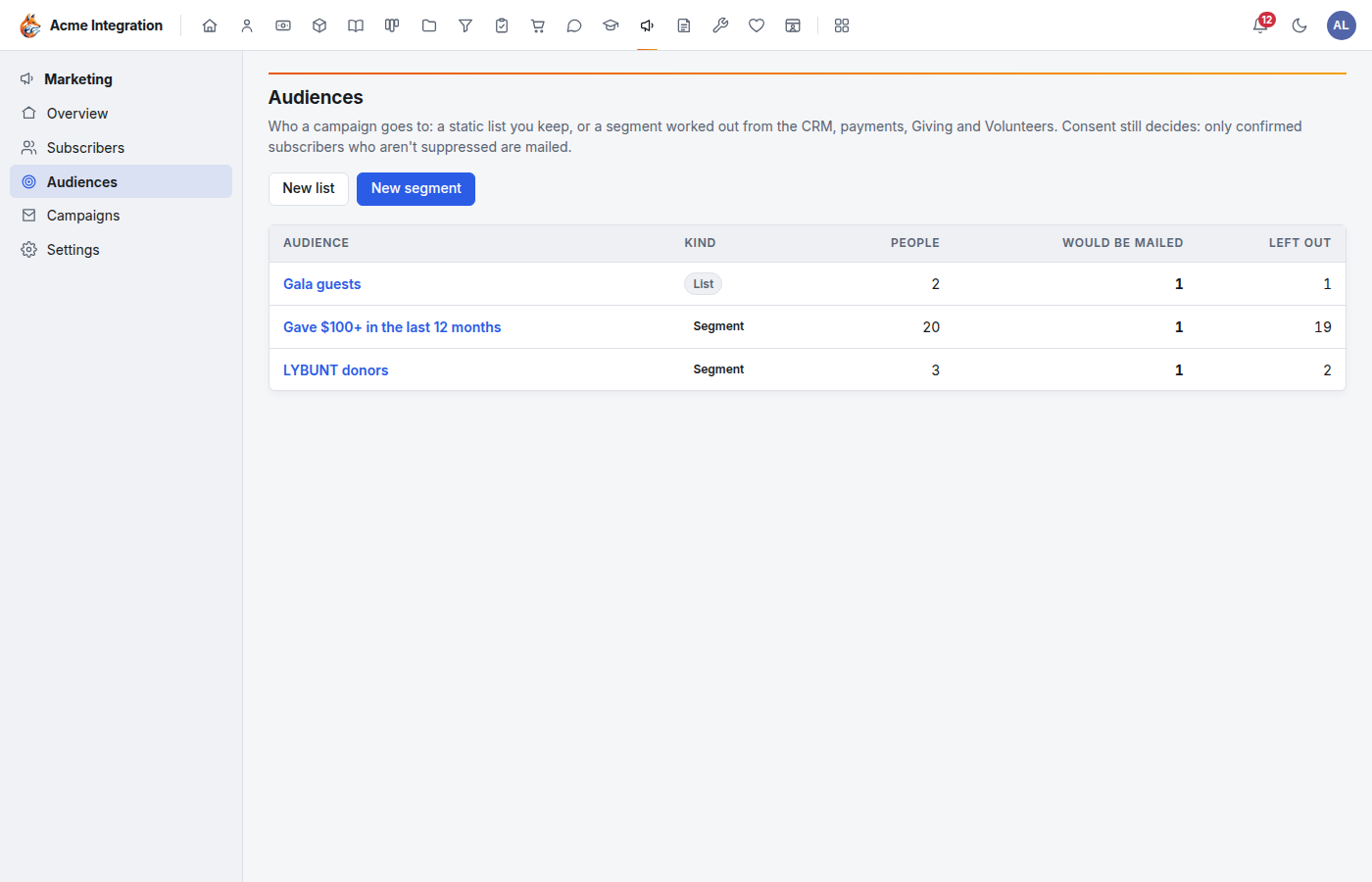
Open Marketing → Audiences.
| Static list | Dynamic segment | |
|---|---|---|
| Who is in it | People you add by hand or from a CSV | Everyone your records say matches its rules |
| Changes | Only when you add or remove people | On its own, as your records change |
| Use it for | Event guests, a board, a sign-up sheet | Donors who gave $100+, lapsed donors, customers of a plan |
Make a static list
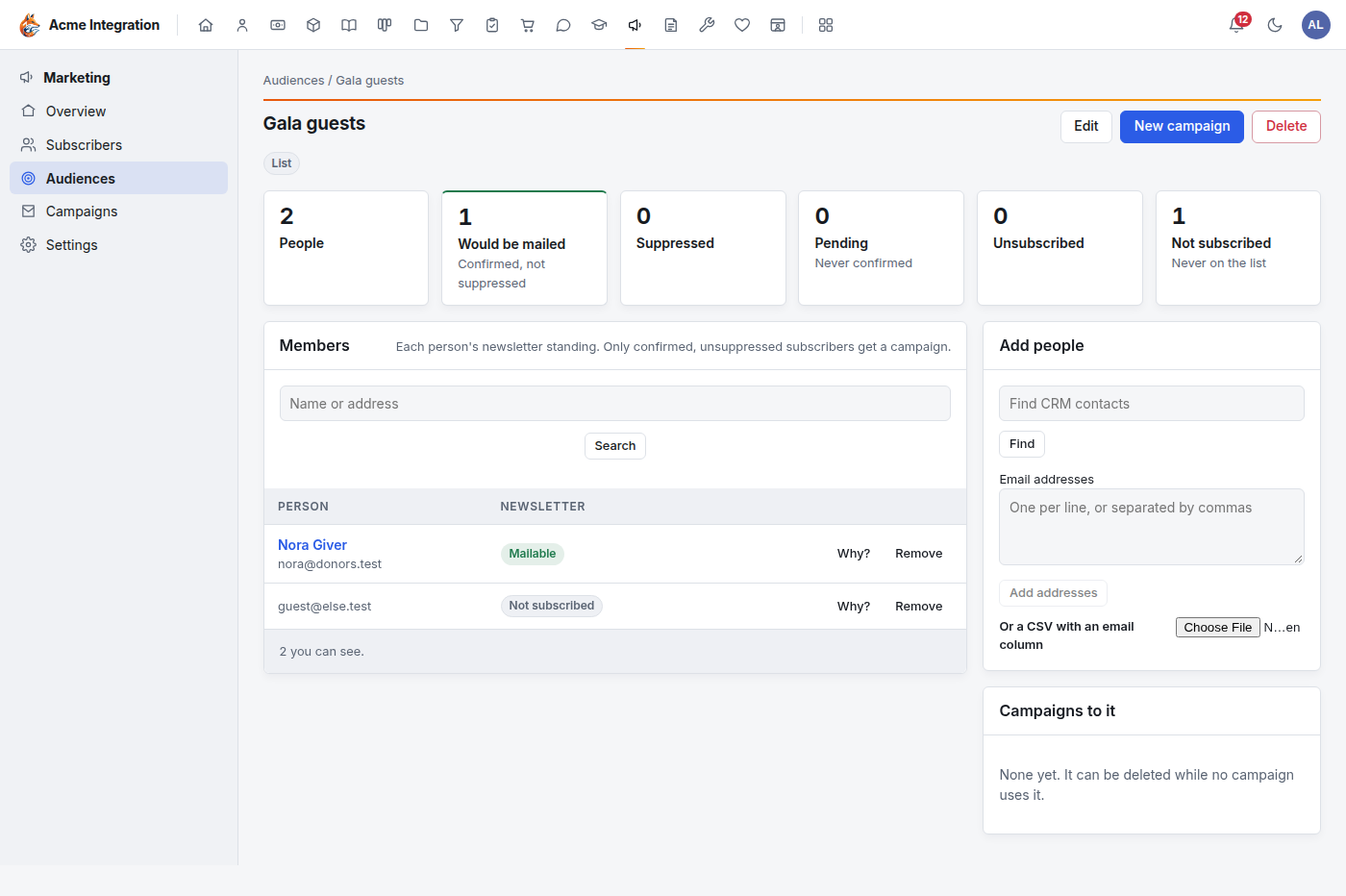
- Click New list.
- Give it a Name (and an optional Description) and click Save. The list's page opens.
- Under Add people, add them any of three ways:
- Contacts: search your CRM contacts and add them. You can add only contacts you can open in the CRM.
- Addresses: type or paste email addresses and click Add addresses. Anything that isn't an email address is refused and listed.
- CSV: upload a file with an email column (a header containing "email" or "e-mail"). Without one, Foxx HQ takes the first cell with an @ on each line. Up to 20,000 addresses at a time.
- To take someone off, click Remove on their row.
An address can be on a list without being a CRM contact.
Build a segment
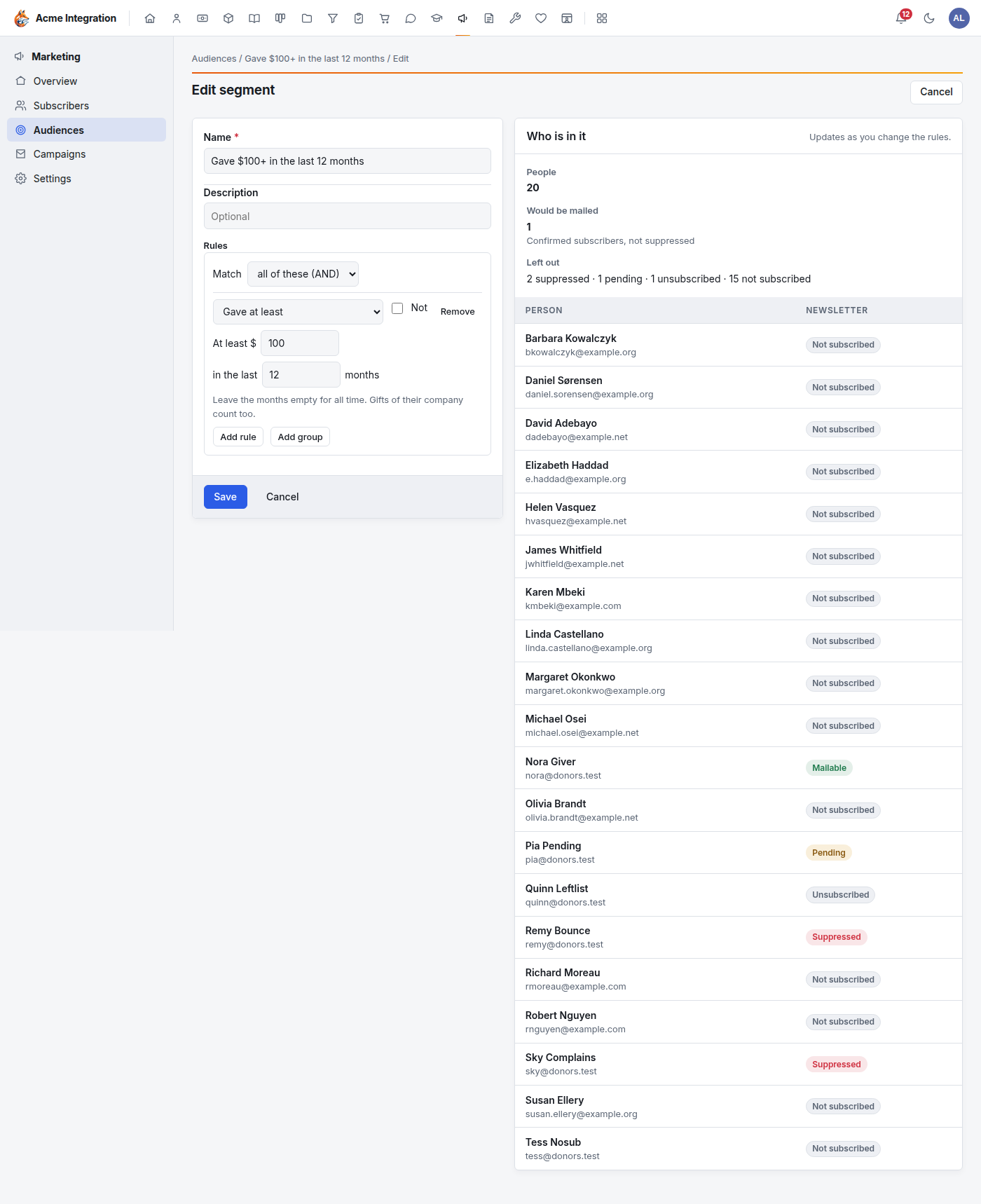
- Click New segment (or Edit on an existing one).
- Give it a Name.
- Under Rules, set Match to all of these (AND) or any of these (OR).
- Pick a rule, then fill in its details. Add rule adds another.
- Tick Not on a rule to turn it around: everyone Foxx HQ knows who does not match it (your active CRM contacts with an email address, and your active volunteers).
- Add group adds a group of rules with its own Match, for combinations such as "gave last year AND (is a customer OR volunteered 10 hours)". Groups go two levels deep; a segment has at most 40 rules.
- Who is in it on the right updates as you change the rules: the number of People, how many Would be mailed, and who is Left out and why.
- Click Save.
The rules
| Rule | Who matches |
|---|---|
| CRM label | The contact carries one of the chosen labels, or their company does. |
| Lifecycle stage | The contact is at one of the chosen stages. |
| Customer (subscription) | Has a subscription, theirs or their company's, to the chosen Products or Plans, in the chosen Subscription statuses. Nothing ticked in a row means any. |
| Gave recently | A posted gift in the last N months. |
| Gave at least | Posted gifts adding up to at least the amount, in the last N months. Leave the months empty for all time. |
| Gave to a fund | A posted gift to one of the chosen Funds (in the last N months, or ever). |
| Gave to a Giving campaign | A posted gift to one of the chosen Giving campaigns (in the last N months, or ever). |
| Lapsed last year (LYBUNT) | Gave Last Year But Unfortunately Not This year: a posted gift last calendar year and none yet this year. |
| Lapsed in an earlier year (SYBUNT) | Gave Some Year But Unfortunately Not This year: a gift in any earlier calendar year and none yet this year. This includes LYBUNT donors. For donors lapsed two years or more, use SYBUNT and Not LYBUNT. |
| Volunteer | An active volunteer; with a number of hours, at least that many booked hours in the last N months (or ever). |
| On a list | On one of your static lists. A segment can't use another segment. |
Good to know:
- A company's gifts and subscriptions count for each of its contacts. A gift from a company makes all its contacts donors for these rules.
- Only posted gifts count: voided gifts and gifts still in an open deposit batch don't. Amounts are after any refund.
- Years are calendar years. On January 1, "this year" starts again.
Read an audience
Each audience's page shows, live:
- People: everyone in it.
- Would be mailed: confirmed subscribers who aren't suppressed.
- Each group left out: Suppressed, Pending (never confirmed), Unsubscribed, and Not subscribed (never on the newsletter list).
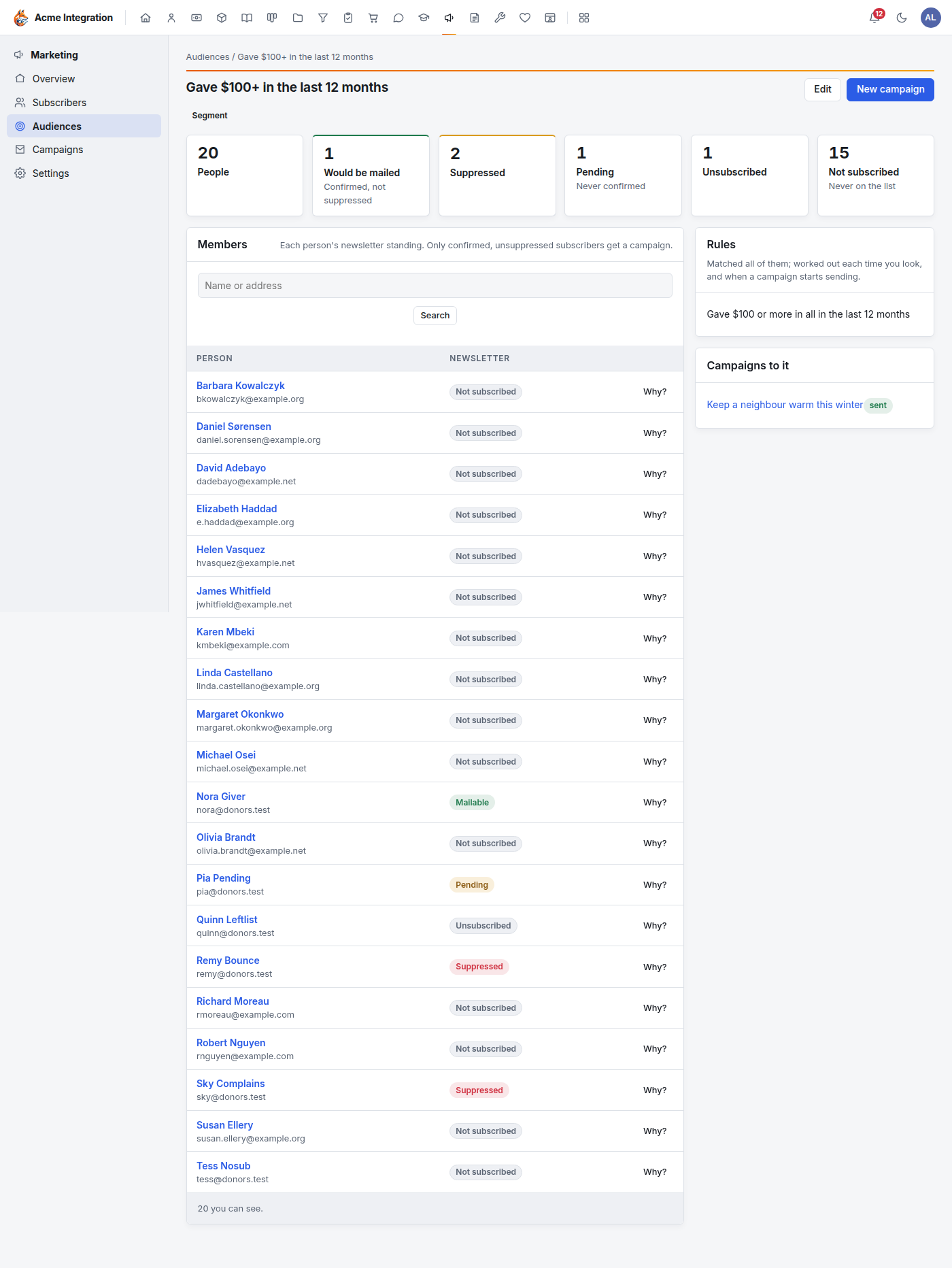
Members lists each person with their newsletter standing. Click Why? on a row to see each rule and group and whether it holds for that person (on a list: when they were added). A contact you can't open in the CRM is counted but not named. To see who is in a segment at all, you need access to every area its rules read; otherwise you see only the counts.
Campaigns to it lists the campaigns that used this audience. New campaign starts one addressed to it.
"Not subscribed" is often the biggest group: donors and customers who never joined the newsletter. They are never mailed by a campaign. Invite them to sign up through your signup form instead.
Send a campaign to an audience
On the campaign's compose page, choose the audience under To (see Marketing and newsletters). The campaign's page then shows Who it reaches now. For a segment, who is in it is worked out again when the campaign starts sending: people who join or leave the segment later don't change a campaign that already went out.
An audience a campaign uses can't be deleted, and neither can a list a segment uses.
Fundraising appeals
Make a campaign an appeal
- Write the campaign as usual.
- In Appeal for, pick the Giving campaign it raises money for.
- Save, test and schedule as usual.
What changes:
- The email ends with a Give now button to the Giving campaign's own page (or, if it has none, your donation page).
- That link, and any link in your text to your giving pages, carries
the appeal's code: the campaign slug, as
?appeal=…. - The code travels through Stripe's or PayPal's checkout and comes back with the gift, so the gift records the appeal. A monthly gift started from an appeal keeps the code, and so does every later month's gift.
An appeal can be scheduled only once the page it links to is published. Until then the campaign page says "Its giving page isn't published." Publish the Giving campaign's page, or your donation page, in Giving first.
Read the appeal's results
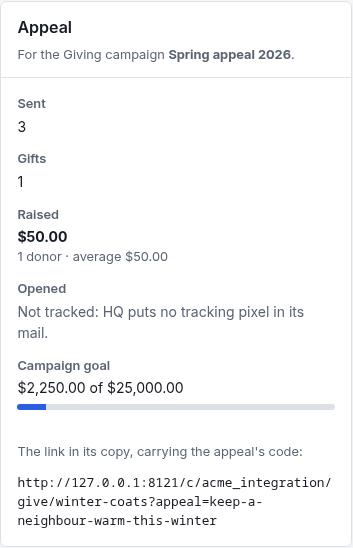
The campaign's page has an Appeal card:
- Sent: copies sent.
- Gifts: gifts that came back through the appeal, and how many monthly gifts it started.
- Raised: their total, the number of donors and the average gift.
- Opened: not tracked. Foxx HQ puts no tracking pixel in its mail.
- Campaign goal: what the Giving campaign has raised in all, from every source, against its goal.
- The exact link in the copy, with the appeal's code.
Troubleshooting
"A rule type is missing from the picker, or the members list shows counts only." You don't have access to the area that rule reads. For Giving rules, ask a company administrator for the Giving admin grant.
"Appeal for isn't on the compose page." Appeals need the Nonprofit organization type and Giving turned on. See Giving.
"Would be mailed is much smaller than People." Most of the audience isn't confirmed on the newsletter list. Only confirmed, unsuppressed subscribers are mailed; the left-out counts say why the others are.
"I can't delete an audience." A campaign uses it, or (for a list) a segment uses it.
"A contact can't be added to my list." It's outside your CRM reach: it has an owner and isn't shared with you.
"The CSV upload added fewer people than the file has." Lines without a valid email address are refused and listed.
"A gift doesn't show in the appeal's results." Only gifts that came through the appeal's link carry its code. A gift typed in by hand, or given on the page without the link, counts toward the Giving campaign's total but not the appeal's.