 foxxcyber/docs
Email deliverability
Keep your mail out of spam folders: connect bounce and complaint reports, read the Email health card, and manage the suppression list of addresses Foxx HQ never emails.
Deliverability is whether your email reaches the inbox. Mailbox providers such as Gmail and Yahoo watch how many of your messages bounce and how many people mark them as spam. Too many, and your receipts and invoices start landing in spam folders too.
Foxx HQ does three things for you:
- it reports your bounces and spam complaints, per kind of mail;
- it suppresses addresses that hard-bounce or complain, so you never mail them again;
- it keeps marketing and transactional mail apart, so a bad campaign can't hide inside your receipts' numbers.
How mail leaves Foxx HQ in the first place (the transport, the From address, the test email) is on Email.
Before you start
- You must be a company administrator for Administration → Email.
- To manage the suppression list you must be able to use the CRM; to remove an address from it, you must be a CRM owner. See CRM.
- Bounce and complaint reports need the Resend or Platform transport. An SMTP relay never reports bounces or complaints, so the Email health card has no rates for it.
- With Your own Resend key, you need access to your Resend account to add a webhook there.
Two kinds of mail
| Transactional | Marketing | |
|---|---|---|
| What | Receipts, invoices, password resets, invitations, notifications | Newsletter campaigns and appeals, nothing else |
| Who gets it | Whoever it is for, even if they left the newsletter | Confirmed subscribers only, each copy with its own unsubscribe link |
| Stopped by an unsubscribe | No | Yes |
| Stopped by the suppression list | Yes | Yes |
The law on commercial email lets transactional mail reach people who unsubscribed from your newsletter (15 U.S.C. 7702).
Send campaigns from a subdomain (recommended)
Under Administration → Email → Campaign From, give campaigns their
own From name and From address, for example on
news.yourdomain.org. Your campaigns then build their own reputation,
apart from your receipts and resets. On the Platform domain
transport the address must be on a domain the platform operator
verified for you; on your own Resend account, on a domain verified
there. Leave it blank to send campaigns from the transport's From.
Connect bounce and complaint reports
Without this, Foxx HQ never hears that a message bounced.
On the Platform transport there is nothing to do. The platform operator connects the platform's webhook once, for every organization.
On your own Resend account:
- Open Administration → Email and find Bounce and complaint reports.
- Copy the Webhook address with Copy.
- In Resend, add a webhook pointing at that address, with the events email.bounced and email.complained.
- Resend shows the webhook's signing secret. It starts with
whsec_. Paste it into Signing secret in Foxx HQ. - Click Save. The section shows connected.
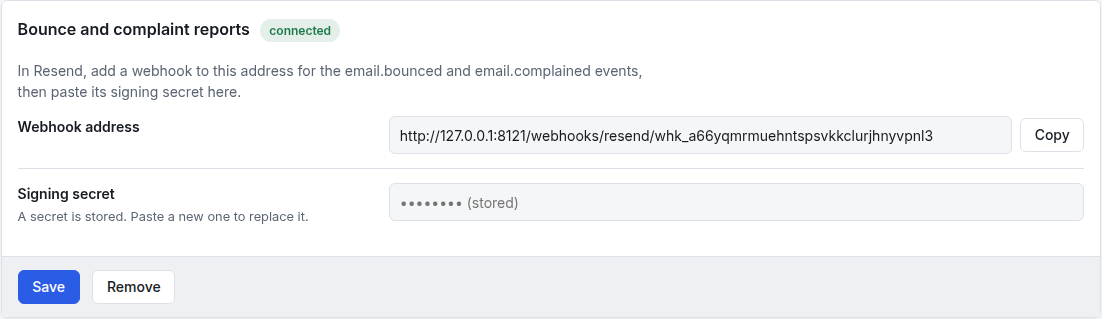
Foxx HQ checks every report's signature with the secret and refuses reports older than five minutes. The secret is never shown again; the field only says one is stored. Paste a new one to replace it, or click Remove to disconnect.
On SMTP there is no webhook. Watch your mail server's bounce messages yourself.
What happens to bounces and complaints
| Report | Means | Foxx HQ |
|---|---|---|
| Hard bounce | The receiving server rejected the address for good. | Adds it to the suppression list (source bounce). Nothing more is sent to it, receipts included. |
| Spam complaint | Someone marked your message as spam. | Adds it to the suppression list (source complaint). Nothing more is sent to it, receipts included. |
| Soft bounce | A passing problem, such as a full mailbox. | Counts it on the health card. Doesn't suppress; the provider retries. |
Read the Email health card
Administration → Email → Email health shows:
- Your sending domains: each domain, what it is Used for, and
whether its SPF, DKIM and DMARC records check out. For
platform domains Foxx HQ shows the platform's last check. For your
own Resend account it says Check in Resend: look there. DMARC isn't
part of Resend's check; publish at least a policy of
noneyourself. - The last 30 days, per kind of mail (Transactional and Marketing): Sent, Hard bounces, Soft bounces, Complaints, the Bounce rate, the Complaint rate and a Status.
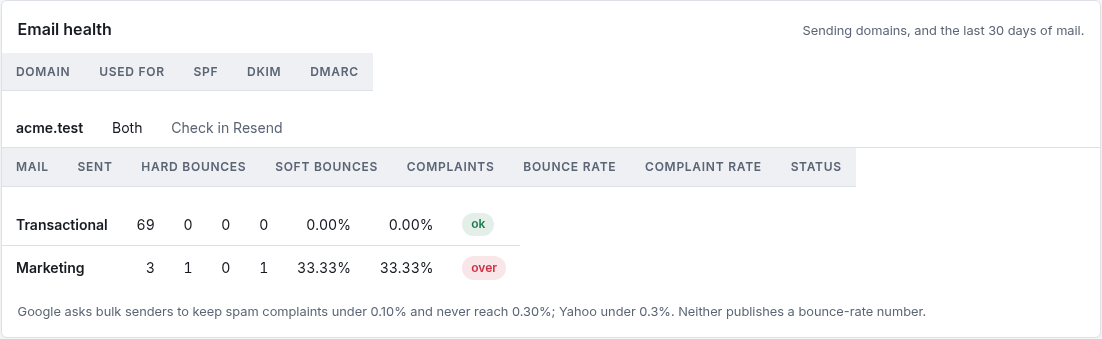
The Status follows the complaint rate:
| Status | Complaint rate |
|---|---|
| ok | under 0.10% |
| watch | from 0.10% |
| over | 0.30% or more |
| no reports | SMTP: no reports exist |
| no mail yet | nothing sent in 30 days |
These lines come from what the big providers publish. Google asks
senders of 5,000 or more messages a day to keep the spam rate below
0.10% and never reach 0.30%, with SPF, DKIM and DMARC set up and
one-click unsubscribe on marketing mail. Yahoo asks for SPF, DKIM, a
DMARC policy of at least none, one-click unsubscribe honoured within
two days, and a spam rate below 0.3%. Neither publishes a bounce-rate
number; Yahoo asks senders to remove invalid addresses promptly, which
suppressing hard bounces does. The complaint rate counts the complaints
your provider passes on; Gmail's own figure is in Google Postmaster
Tools.
On a small list, one complaint gives a big percentage. Three marketing emails with one complaint read 33% and over. Look at the counts as well as the rates.
If the numbers climb
- Send campaigns only to people who asked. Foxx HQ already mails confirmed subscribers only; don't import lists of people who didn't ask.
- Send to a segment rather than everyone when the message isn't for everyone (see Audiences and appeals).
- Send less often, and keep the unsubscribe link easy to find.
The platform console and Administration → Overview also flag Email hard bounces (30 days) and Spam complaints (30 days) for your administrators.
The suppression list
CRM & Sales → Suppression lists every address this organization will never email. Every outgoing message checks it: CRM email, campaigns, quotes, invoices and notifications.
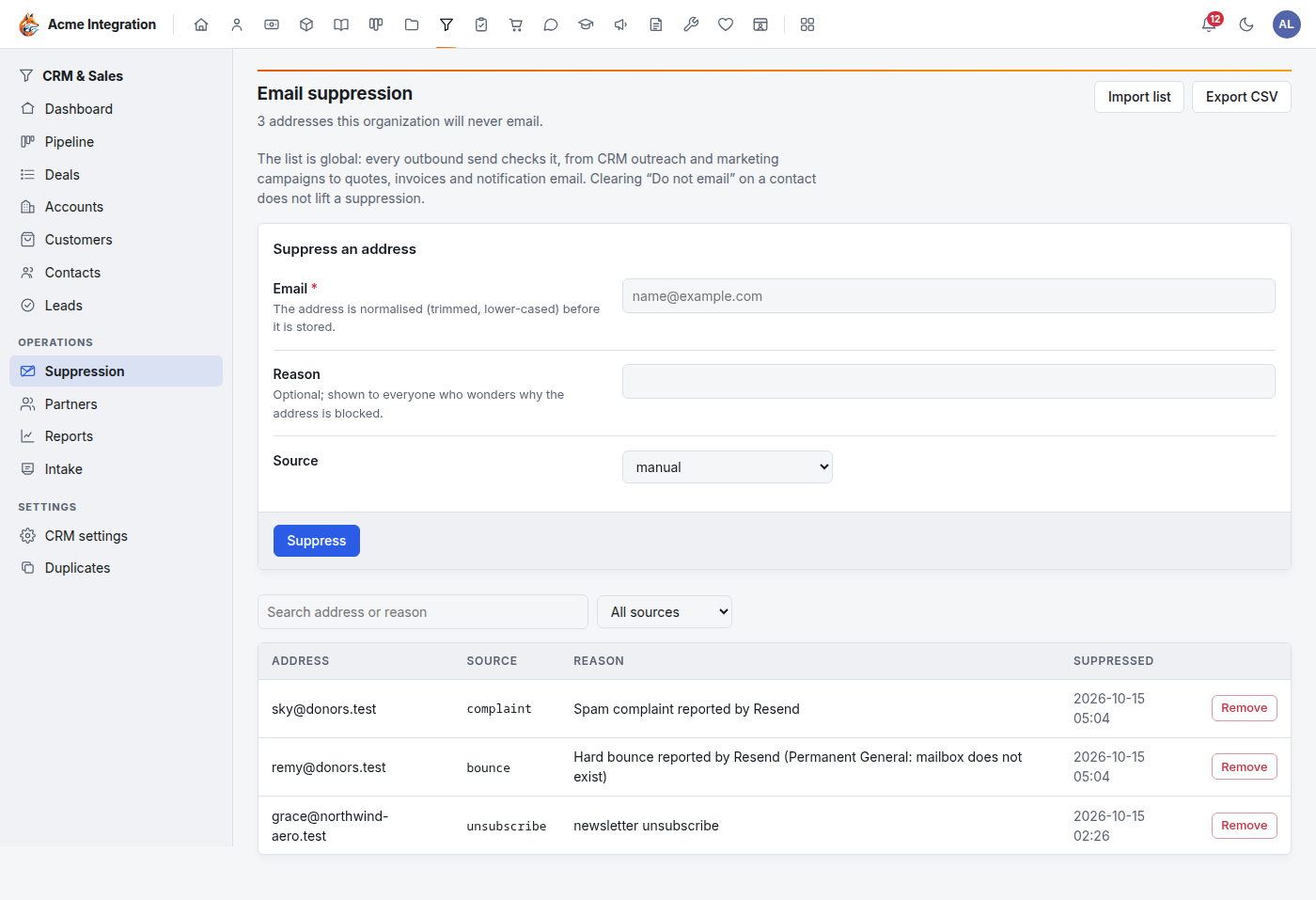
Each address shows its Source:
- bounce or complaint: reported by the mail provider;
- unsubscribe: the person left the newsletter;
- manual: someone added it here;
- an import's source, for lists brought in from another system.
Suppress an address by hand
- Under Suppress an address, type the Email.
- Optionally write a Reason. Everyone who wonders why the address is blocked sees it.
- Leave Source on manual, and click Suppress.
Use this when someone asks you to stop all email, receipts included.
Import opt-outs from another system
Click Import list, choose the file (up to 8 MB), and pick the Source for rows that don't name one. Addresses are trimmed and lower-cased on the way in.
Remove an address (CRM owners)
Click Remove on the row, for example after someone fixed their mailbox and asked to hear from you again.
Never remove a complaint to send someone a campaign anyway. They told their mail provider your mail is spam; mailing them again hurts every email you send.
Export CSV downloads the list.
Troubleshooting
"Email health shows no rates, or says no reports." You use SMTP, which never reports bounces or complaints, or the webhook isn't connected. Connect Bounce and complaint reports (Resend), or switch to the Platform transport.
"Bounce and complaint reports isn't connected."
Check that the Resend webhook uses exactly the Webhook address shown,
with both events, and that the secret pasted is that webhook's (it
starts with whsec_).
"A customer gets no email at all, not even receipts." Their address is on the suppression list. Search for it under Suppression. Clearing Do not email on their contact does not lift a suppression.
"Someone unsubscribed, but still gets receipts." That is intended: an unsubscribe stops marketing only. Add the address under Suppress an address to stop everything.
"SPF, DKIM and DMARC say Check in Resend." Foxx HQ can't see your own Resend account's checks. Open your domain in Resend.
"The Platform domain section says no verified platform domain yet." Ask the platform operator to register and verify a sending domain for your organization (in the platform console's Mail page).