 foxxcyber/docs
Instance health
Every tile and list on the This instance card of the platform console: database and file storage, errors, background work, queues and migrations, and what to do when one turns amber.
The first card on the platform console's Overview is This instance. It answers one question: is this deployment of Foxx HQ working? It looks only at this deployment. If you run several deployments, check each one's console.
Before you start
- Sign in to the platform console (see The platform console). Any platform admin sees this card.
- Open Overview in the sidebar. The card is at the top.
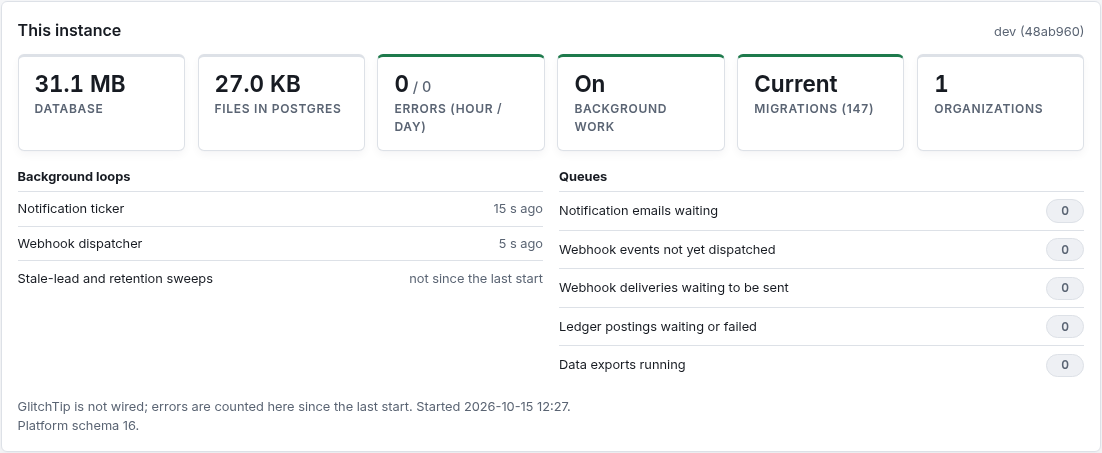
The version of Foxx HQ that is running is shown at the top right of the card, for example dev (48ab960). Quote it when you report a problem.
The tiles
| Tile | What it shows | When to worry |
|---|---|---|
| Database | How much space the database takes up. | When it grows much faster than your data does, or nears your database plan's limit. |
| Files… | How much the stored files weigh, and where they live: Files in Postgres (inside the database), Files on disk (a file storage directory on the server) or Files in the bucket (S3-compatible storage). | Files in Postgres grow your database and its backups. Move them to a bucket (see Deployment and file storage). |
| Errors (hour / day) | Server errors in the last hour and the last 24 hours. Green when there were none today, amber when there was one in the last hour. | Any count above zero is worth a look. |
| Background work | On when the server runs its background loops; Off when they are switched off on purpose. | Off on a live deployment: notification emails, webhooks and scheduled sweeps stop. |
| Migrations (number) | Current when every organization's data is at the newest database version (the number in brackets); otherwise N behind. | Anything behind. The card lists each organization that is behind and the version it is at. |
| Organizations | How many organizations this deployment serves. | More than one on a production deployment: Foxx HQ runs one deployment per organization, several only for trials. |
About the error count
The count lives in the server's memory. It starts again from zero every time the server restarts, and it keeps at most the last 1,000 errors. The line under the lists says whether errors are also sent to GlitchTip, the error tracker, which keeps the full record with each error's details:
- "Errors also go to …" means GlitchTip is connected. Open GlitchTip to see what went wrong.
- "GlitchTip is not wired; errors are counted here since the last start." means only this count exists. Whoever runs the server can connect GlitchTip by setting its address (see Deployment and file storage).
The same line says when the server Started and which version the platform's own data (Platform schema) is at.
Background loops
The server does some work on a timer rather than while someone waits. Each loop shows how long ago it last finished a pass:
| Loop | What it does |
|---|---|
| Notification ticker | Sends notification emails and reminders that are due. |
| Webhook dispatcher | Delivers webhook messages to organizations' apps and retries failures. |
| Stale-lead and retention sweeps | Runs every few hours: flags leads nobody has followed up and deletes old logs past each organization's retention setting. |
"not since the last start" is normal for the sweeps right after a restart, because they run only every few hours. For the other two it means the loop is not running: check the Background work tile.
Queues
Work waiting for a background loop, added up across every active organization. A small number that comes and goes is normal. A number that keeps growing means the loop that drains it is stuck or switched off.
| Queue | Drained by | If it keeps growing |
|---|---|---|
| Notification emails waiting | Notification ticker | Check the organization's email settings and the mail provider. |
| Webhook events not yet dispatched | Webhook dispatcher | Check that background work is on. |
| Webhook deliveries waiting to be sent | Webhook dispatcher | A receiving app may be down. The organization's webhook delivery log says which. |
| Ledger postings waiting or failed | The ledger | Finance entries that could not post to the general ledger yet. Ask the organization's finance administrator to check the ledger. |
| Data exports running | Exports | A whole-organization export is being built. It should finish within minutes. |
Files in the bucket
When file storage uses a bucket, the card adds one more line: the bucket's name, how many files (and how much) are already in it, how many are still to move out of the database or disk, how many the mover has moved and deleted since the server started, how many deletions are due, and the Last error if there was one.
"still to move" falls to zero over the first hours after you switch the bucket on. If it stops falling and a Last error shows, the mover is retrying a file it could not move; the other files move past it. See Deployment and file storage.
Organizations needing attention
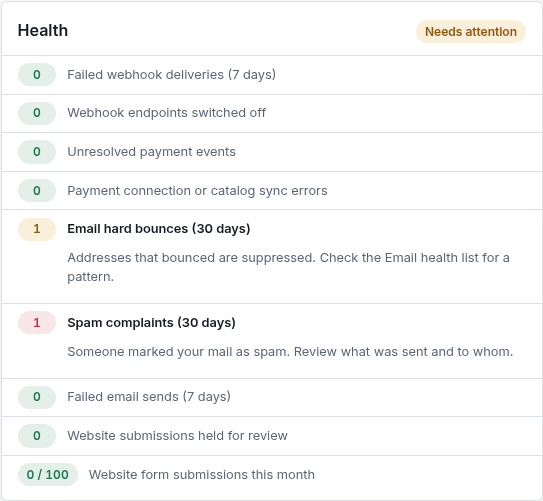
Under This instance, the Organizations card checks each organization for problems its administrators should fix, and lists the ones needing attention first:
| Signal | What to do |
|---|---|
| Failed webhook deliveries (7 days) | Open the endpoint's delivery log, fix the receiver, then Replay. |
| Webhook endpoints switched off | An endpoint that failed for three days was turned off. Fix it and turn it back on. |
| Unresolved payment events | Stripe or PayPal sent events HQ could not match. Resolve or dismiss each one. |
| Payment connection or catalog sync errors | Test the connection again, or sync the products that failed. |
| Email hard bounces (30 days) | Addresses that bounced are suppressed. Check the Email health list for a pattern. |
| Spam complaints (30 days) | Someone marked the mail as spam. Review what was sent and to whom. |
| Failed email sends (7 days) | The mail transport refused messages. Send a test from the Email page. |
| Website submissions held for review | The spam check held these. Release the real ones, discard the rest. |
| Website form submissions this month | Counts against the monthly limit: amber from 80%, red at the limit, after which website forms refuse new messages. |

The organization's own administrators see the same signals on Administration → Overview, and they are the ones who fix most of them. The organization's dashboard in the console shows every signal, including the ones that are fine, with the hint above for each one that is not.
Troubleshooting
"Background work is Off."
The server was started with background work switched off (the
V2_NO_TICKER=1 setting). That is meant for tests and for a second copy
of the server that shares the database. On the main deployment, remove
the setting and restart.
"Migrations shows N behind." The server migrates every organization when it starts, so this means a migration failed for the listed organizations. Check the server's start log for the error, fix it, then open the organization's dashboard and click Migrate to head.
"The card says it could not load the instance's health." Click Try again. If it keeps failing, the database is likely unreachable: check the server's log.
"Errors went up, but GlitchTip is not wired." The count tells you something failed, not what. Look in the server's log around that time, and consider connecting GlitchTip.