 foxxcyber/docs
Webhooks
Have Foxx HQ tell your apps when a subscription starts, changes or ends, a customer changes, a refund is made or someone joins or leaves the newsletter: add endpoints, keep the signing secret, read the delivery log and replay.
A webhook is a message Foxx HQ sends to another app's address when something happens: a subscription starts, changes or ends, a customer's details change, a refund is recorded, someone joins or leaves the newsletter. The app acts on it, for example by giving a new subscriber an account. Foxx HQ signs every message and keeps trying until the app answers.
Nothing is sent until you add an endpoint. Subscription events are also sent only for products with Notify apps turned on.
Before you start
- You must be a company administrator to add, change and remove endpoints and read their logs.
- The app needs a public https address to receive messages. Private, internal and loopback addresses are refused.
- Whoever runs Finance turns on Notify apps for each product the app serves (Finance → Catalog, the product's Apps and fulfilment card). That needs Stripe connected; see Payments setup.
- You can have up to 20 endpoints.
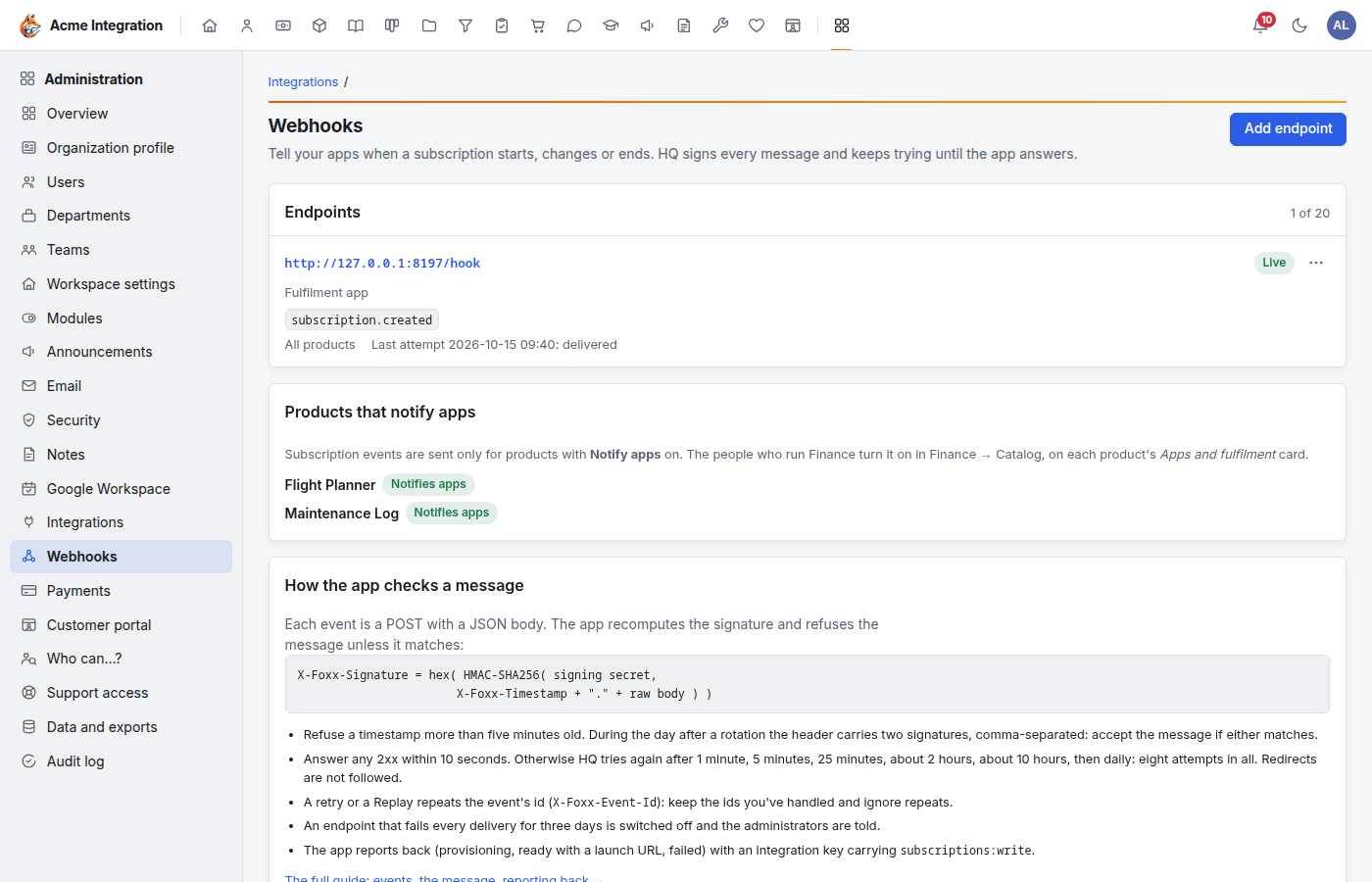
Add an endpoint
- Open Administration → Webhooks and click Add endpoint.
- Fill in:
- URL: the https address the app listens on.
- Description: optional, for example the app's name.
- Events: tick the ones the app wants (see the table below).
- Products: tick the products this endpoint is for, or leave all unticked to receive every product's events. Events that name no product (newsletter changes, refunds) go to every endpoint that takes their type.
- Click Add endpoint.
- Copy the signing secret now. It starts with
hqwh_and is shown once. Click Copy secret, give it to the app, then click I've copied it. Hide it.
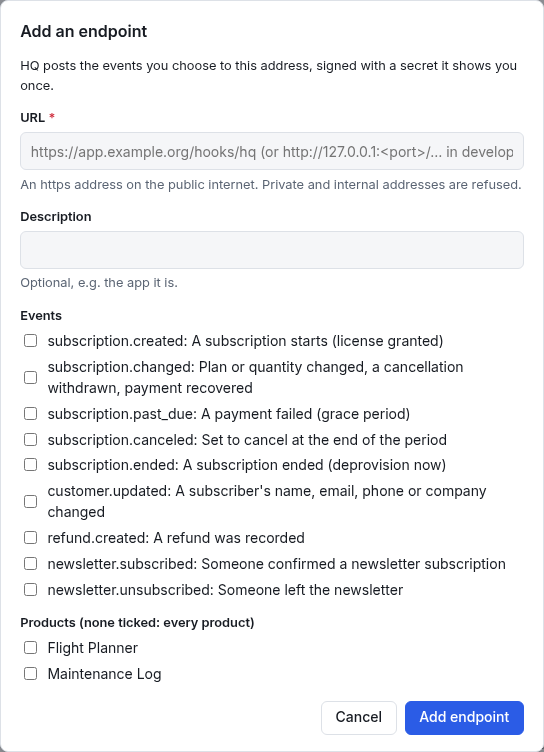
The events
| Event | When |
|---|---|
subscription.created | A subscription starts: grant the license. |
subscription.changed | The plan or quantity changed, a cancellation was withdrawn, or a failed payment was paid. |
subscription.past_due | A renewal payment failed. Stripe retries the card; the customer is in a grace period. |
subscription.canceled | Set to cancel at the end of the period. Access continues until then. |
subscription.ended | The subscription has ended. Remove access now. |
customer.updated | A subscriber's name, email, phone or company changed in the CRM. |
refund.created | A refund was recorded in Finance. |
newsletter.subscribed | Someone confirmed a newsletter subscription. |
newsletter.unsubscribed | Someone left the newsletter. |
Foxx HQ decides when; the app decides how. On
subscription.ended, for example, the app removes access its own way.
Foxx HQ never deletes anything in the app.
How the app checks a message
The How the app checks a message card gives the developer what they
need. Each message is a POST with a JSON body and these headers:
X-Foxx-Event-Id, X-Foxx-Event-Type, X-Foxx-Timestamp and
X-Foxx-Signature. The signature is the hex HMAC-SHA256 of the
timestamp, a full stop and the raw body, made with the signing secret.
The app should:
- refuse a timestamp more than five minutes old;
- answer any 2xx within 10 seconds, and do slow work afterwards;
- keep the event ids it has handled and ignore repeats (a retry or a Replay repeats the id);
- act on the state in the message rather than on arrival order.
The full guide, with the message format and how the app reports back, is in the app's help: Help & guides → Webhooks.
Retries and switched-off endpoints
If the app doesn't answer 2xx within 10 seconds (or redirects, or can't be reached), Foxx HQ tries again after 1 minute, 5 minutes, 25 minutes, about 2 hours, about 10 hours, then daily: eight attempts in all, over about two and a half days. After that the delivery is marked Failed; you can still replay it.
An endpoint whose deliveries all fail for three days is switched off, and company administrators are notified. Its events are kept. Fix the app, then switch the endpoint back on: the waiting events go out.
Read the delivery log and replay
- On Administration → Webhooks, click the endpoint's address, or open its row menu and click Delivery log.
- The log lists every delivery, newest first: the event, when it was created, how many attempts, the last answer and how long it took, and Waiting, Delivered or Failed. Show filters by status.
- Open a delivery's row menu and click Details to see every attempt and the exact body sent.
- Click Replay to send it again now, with the same id and body. The result shows straight away.
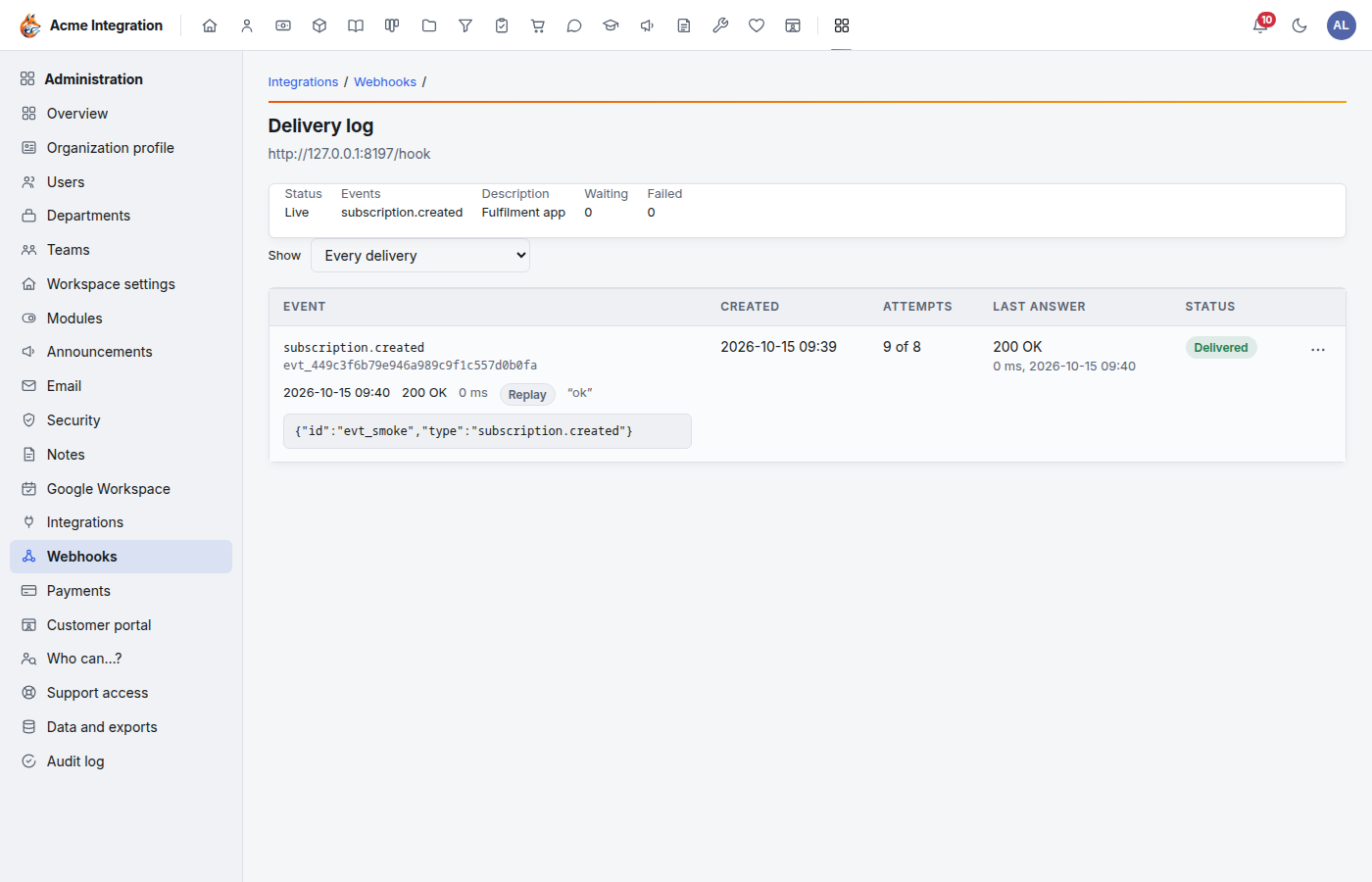
The log is kept for 30 days by default. Change that under Data and exports → Retention (7 to 365 days).
Change, rotate, switch off or delete
From the endpoint's row menu (⋯):
- Edit…: change the URL, description, events or products.
- Rotate secret…: makes a new secret, shown once. For 24 hours Foxx HQ signs with both the new and the old secret, so the app can be updated without missing a message.
- Switch off / Switch on: off, Foxx HQ stops sending and the events wait; on, they go out.
- Delete…: stops sending and deletes the endpoint's delivery log. It can't be undone.
No developer? Fulfil by hand
A product's Apps and fulfilment card in Finance → Catalog can also email an address or give a person a task when a subscription starts or ends. That works without any endpoint. See Finance overview.
Troubleshooting
Nothing arrives at the app. Check that: the endpoint is Live (not Off); it takes the event type; the product has Notify apps on and (if you ticked products) is ticked on the endpoint; and the URL is a public https address.
"Private and internal addresses are refused." The URL points at a private network, the machine itself, or a cloud metadata address. Use the app's public address.
The badge says "Failing since…". The app is answering with errors or not at all. Open the delivery log to see what it answered, fix the app, then Replay.
The endpoint is Off with a reason. It failed for three days. Fix the app, then Switch on.
The app says the signature is wrong. It has the wrong secret, or it parsed and re-serialized the body before checking. Rotate the secret, give the app the new one, and have it check the raw body.
Add endpoint is greyed out. You have 20 endpoints. Delete one you no longer use.