 foxxcyber/docs
Choose how your organization's email is sent (your own mail server, your own Resend account, or the platform's), set the From address, connect bounce and complaint reports, and read Email health.
Foxx HQ sends receipts, invoices, password resets, notifications and newsletter campaigns. Administration → Email decides how that mail leaves, and who it says it is from.
Before you start
- You must be a company administrator.
- Pick one way of sending (a transport):
- SMTP relay: your own mail server. You need its host, port, and usually a username and password. SMTP can't send campaigns and can't report bounces or spam complaints.
- Your own Resend key: your organization's account at Resend
(resend.com). You need an API key (it starts with
re_) and a sending domain you have verified in Resend. - Platform domain: the platform's own Resend account, sending from a domain the platform operator verified for you. Nothing to set up on your side, but the platform operator must register the domain first.
- Newsletter campaigns (Marketing) need Resend or Platform.
Set up sending
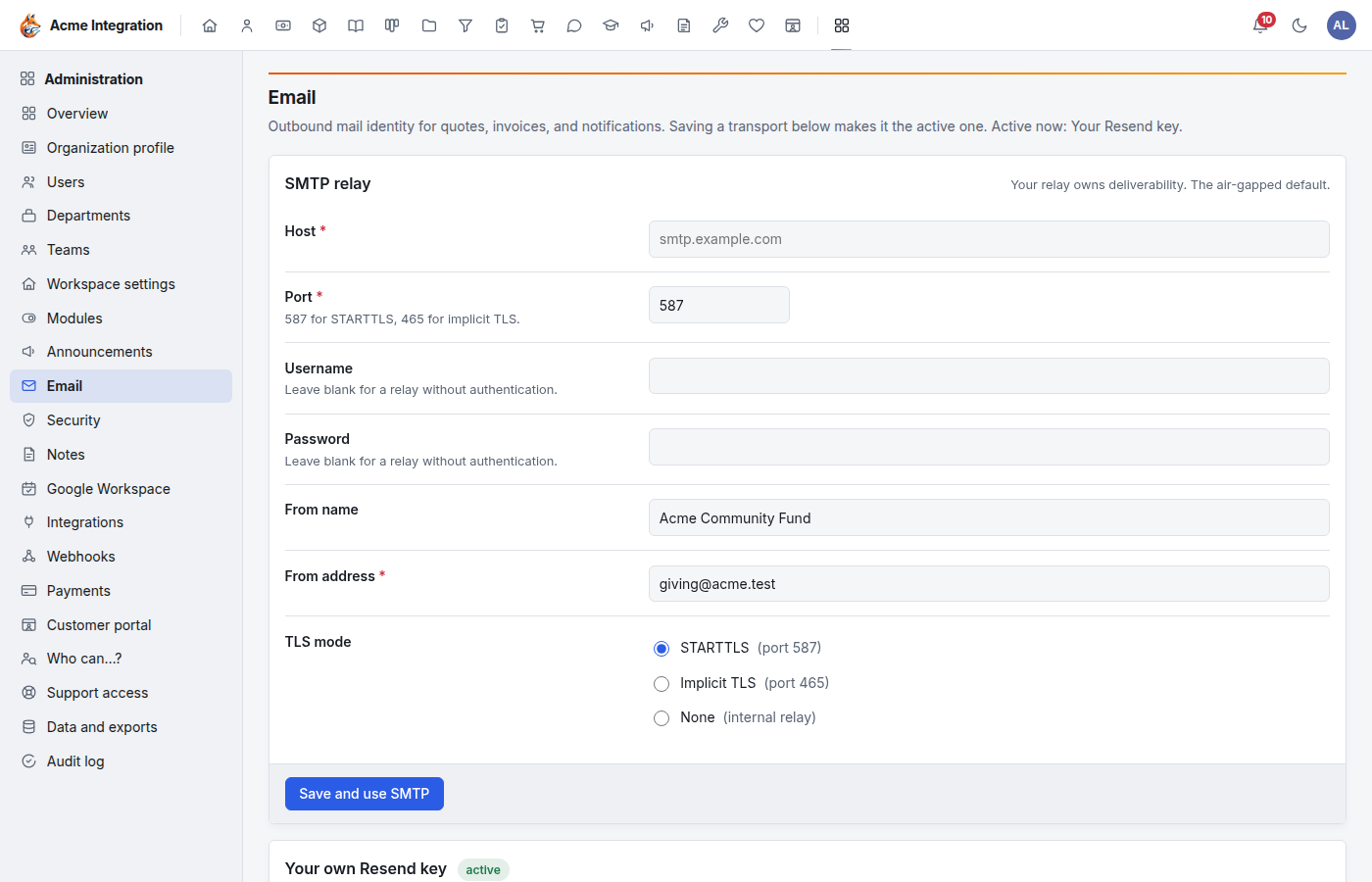
The page header says which transport is Active now. Saving a transport's card makes it the active one.
SMTP relay
- Fill in Host (for example
smtp.example.com) and Port (587 for STARTTLS, 465 for implicit TLS). - Fill in Username and Password, or leave both blank for a relay without sign-in. A stored password is never shown again; leave the field blank to keep it, or tick Clear the stored password.
- Fill in From name (defaults to your organization's name) and
From address (for example
billing@example.com). - Choose the TLS mode: STARTTLS (port 587), Implicit TLS (port 465) or None (only for an internal relay).
- Click Save and use SMTP.
Your own Resend key
- In Your own Resend key, paste the API key (
re_…). - Fill in From name and From address. The address must be on a domain you verified in your Resend account.
- Click Save and use Resend.
- Connect bounce and complaint reports (below).
Platform domain
- In Platform domain, fill in From name and the Address: the part before the @, then pick one of your verified domains.
- Click Save and use platform sending.
If the card says "No verified platform domain yet", ask the platform operator to register a sending domain for your organization.
Campaign From (optional)
With Resend or Platform active, a Campaign From card appears.
Campaigns can send from their own name and address, for example on a
subdomain such as news.yourdomain.org. That keeps your campaigns'
reputation apart from your receipts and password resets. On the
Platform transport the address must be on one of your verified platform
domains; on your own Resend account, on a domain verified there. Leave
it blank to use the main From. Click Save (or Clear).
Connect bounce and complaint reports
When a message can't be delivered, or someone marks it as spam, the provider tells Foxx HQ, and Foxx HQ stops mailing that address:
- Hard bounce (the address was rejected for good): the address goes on the suppression list. Nothing more is sent to it, receipts included.
- Spam complaint: the address goes on the suppression list too.
- Soft bounce (a temporary problem, such as a full mailbox): counted, not suppressed.
CRM owners can take an address off the suppression list (CRM → Suppression), for example once someone fixes their mailbox.
On the Platform transport there is nothing to do: the card says reports come through the platform's Resend account.
With your own Resend key, connect it once:
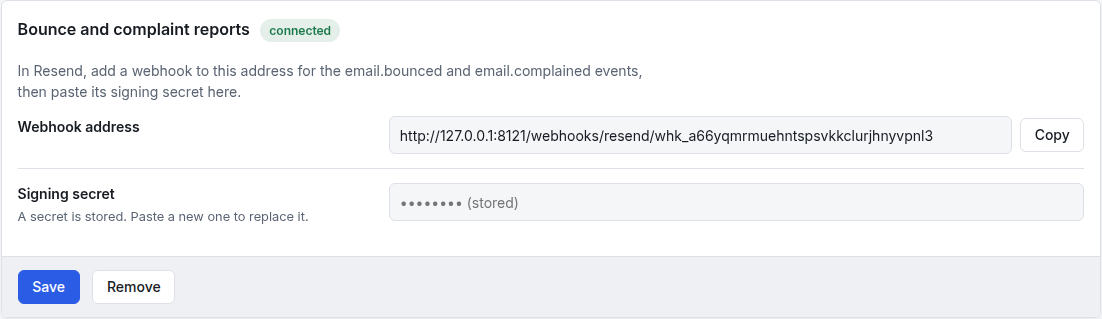
- In Bounce and complaint reports, click Copy beside the Webhook address.
- In your Resend account, add a webhook to that address with the
events
email.bouncedandemail.complained. - Copy the webhook's signing secret from Resend (it starts with
whsec_), paste it into Signing secret, and click Save.
The badge changes to connected. Foxx HQ checks every report's signature with that secret and refuses reports more than five minutes old. The secret is never shown again; Remove clears it.
With SMTP there are no reports. Watch your mail server's bounce messages yourself.
Read Email health
The Email health card shows your sending domains, whether their SPF, DKIM and DMARC records check out (for your own Resend account, check them in Resend), and the last 30 days of mail, split into Transactional and Marketing: copies sent, hard bounces, soft bounces, complaints, the bounce rate and the complaint rate.
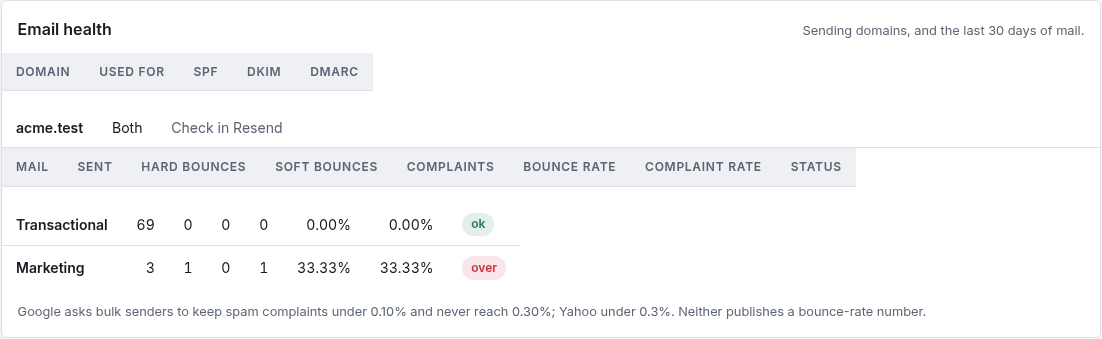
The Status column marks the complaint rate ok under 0.10%, watch from 0.10%, and over at 0.30% or more. These follow what the big mailbox providers publish for bulk senders: Google asks senders to keep spam complaints under 0.10% and never reach 0.30%; Yahoo asks for under 0.3%. Neither publishes a bounce-rate number.
If the numbers climb: send campaigns only to people who asked (Foxx HQ already mails confirmed subscribers only), use a segment rather than everyone, send less often, and keep the unsubscribe link easy to find.
Two kinds of mail
- Transactional: receipts, invoices, password resets, invitations, notifications. These still reach people who left the newsletter.
- Marketing: campaigns only. Each copy carries its own unsubscribe link and one-click unsubscribe headers, and goes only to confirmed subscribers.
Test and watch
- Send a test: type a Recipient and click Send test email. It goes through the active transport.
- Queued notification emails: the server normally sends these by itself. Send queued emails now pushes them out by hand.
- Recent sends: the last 20 messages, with sent, failed or suppressed (the recipient is on the suppression list) and any error.
Troubleshooting
The header shows "not configured". No transport is saved yet. Save one of the three cards.
A red banner says the encryption key is not set. The server can't store passwords or API keys yet. Ask the platform operator to set it.
The Campaign From card is missing. It shows only while Resend or Platform is active.
The Bounce and complaint reports card says "SMTP has no webhook". Correct: switch to Resend or Platform to get bounce reports.
Someone isn't getting receipts. Look them up in Recent sends. If it says suppressed, their address bounced or they complained; a CRM owner can take it off the suppression list.
Health shows "no reports". You are on SMTP, or your own Resend key's webhook isn't connected yet.